
Nissan Armada 2025-2026 Owner's Manual: How to enable/disable the I-DA system
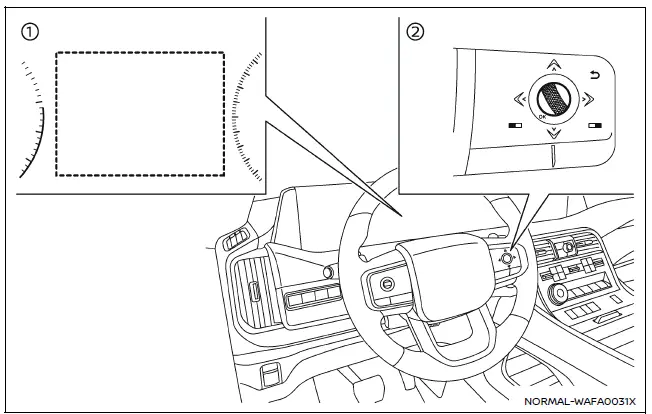
- Vehicle information display
- Steering-wheel-mounted control (right side)
To enable or disable the Intelligent Driver Alertness system in the Nissan Armada, follow these steps:
1. Press the
 button until "Settings" appears in the vehicle information display, then confirm
using the scroll dial. Use the scroll dial to navigate to "Driver Assistance" and
press to select.
button until "Settings" appears in the vehicle information display, then confirm
using the scroll dial. Use the scroll dial to navigate to "Driver Assistance" and
press to select.
2. Select "Driver Monitor", then choose "Driver Alertness" and confirm by pressing the scroll dial to turn the system ON or OFF.
NOTE:
The Nissan Armada I-DA system automatically reactivates each time the engine is restarted, ensuring that driver monitoring is consistently enabled by default.
I-DA system limitations
WARNING
The following limitations apply to the Nissan Armada Intelligent Driver Alertness system. Failure to consider these limitations may result in serious injury or death.
- The Nissan Armada I-DA system may not function correctly or may fail
to provide alerts under the following conditions:
- Poor road surfaces, including uneven pavement or potholes.
- Strong crosswinds affecting vehicle stability.
- Aggressive or sporty driving styles involving rapid acceleration or high-speed cornering.
- Frequent lane changes or rapid variations in vehicle speed.
- The system may not provide alerts in the following situations:
- Vehicle speeds below approximately 37 mph (60 km/h).
- Short or momentary lapses in driver attention.
- Brief distractions, such as reaching for or dropping an object.
System malfunction
If the Nissan Armada I-DA system detects a malfunction, the message "Malfunction See Owner's Manual" will appear in the vehicle information display, and the system will automatically deactivate to prevent unreliable operation.
Action to take:
Safely stop the Nissan Armada, shift into P (Park), and turn off the engine. Restart the vehicle to check if the issue resolves. If the warning message remains visible, the system requires professional inspection. It is strongly recommended to visit an authorized NISSAN dealer to ensure proper functionality of the Nissan Armada driver assistance systems.
 Basic information
WARNING
Failure to strictly follow all safety warnings and operating instructions
related to the Intelligent Driver Alertness system in the Nissan Armada may result
in serious injury or fatal acc ...

Other materials:
Engine Cover Replacement
Engine Cover Replacement
Callout
Component Name
1
Engine Cover
Procedure
Use a suitable tool to first unclip the front of the cover, then rotate
the cover backward and pull upward to remove.
...
Fuel Tank Filler Door Latch Housing Replacement
Fuel Tank Filler Door Latch Housing Replacement
Callout
Component Name
Preliminary Procedures
Remove the rear wheelhouse panel liner. Refer to Rear Wheelhouse
Liner Replacement.
Remove the fuel tank filler door. Refer to ...
Turbocharger Oil Return Pipe Replacement
Removal procedure
Remove the drivetrain and front suspension frame skid plate, if equipped.
Refer to Drivetrain and Front Suspension Frame Skid Plate Replacement.
Note: Simplified Graphic. DO NOT remove the warm up three
way catalytic converter.
...

0.0045