
Nissan Armada 2025-2026 Owner's Manual: How to enable/disable the I-LI system
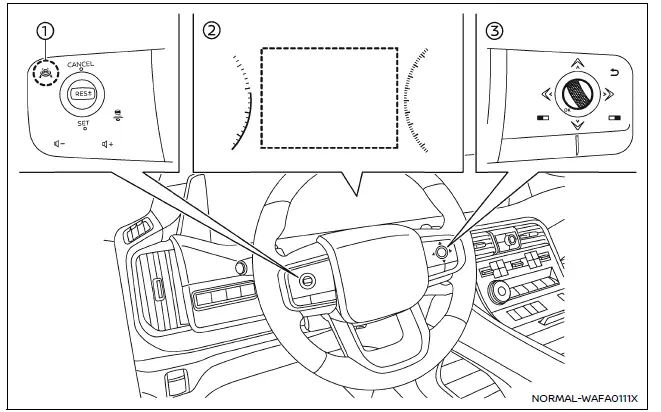
Example
- ProPILOT Assist switch
- Vehicle information display
- Steering-wheel-mounted control (right side)
Basic information
In the Nissan Armada, the Intelligent Lane Intervention (I-LI) system can be configured through the vehicle information display and steering wheel controls, providing drivers with flexible control over lane assistance features. This ensures that the Nissan Armada adapts to individual driving preferences while maintaining advanced safety functionality.
Follow these steps to enable or disable the Nissan Armada I-LI system:
1. Press the
 button repeatedly until "Settings" appears on the vehicle information display, then
confirm by pressing the scroll dial.
button repeatedly until "Settings" appears on the vehicle information display, then
confirm by pressing the scroll dial.
Use the scroll dial to navigate to "Driver Assistance" and confirm your selection.
2. Select "Lane Assist" using the scroll dial and press to confirm.
3. Choose "Intervention" and press the scroll dial again.
4. Press the ProPILOT Assist switch to activate or deactivate the Nissan Armada I-LI system.
NOTE:
- Activating ProPILOT Assist in the Nissan Armada will simultaneously enable the I-LI system and Blind Spot Intervention system. Even if I-LI is disabled in the menu, it may automatically activate when Steering Assist is engaged.
- The Nissan Armada retains your selected settings even after the engine is restarted, ensuring consistent system behavior across driving sessions.
Setting lane sensitivity
The Nissan Armada allows drivers to customize lane sensitivity levels, tailoring how early and aggressively the system responds to lane departure situations.
To adjust sensitivity:
1. Press the
 button until "Settings" appears, then confirm with the scroll dial.
Navigate to "Driver Assistance" and confirm.
2. Select "Lane Assist" and press the scroll dial.
3. Choose "Lane Sensitivity" and select one of the following options:
- Strong
- Normal
- Mild
NOTE:
The selected sensitivity level in the Nissan Armada is saved even after restarting the engine and is also applied to the Lane Departure Warning (LDW) system.
 How to enable/disable the LDW system
Vehicle information display
Steering-wheel-mounted controls (right side)
Basic information
To activate or deactivate the Nissan Armada LDW system, follow these steps:
1. Press the
bu ...
 LDW/I-LI system limitations
WARNING
The following outlines important limitations of the Nissan Armada LDW and
I-LI systems. Failure to understand and follow these limitations may result in serious
injury or death.
The N ...
Other materials:
Instrument Panel Upper Compartment Door Latch Replacement
Instrument Panel Upper Compartment Door Latch Replacement
Callout
Component Name
1
Instrument Panel Upper Compartment Door Latch
Procedures
Open the instrument panel compartment door.
Unsnap the instrument com ...
Instrument Panel Accessory Bezel Package Installation
Installation Instructions Part Number
95205543
Kit Contents
Qty
Description
1
Molding Assembly - I/P Center Upper
1
Molding Assembly - I/P Center
1
Bezel Assembly - ...
Active sound enhancement
NOTE:
To ensure the active sound enhancement system in the Nissan Armada operates
at its best performance, follow these important guidelines:
Do not block or cover the speakers, as this may distort or reduce sound
quality.
Avoid modifying or replacing the original speaker components inst ...

0.0171