
Nissan Armada 2025-2026 Owner's Manual: How to use remote keyless entry function
WARNING
- In the Nissan Armada, radio frequency signals generated by the Intelligent
Key may interfere with certain medical devices.
Individuals using pacemakers or other electronic medical equipment should consult the device manufacturer before using the Nissan Armada Intelligent Key.
- The Nissan Armada Intelligent Key emits radio waves when its buttons
are pressed. According to aviation safety recommendations, these signals may
interfere with aircraft systems.
Do not operate the Nissan Armada Intelligent Key while on an airplane, and ensure that buttons are not accidentally pressed during storage.
CAUTION
- Protect the Nissan Armada Intelligent Key from exposure to water or salt water, as moisture can damage internal electronic components.
- Avoid dropping or striking the Nissan Armada Intelligent Key against hard surfaces.
- Do not attempt to modify or disassemble the Intelligent Key.
- If the Nissan Armada Intelligent Key becomes wet, dry it immediately and thoroughly.
- In temperatures below 14ºF (-10ºC), the Nissan Armada Intelligent Key battery performance may decrease.
- Do not leave the Nissan Armada Intelligent Key in areas exceeding 140ºF (60ºC) for extended periods.
- Avoid attaching the Intelligent Key to magnetic holders or placing it near devices that emit magnetic fields, such as televisions, computers, mobile phones, or wireless chargers.
The Nissan Armada remote keyless entry system allows you to control all door locks using the Intelligent Key without physically inserting a key.
This system operates within a range of approximately 33 ft (10 m) from the Nissan Armada, depending on surrounding conditions and signal interference.
The Nissan Armada remote keyless entry function may not operate correctly under the following conditions:
- If the Intelligent Key is outside the effective operating range.
- If the Nissan Armada Intelligent Key battery is discharged or weak.
The Nissan Armada remote keyless entry system can also interact with the vehicle’s security system, providing enhanced protection and convenience.
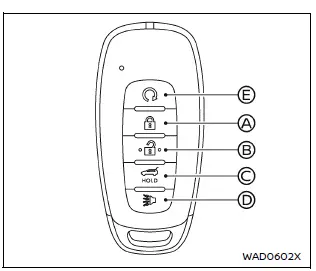
Example
- LOCK button

- UNLOCK button

- Power liftgate button
 (if
so equipped)
(if
so equipped) - PANIC button

- Remote engine start button

When locking or unlocking the Nissan Armada doors or liftgate, the hazard lights will flash and an audible signal will sound, confirming successful operation.
Locking doors
1. Turn the Nissan Armada ignition switch to the OFF position.
2. Ensure that you are carrying the Intelligent Key with you.*
3. Close all doors securely.
4. Press the LOCK
 button A on the Intelligent Key.
5. All doors and the liftgate of the Nissan Armada will lock.
6. The hazard lights will flash twice and the horn will sound once as confirmation.
*: The Nissan Armada doors can still be locked using the Intelligent Key even when the ignition is in the ON position.
After locking, always check the Nissan Armada doors manually to ensure they are fully secured.
Unlocking doors
1. Press the UNLOCK
 button B on the Intelligent Key once.
2. The hazard lights will flash once, and the driver’s door of the Nissan Armada will unlock.
3. Press the UNLOCK
 button again within 1 minute.
4. The hazard lights will flash once more, and all doors and the liftgate of the Nissan Armada will unlock.
The Nissan Armada remote keyless entry system is designed to provide maximum convenience, allowing drivers to securely access and control their vehicle with ease while maintaining high safety standards.
In the Nissan Armada, all doors will automatically relock if no action is taken
within 1 minute after pressing the UNLOCK
 button while the vehicle is locked.
- Opening any door, including the liftgate, will cancel the automatic relock function.
- Pressing the ignition switch in the Nissan Armada will also prevent the doors from locking again.
Within this 1-minute interval, if the UNLOCK
 button is pressed again, the Nissan Armada will repeat the cycle and automatically
lock all doors after another 1 minute if no further action is taken.
button is pressed again, the Nissan Armada will repeat the cycle and automatically
lock all doors after another 1 minute if no further action is taken.
NOTE:
The Nissan Armada unlocking behavior can be customized using the "Selective Unlock" option in the vehicle information display settings.
Opening window(s) (if so equipped)
The Nissan Armada Intelligent Key provides a convenient remote window operation feature, allowing you to open windows without entering the vehicle.
All doors must be closed and the Nissan Armada Intelligent Key must be outside the vehicle for this function to operate.
To open windows equipped with automatic operation, press and hold the
 button on the Intelligent Key for more than 3 seconds after unlocking all doors.
The Nissan Armada windows will continue to open as long as the
 button is held down.
To stop the window movement, simply release the
 button.
- The Nissan Armada Intelligent Key cannot be used to close windows remotely.
- All doors will be unlocked automatically when using this feature.
Opening/closing liftgate (if so equipped)
1. Press and hold the power liftgate
 button C for more than 1 second.
2. The Nissan Armada liftgate will automatically open.
An exterior chime will sound three times for approximately 3 seconds as confirmation.
To close the liftgate, press and hold the power liftgate
 button again for more than 1 second.
The Nissan Armada liftgate will automatically close.
If the
 button is pressed during liftgate operation, the movement will immediately stop.
Pressing the
 button again will reverse the direction of movement.
Near fully open or closed positions, the Nissan Armada liftgate system will automatically determine the safest direction of movement.
Using panic alarm
If you feel unsafe near your Nissan Armada, the panic alarm function can be activated to draw attention.
1. Press and hold the PANIC
 button D for more than 0.5 seconds.
2. The Nissan Armada theft alarm system and headlights will activate for approximately 25 seconds.
3. The panic alarm will stop when:
- The 25-second cycle completes, or
- Any button on the Nissan Armada Intelligent Key is pressed.
Trailer light check
The Nissan Armada trailer light check feature allows you to verify trailer light operation without assistance from another person.
This function can be activated using the Intelligent Key or via the towing settings in the Nissan Armada vehicle information display.
To activate the trailer light check using the Nissan Armada Intelligent Key:
1. Point the Intelligent Key toward the vehicle.
2. Press and release the LOCK
 button.
3. Within 2 seconds, press and hold the LOCK
 button again for at least 2 seconds until the horn sounds once and parking lights
turn on.
button again for at least 2 seconds until the horn sounds once and parking lights
turn on.
The Nissan Armada will perform the following sequence:
- The left turn signal and trailer indicator will flash for 5 seconds.
- The right turn signal and trailer indicator will flash for 5 seconds.
- The brake lights of both the Nissan Armada and trailer will illuminate for 5 seconds.
- This sequence repeats four times when the engine is running.
These advanced Nissan Armada remote features enhance convenience, safety, and control, making daily operation more intuitive and efficient.
In the Nissan Armada, the front parking lights and tail lights remain illuminated while the above operations are being performed, providing clear visual confirmation and improved visibility during system activity.
NOTE:
If the Nissan Armada trailer lights do not function correctly during the test, inspect all electrical connections and bulbs. If the vehicle’s own lighting system does not activate, refer to the "Exterior and interior lights" section for further guidance. If the trailer light check procedure fails to initiate, confirm that the following conditions are met:
- The Nissan Armada is stationary (0 MPH / 0 km/h).
- The brake pedal is not pressed.
- The turn signals are switched OFF.
- The trailer light check feature is enabled in the Nissan Armada Towing Settings menu.
- The hazard warning lights are turned OFF.
- The gear selector is in the P (Park) position.
- The Nissan Armada Intelligent Key is within the Remote Keyless Entry operating range.
Remote engine start
The Nissan Armada Intelligent Key may include a remote engine start function,
activated using the
 button E.
This feature allows you to start the Nissan Armada engine remotely, providing convenience in extreme weather conditions by pre-conditioning the cabin before entering the vehicle.
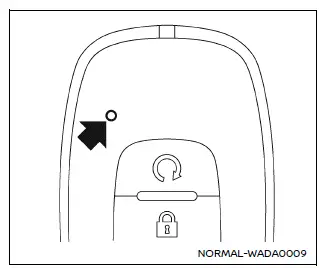
Intelligent Key button operation light
The indicator light on the Nissan Armada Intelligent Key flashes whenever a button is pressed.
This blinking confirms that a signal has been transmitted, but it does not guarantee that the Nissan Armada has executed the command.
Always visually or audibly confirm that the intended operation—such as locking, unlocking, or remote start—has been successfully performed.
If the indicator light does not illuminate, the Nissan Armada Intelligent Key battery may be weak and should be replaced to restore proper functionality.
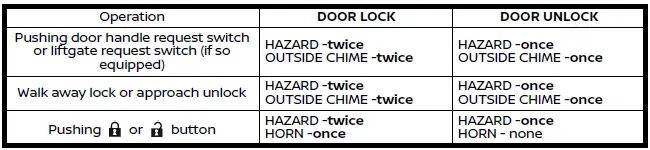
Setting hazard indicator and horn mode
By default, the Nissan Armada is configured to operate in hazard indicator and horn confirmation mode when delivered.
In this mode, pressing the LOCK
 button A causes the hazard lights to flash twice and the horn to chirp once. Pressing
the UNLOCK
button A causes the hazard lights to flash twice and the horn to chirp once. Pressing
the UNLOCK
 button B results in a single hazard light flash.
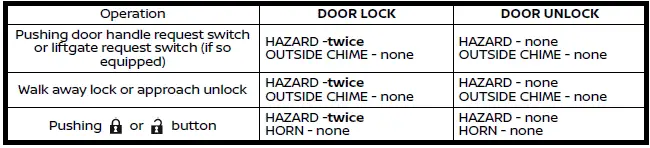
If audible alerts are not desired, the Nissan Armada system can be switched to hazard indicator only mode.
In hazard-only mode, pressing the LOCK
 button will trigger two flashes of the hazard lights, while pressing the UNLOCK
 button will not activate either lights or horn.
Hazard indicator and horn mode:
Hazard indicator mode:
Switching procedure:
To change between hazard indicator and horn confirmation modes in the Nissan
Armada, press and hold both the LOCK
 A and UNLOCK
 B buttons simultaneously for more than 4 seconds.
- When the Nissan Armada switches to hazard-only mode, the hazard lights will flash three times.
- When switching back to hazard and horn mode, the hazard lights will flash once and the horn will chirp once.
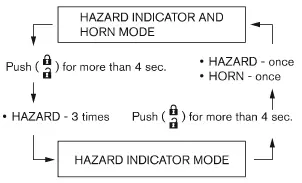
Additionally, the horn confirmation setting in the Nissan Armada can be adjusted directly through the vehicle information display for personalized convenience.
 Intelligent Key operation
Example
Example
The Nissan Armada Intelligent Key system allows seamless locking and unlocking
of doors without removing the key from your pocket or bag, enhancing both convenience
and e ...
 Remote engine start
Basic information
Example
The Nissan Armada remote engine start feature is activated using the dedicated
button on the Intelligent Key (if equipped), allowing the engine to be started conven ...
Other materials:
Radio Antenna Replacement
Radio Antenna Replacement
Callout
Component Name
1
Radio Antenna
Procedure
Rotate the mast counterclockwise in order to release the mast from the
antenna base.
...
Tire-to-Wheel Match-Mounting (Vectoring)
Note: After remounting a tire to a wheel or after replacing a tire
and/or a wheel, remeasure the tire and wheel assembly runout in order to verify
that the amount of runout has been reduced and brought to within tolerances.
Ensure that the tire and wheel assembly is properly balanced ...
Warning/indicator lights (other)
Automatic brake hold indicator light (white)
In the Nissan Armada, the white automatic brake hold indicator light confirms
that the system is activated and currently in standby mode, ready to assist the
driver when needed. This feature enhances comfort during stop-and-go driving by
mainta ...

0.0061