
Nissan Armada 2025-2026 Owner's Manual: Intelligent Key operation
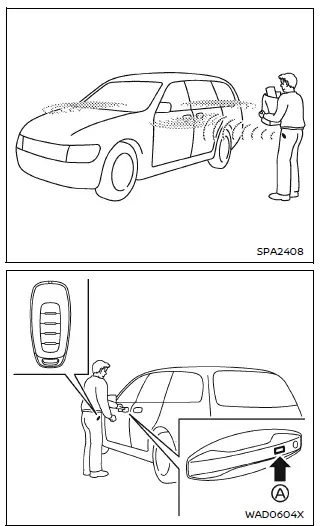
Example
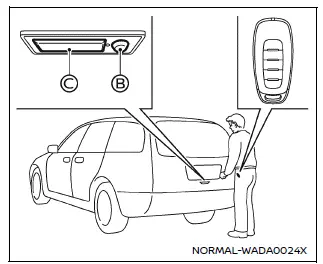
Example
The Nissan Armada Intelligent Key system allows seamless locking and unlocking of doors without removing the key from your pocket or bag, enhancing both convenience and everyday usability.
When carrying the Nissan Armada Intelligent Key within the operating range, you can lock or unlock all doors by pressing the door handle request switch A (located on the front and rear doors) or the liftgate request switch B (if equipped).
Each time the Nissan Armada doors are locked or unlocked, the hazard lights will flash and an exterior chime will sound, providing clear confirmation of the action.
Welcome light function
- When unlocking the Nissan Armada, the parking lights, tail lights, and license plate lights illuminate for a short duration, improving visibility in low-light conditions.
- When approaching the Nissan Armada with the Intelligent Key while the doors are locked, exterior lights will automatically activate. However, repeated approaches without unlocking may disable this feature temporarily to prevent unnecessary battery usage.
- The Nissan Armada welcome lighting function can be customized or disabled through the vehicle settings.
Locking doors
1. Ensure the Nissan Armada is in the P (Park) position, switch the ignition OFF, and confirm that you have the Intelligent Key with you.
2. Close all doors securely.
3. Press the door handle request switch A or the liftgate request switch B while holding the Nissan Armada Intelligent Key.
4. All doors and the liftgate will lock simultaneously.
5. The hazard lights will flash twice, and the external buzzer will sound twice to confirm locking.
NOTE:
- The Nissan Armada request switches can be disabled via the "Ext. Door Switch" setting in the vehicle information display.
- The Nissan Armada doors can still be locked using the request switch even if the ignition is not in the OFF position.
- The driver’s door request switch will not lock the doors if the driver’s
door is open.
However, the Nissan Armada doors can still be locked using the mechanical key regardless of door status.
- If the Nissan Armada Intelligent Key is detected inside the vehicle, the system will prevent locking and emit a warning sound. However, doors can still be locked using a second Intelligent Key.
CAUTION
- After locking the Nissan Armada using the request switch, always verify that the doors are securely locked by attempting to open them.
- Ensure the Nissan Armada Intelligent Key is in your possession before locking to avoid accidentally leaving it inside the vehicle.
- The request switch will only function when the Nissan Armada Intelligent Key is properly detected within the operating range.
Unlocking doors
1. Press the door handle request switch A or the liftgate request switch B while carrying the Nissan Armada Intelligent Key.
2. The hazard lights will flash once and an external chime will sound once to confirm unlocking.
- Pressing the driver’s door handle request switch or liftgate switch will unlock only the driver’s door or liftgate.
- Pressing a front or rear passenger door request switch will unlock all doors and the liftgate of the Nissan Armada.
The Nissan Armada Intelligent Key system is designed to provide effortless access and enhanced security, ensuring a smooth and modern user experience in everyday driving situations.
3. In the Nissan Armada, press the driver’s door handle request switch or the liftgate request switch (if equipped) again within 1 minute to continue the unlocking sequence.
4. The hazard warning lights will flash once and an exterior chime will sound again, confirming that all doors and the liftgate of the Nissan Armada are now fully unlocked.
If no further action is taken within 1 minute after unlocking, the Nissan Armada will automatically relock all doors for security purposes.
- Opening any door will cancel the automatic relock function.
- Pressing the ignition switch will also prevent the Nissan Armada from relocking.
During this 1-minute interval, if the UNLOCK
 button on the Intelligent Key is pressed, the Nissan Armada will again relock all
doors automatically after another 1 minute if no action is taken.
button on the Intelligent Key is pressed, the Nissan Armada will again relock all
doors automatically after another 1 minute if no action is taken.
NOTE:
The Nissan Armada unlocking behavior can be customized through the "Selective Unlock" setting in the vehicle information display, allowing you to tailor access preferences.
Opening liftgate
1. Carry the Nissan Armada Intelligent Key with you.
2. Press the liftgate opener switch C.
3. The Nissan Armada liftgate will automatically unlock and open for convenient cargo access.
Walk away lock function
The Nissan Armada features a walk away lock function that automatically locks the vehicle when you move away with the Intelligent Key (approximately 7 ft / 2 m range).
This function is disabled by default but can be activated through the Nissan Armada vehicle settings menu.
NOTE:
- When the Nissan Armada locks automatically using the walk away function, the hazard lights will flash twice. Always confirm that the vehicle is securely locked before leaving.
- The Nissan Armada walk away lock function may not operate under certain
conditions:
- If any door or the liftgate is not completely closed.
- If the Nissan Armada engine is running.
- If the Intelligent Key is inside the vehicle.
- If the Intelligent Key is left outside the vehicle for an extended period. (Opening and closing a door will reactivate the function.)
Approach unlock function
The Nissan Armada also offers an approach unlock function, which automatically unlocks the vehicle when you come within approximately 3 ft (1 m) while carrying the Intelligent Key.
This feature is also disabled by default and can be enabled through the Nissan Armada settings.
NOTE:
- When approaching the Nissan Armada from the front, the system may require you to move closer to the door for proper detection.
- The Nissan Armada approach unlock function may not operate in the following
situations:
- If the Intelligent Key is inside the vehicle.
- If the Intelligent Key has been placed outside the vehicle for a prolonged period. (Locking and unlocking the vehicle will reactivate the system.)
- If the Nissan Armada engine is running (except when using remote engine start).
- If more than 8 days have passed since the vehicle was last locked.
- If the Nissan Armada was locked using the interior power door lock switch.
- If both the Nissan Armada approach unlock and selective unlock features are enabled, only the driver’s door will unlock upon approach for enhanced security.
The Nissan Armada Intelligent Key system integrates advanced convenience features such as automatic locking and unlocking, improving everyday usability while maintaining a high level of safety and vehicle security.
Battery saver system
In the Nissan Armada, the battery saver system is designed to protect the vehicle’s battery from unnecessary discharge during extended use.
When specific conditions are met for a certain period of time, the Nissan Armada automatically cuts off power to selected electrical components to preserve battery life.
- This function is activated when the ignition switch remains in the ON position without the engine running for an extended duration.
This intelligent feature ensures that the Nissan Armada remains ready for operation even after prolonged inactivity.
Warning lights and audible reminders
The Nissan Armada is equipped with advanced warning systems, including visual indicators and audible alerts, to prevent unintended vehicle movement and reduce the risk of theft or misuse.
If an issue is detected with the Intelligent Key or vehicle operation, the Nissan Armada will emit chimes or beeps both inside and outside the vehicle, while displaying warning messages on the instrument panel.
Whenever a warning appears or a chime sounds, carefully inspect the Nissan Armada and verify the location and status of the Intelligent Key.
Troubleshooting guide
Ensure that all Nissan Armada Intelligent Keys registered to the vehicle are accounted for. The presence of multiple keys within range or inside the vehicle may cause unexpected system responses.
Symptom: When stopping the engine > "No Key Press and Hold to Stop Engine" message appears on the display.
- Possible cause: The Nissan Armada Intelligent Key is not inside the vehicle.
- Remedy: Bring the Intelligent Key inside the Nissan Armada and press the ignition switch once to stop the engine.
- Possible cause: The Intelligent Key is missing or its battery is depleted.
- Remedy: Press and hold the Nissan Armada ignition switch for more than 2 seconds to stop the engine.
Symptom: When closing the door after exiting the vehicle > The "No Key Detected" warning appears, the outside chime sounds three times, and the interior chime sounds for approximately 3 seconds.
- Possible cause: The Nissan Armada engine is still running.
- Remedy: Turn the ignition switch to the OFF position before leaving the vehicle.
Symptom: When opening the driver's door after the engine has been turned off > The "Check Rear Seat" warning appears, followed by six horn sounds.
- Possible cause: The Nissan Armada Rear Door Alert system (Horn & Alert mode) is activated.
- Remedy: Check the rear seats for passengers or items and clear the alert using the steering wheel controls.
Symptom: When pressing the request switch to lock doors > The outside chime sounds continuously for a few seconds.
- Possible cause: The Nissan Armada Intelligent Key is still inside the vehicle.
- Remedy: Remove the Intelligent Key from the vehicle before locking the doors.
Symptom: When pressing the ignition switch to start the engine > The "Key Battery Low" warning appears.
- Possible cause: The Nissan Armada Intelligent Key battery is low.
- Remedy: Replace the battery with a new one to restore proper function.
Symptom: When pressing the ignition switch > The "Key System Error" warning appears.
- Possible cause: There may be a malfunction in the Nissan Armada Intelligent Key system.
- Remedy: Contact an authorized Nissan dealer for inspection and service.
The Nissan Armada Intelligent Key and warning system work together to provide enhanced safety, convenience, and reliability, ensuring that drivers are always informed about the vehicle’s status and potential issues.
 Intelligent Key operating range
The Nissan Armada Intelligent Key system functions only when the key is located
within the defined operating range of the request switches 1 and 2 (if equipped).
For optimal performance, the Ni ...
 How to use remote keyless entry function
WARNING
In the Nissan Armada, radio frequency signals generated by the Intelligent
Key may interfere with certain medical devices.
Individuals using pacemakers or other electronic medical ...
Other materials:
Intermediate Steering Shaft Replacement
Intermediate Steering Shaft Replacement
Callout
Component Name
Preliminary Procedure
Remove the steering column and the intermediate steering shaft as an
assembly. Refer to Steering Column Replacement.
1
...
Engine Oil Cooler Pipe Replacement (LUW)
Engine Oil Cooler Pipe Replacement
Callout
Component Name
Preliminary Procedures
Drain the cooling system. Refer to Cooling System Draining and Filling.
Remove the exhaust manifold with catalytic converter. Refer to Exhaus ...
Rear automatic air conditioning system
Basic information
The rear automatic climate control system in the Nissan Armada is engineered
to provide enhanced comfort for all passengers, especially those seated in the second
and third rows. When the front air conditioning system of the Nissan Armada is activated,
the rear system become ...

0.0064