
Nissan Armada 2025-2026 Owner's Manual: Rear automatic air conditioning system
Basic information
The rear automatic climate control system in the Nissan Armada is engineered to provide enhanced comfort for all passengers, especially those seated in the second and third rows. When the front air conditioning system of the Nissan Armada is activated, the rear system becomes fully operational and can be conveniently controlled in several ways: through the front climate control panel, via the touchscreen climate interface, or directly using the dedicated rear control panel located at the back of the center console. This multi-zone functionality ensures that every occupant of the Nissan Armada can enjoy a personalized cabin environment.
Operation on the front air conditioner controls
To manage the rear automatic air conditioning system of the Nissan Armada from the front controls, simply select the "REAR" key on the climate control display. This action opens the dedicated rear climate interface, allowing the driver or front passenger to adjust settings for rear occupants with precision and ease.
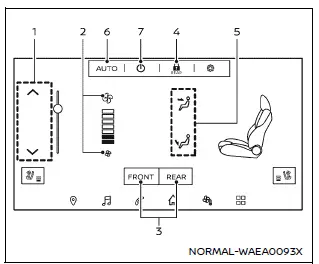
Example
Available items:
- Temperature control keys
Touch these controls to increase or decrease the rear cabin temperature in the Nissan Armada, ensuring optimal comfort for rear passengers. - Fan speed control keys
Adjust the intensity of airflow from the rear ventilators to suit individual preferences. - FRONT/REAR air conditioner keys
Switch seamlessly between the main climate control screen and the rear climate control interface of the Nissan Armada. - Rear air conditioner lock key
Activate or deactivate the lock function to restrict rear passengers from changing climate settings. - Air flow control keys
Customize airflow direction and activate specific air outlets for better air distribution throughout the Nissan Armada cabin. - AUTO (automatic) key
Enable or disable automatic mode, allowing the system to intelligently regulate temperature, airflow, and fan speed. - ON/OFF key
Turn the rear air conditioning system of the Nissan Armada on or off as needed.
While the rear climate screen is active, the rear system of the Nissan Armada can also be controlled using the physical buttons on the front air conditioning control panel, offering flexibility and quick access while driving.
Rear air conditioner control lock:
The rear air conditioner lock function in the Nissan Armada is designed to give the driver full control over the rear climate system. When activated, rear passengers cannot modify the settings using the rear control panel. The lock is indicated by an orange highlight on the control icon. To restore rear passenger control, simply press the lock key again to deactivate it.
Rear air conditioner control switches operation
When the rear air conditioner lock is turned off (indicated by a white icon), passengers in the rear seats of the Nissan Armada can independently adjust their climate settings using the control panel located at the rear of the center console. This feature enhances passenger comfort by allowing localized adjustments without affecting the front climate settings.
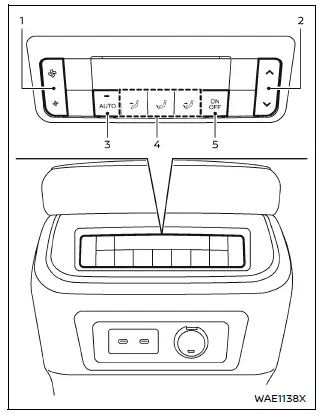
Example
- Fan speed control switches
Increase or decrease rear airflow intensity using the up/down controls. - Temperature control switches
Adjust the rear cabin temperature independently for improved comfort in the Nissan Armada. - AUTO (automatic) switch
Activate automatic mode for the rear climate system, allowing it to maintain the selected temperature automatically. - Air flow control switches
Change the direction and distribution of airflow for rear passengers. - ON/OFF switch
Turn the rear automatic air conditioning system on or off directly from the rear panel.
Thanks to its advanced multi-zone climate capabilities, the Nissan Armada ensures that every passenger experiences a comfortable ride, regardless of weather conditions. This intelligent system adapts quickly to changes and provides a premium cabin environment, making long journeys more enjoyable for everyone onboard.
 Automatic air conditioner
Basic information
The automatic climate control system in the Nissan Armada is designed to provide
maximum comfort and convenience for both driver and passengers. You can operate
the system eithe ...
 Biometric cooling
Example
The Nissan Armada features an advanced Biometric Cooling system that utilizes
an infrared (IR) sensor to intelligently monitor passenger surface temperature and
automatically adjust a ...
Other materials:
Dolly Towing from the Front
The vehicle can be towed from the front using a dolly. To tow the vehicle using
a dolly, follow these steps:
1. Attach the dolly to the tow vehicle following the dolly manufacturer's instructions.
2. Drive the front wheels onto the dolly.
3. Put an automatic transmission in P (Park) or a ...
Roof Outer Panel Replacement (4NB)
Removal Procedure
Warning: Refer to Approved Equipment for Collision Repair
Warning.
Disable the SIR system. Refer to SIR Disabling and Enabling.
Disconnect the negative battery cable. Refer to Battery Negative Cable
Disconnection and Connection.
Remove all ...
The second generation of the Mitsubishi Outlander Review (2007-2013)
Mitsubishi's collaboration with the French group PSA (Peugeot-Citroen) in Europe
and the adoption of a Volkswagen diesel engine marked significant milestones in
the development of the second-generation Outlander.
After a successful five-year run, Mitsubishi bid farewell to the first-genera ...

0.008