
Nissan Armada 2025-2026 Owner's Manual: Intelligent Key operating range
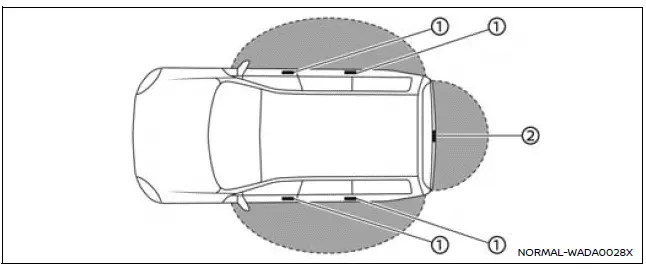
The Nissan Armada Intelligent Key system functions only when the key is located within the defined operating range of the request switches 1 and 2 (if equipped).
For optimal performance, the Nissan Armada Intelligent Key must be within approximately 80 cm (31.50 in) of each request switch.
If the Nissan Armada Intelligent Key battery is weak or if strong radio interference is present in the surrounding environment, the effective operating range may decrease, and the system may not respond correctly.
Additionally, when the Nissan Armada Intelligent Key is positioned too close to the door glass or handle, the system may have difficulty detecting it, which can prevent proper operation of the request switch.
It is also important to note that when the Nissan Armada Intelligent Key is within the operating range, other individuals can operate the request switch to lock or unlock the doors—even if they are not carrying the key.
Door locks/unlocks precaution
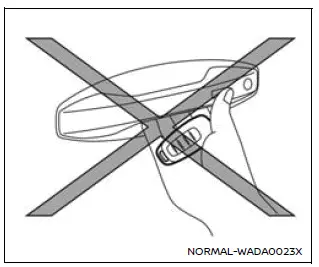
- When using the Nissan Armada Intelligent Key, avoid pressing the door handle request switch while holding the key too close to the handle. This may cause the system to misinterpret the key location and fail to detect it correctly.
- After locking the Nissan Armada using the request switch, always confirm that all doors are securely locked by attempting to open them.
- To prevent accidentally leaving the Nissan Armada Intelligent Key inside the vehicle, ensure the key is with you before locking the doors.
- Do not pull the door handle before pressing the request switch, as this may interfere with proper operation of the Nissan Armada locking system.
The Nissan Armada Intelligent Key system is designed for convenience and security, but proper usage and awareness of operating range conditions are essential to ensure reliable performance in everyday situations.
 Basic information
WARNING
In the Nissan Armada, radio frequency signals emitted by the Intelligent
Key system may interfere with certain medical devices.
Individuals using pacemakers or similar medical equi ...
 Intelligent Key operation
Example
Example
The Nissan Armada Intelligent Key system allows seamless locking and unlocking
of doors without removing the key from your pocket or bag, enhancing both convenience
and e ...
Other materials:
Wheel Alignment Measurement
Steering and vibration complaints are not always the result of improper alignment.
One possible cause is wheel and tire imbalance. Another possibility is tire lead
due to worn or improperly manufactured tires. Lead/pull is defined as follows: At
a constant highway speed on a typical straight r ...
Heater Outlet Hose Replacement (LDE, LUW)
Special Tools
BO-38185 Hose Clamp Pliers
For equivalent regional tools, refer to Special Tools.
Removal Procedure
Drain the cooling system. Refer to Cooling System Draining and Filling.
Disengage the heater outlet hose quick connect clip (1) at the heater ...
Camshaft Installation
Special Tools
EN-422 Installer
For equivalent regional tools, refer to Special Tools.
Note: Coat with MoS 2 lubricating paste. Refer to Adhesives, Fluids,
Lubricants, and Sealers.
Install the intake camshaft (1).
Note: Note the identification mark ...

0.0062