
Chevrolet Sonic Owner's Manual: Interior Lighting
Dome Lamps
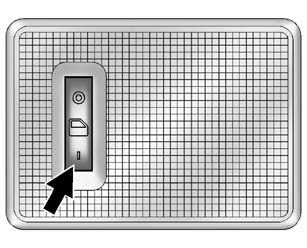
The dome lamp controls are in the headliner above the rear seats.
 : Press to turn the lamps off, even
when a door is open.
 : When the button is returned to
the middle position, the lamps turn on automatically when a door is opened.
 : Press to turn on the dome lamps.
Reading Lamps
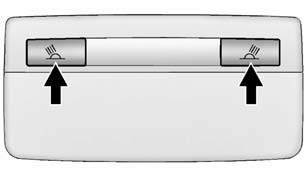
For vehicles with front reading lamps, they are in the overhead console.
 or
or
 : Press to turn each lamp on or off.
For more information about interior lighting, see Instrument Panel Illumination Control or Courtesy Lamps.
 Steering Wheel Adjustment
To adjust the steering wheel:
1. Pull the lever down.
2. Move the steering wheel up, down, forward, and backward.
3. Pull the lever up to lock the steering wheel in place.
Do not adjust the stee ...
 Exterior Lighting
The exterior lamp control is on the instrument panel to the outboard side of
the steering column.
O : Briefly turn to this position to turn the automatic light control off or
on again.
AUTO: T ...
Other materials:
Winter Tires
This vehicle was not originally equipped with winter tires. Winter tires are
designed for increased traction on snow and ice-covered roads. Consider installing
winter tires on the vehicle if frequent driving on ice or snow covered roads is
expected. See your dealer for details regarding winter ...
GM Mobility Reimbursement Program
This program is available to qualified applicants for cost reimbursement of eligible
aftermarket adaptive equipment required for the vehicle, such as hand controls or
a wheelchair/ scooter lift for the vehicle.
For more information on the limited offer, visit www.gmmobility.com or call the
...
Camshaft Cover Removal
Remove the oil level indicator (1).
Remove the 15 camshaft cover bolts (1).
Remove the camshaft cover (2) and the camshaft cover gasket (3).
...

0.0071