
Nissan Armada 2025-2026 Owner's Manual: Lane Change Assist (ProPILOT Assist 2.1)
Basic information
Lane Change Assist in the Nissan Armada is an advanced feature of ProPILOT Assist 2.1, designed to support the driver during lane changes under appropriate conditions. Before using this system, it is recommended to fully understand the ProPILOT Assist functionality and its operational limits.
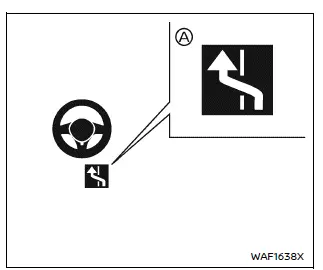
When ProPILOT Assist is active and the system indicator A is illuminated in blue, the Nissan Armada Lane Change Assist can assist with steering input during a lane change after the driver activates the turn signal. The driver must keep hands on the steering wheel and confirm that the maneuver is safe at all times.
The Lane Change Assist status indicator in the Nissan Armada will illuminate when the following conditions are met:
- ProPILOT Assist 2.1 is active in hands-off (blue) mode.
- The vehicle is traveling above approximately 37 MPH (60 km/h).
- The roadway has two or more lanes.
- The target lane markings are clearly visible as dotted white lines.
- The road is straight or has only gentle curvature.
- The speed limit is approximately 45 MPH (70 km/h) or higher.
- The Lane Change Assist or Passing Assist function is enabled.
Lane Change Assist in the Nissan Armada may cancel or be unavailable under the following conditions:
- Driving on unrecognized freeway curves or interchanges not mapped by the navigation system.
- The feature is disabled in the vehicle settings menu.
- Another vehicle is detected in the intended target lane.
- Lane markings are unclear or not detected.
- Vehicle speed drops below approximately 37 MPH (60 km/h).
- The driver’s hands are not detected on the steering wheel.
- ProPILOT Assist or ICC system is canceled.
- An obstacle is detected near the lane boundary.
How to enable/disable Lane Change Assist:
Vehicle information Display
Settings → Driver Assistance → Lane Change Assist → Activate by turn signal → ON/OFF
WARNING
Improper use of the Nissan Armada Lane Change Assist system may result in serious injury or death.
- This system is designed to assist only and does not replace driver responsibility. Always keep hands on the steering wheel and verify that it is safe to change lanes.
NOTE:
Driver steering input always has priority. If the Nissan Armada does not detect the driver’s hands on the steering wheel, warnings will be issued and the Lane Change Assist function may be canceled.
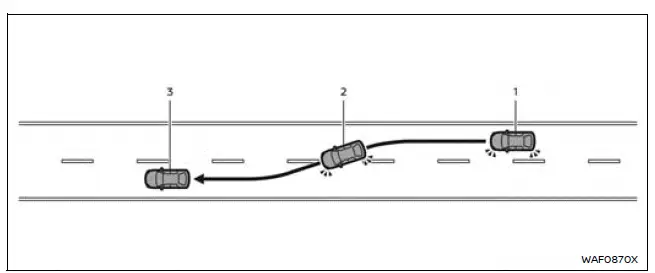
System operation
Before initiating a lane change in the Nissan Armada, always confirm that the adjacent lane is clear and safe.
1. Keep both hands on the steering wheel and activate the turn signal toward the desired direction.
2. The Lane Change Assist display will appear and flash green, indicating that the system is actively assisting with steering input toward the target lane.
3. Once the lane change is completed, the turn signal will automatically cancel*1, and Steering Assist resumes normal operation.
*1 If the turn signal lever is fully engaged manually, it may not cancel automatically even after the maneuver is completed.
4. Hands-off (blue) mode will resume in the Nissan Armada once all required conditions are satisfied.
The Lane Change Assist operation will stop (the indicator will turn off) in the following cases:
- If the turn signal is switched in the opposite direction.
- If the driver manually turns the steering wheel.
- If another vehicle is detected in the target lane.
- If lane markings are no longer clearly detected.
- If vehicle speed falls below approximately 37 MPH (60 km/h).
- If the system cannot detect the driver’s hands.
- If ProPILOT Assist or ICC is canceled.
- If lane markings are not dotted white lines.
- If an obstacle is detected near the lane boundary.
NOTE:
If the Nissan Armada Lane Change Assist is interrupted before completion, the system may gently steer the vehicle back toward the center of the original lane to maintain stability and safety.
Additional recommendation: For maximum safety when using advanced driver assistance systems in the Nissan Armada, always maintain full situational awareness and be ready to intervene at any moment.
 Driver Monitor (ProPILOT Assist 2.1)
Basic information
In the Nissan Armada equipped with ProPILOT Assist 2.1, the Driver Monitor system
plays a critical role in ensuring driver awareness and safety. Using a driver-facing
camera mou ...
 Passing Assist (ProPILOT Assist 2.1)
Basic information
Passing Assist in the Nissan Armada is an advanced feature of ProPILOT Assist
2.1, engineered to support safer and more efficient overtaking maneuvers on highways.
Before using ...
Other materials:
Drum Brake Hardware Replacement (J93, J94)
Removal Procedure
Warning: Refer to Brake Dust Warning.
Raise and support the vehicle. Refer to Lifting and Jacking the Vehicle.
Remove the tire and wheel assembly. Refer to Tire and Wheel Removal
and Installation.
Remove the brake drum. Refer to Brake Drum R ...
Cooling Fan Description and Operation (LUV)
The engine cooling fan system is composed of one cooling fan, a series of 5 relays,
the engine control module (ECM), and the associated wiring. The cooling fan assembly
includes two resistors. This combination of components enables the ECM to operate
the cooling fan at 3 speeds usi ...
Basic information
CAMERA/
button
WARNING
Improper use of the Nissan Armada Moving Object Detection (MOD) system
may lead to serious injury or fatal accidents. Always follow all safety instructions
carefully.
The Nissan Armada MOD system is designed as a driver assistance feature
only an ...

0.0048