
Nissan Armada 2025-2026 Owner's Manual: MOD system operation
The Nissan Armada MOD system activates automatically under the following conditions:
- When the transmission is shifted into R (Reverse).
- When the CAMERA/
 button is pressed to enable the Around View Monitor display.
 - When the Nissan Armada vehicle speed drops below approximately 5 MPH (8 km/h).
The Nissan Armada MOD system operates depending on gear selection and driving conditions when the camera display is active:
- When the transmission is in P (Park) or N (Neutral) and the vehicle is stationary, the Nissan Armada MOD system detects moving objects in the bird’s-eye view. The system will not operate if any door is open, and performance may be affected if the mirrors are folded.
- When the transmission is in D (Drive) and the Nissan Armada speed is below approximately 5 MPH (8 km/h), moving objects are detected in the front view, front-wide view, and Invisible Hood View.
- When the transmission is in R (Reverse) and the Nissan Armada speed is below approximately 5 MPH (8 km/h), the system detects movement in the rear view and rear-wide view. The system will not function if the liftgate is open.
The Nissan Armada MOD system does not operate in front-side view or 3D view modes, and the MOD icon will not be displayed in those views (depending on model configuration).
When the Nissan Armada MOD system detects movement near the vehicle, an orange frame appears in the corresponding camera view, and a single chime sounds as a warning.
If movement continues, the orange frame remains visible, helping the driver maintain awareness of the detected object.
NOTE:
When the Rear Cross Traffic Alert (RCTA) system is actively sounding a warning, the Nissan Armada MOD system will not emit an additional chime.
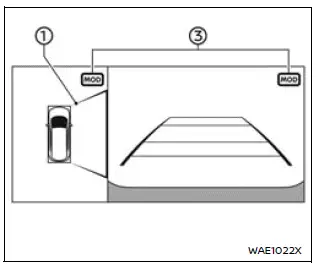
Front and bird's-eye views
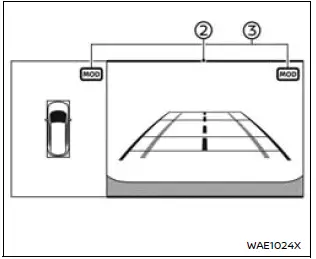
Rear and bird's-eye views
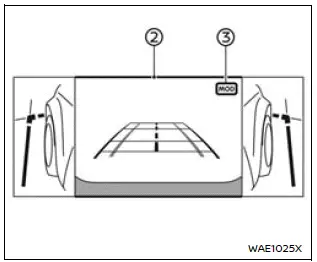
Rear and front-side views
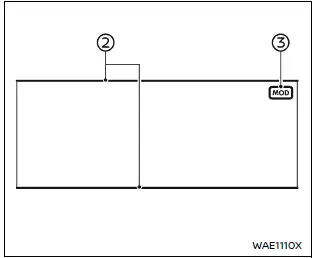
Front-wide view
Rear-wide view
In the Nissan Armada bird’s-eye view, the orange frame 1 highlights the exact camera zone (front, rear, left, or right) where motion has been detected.
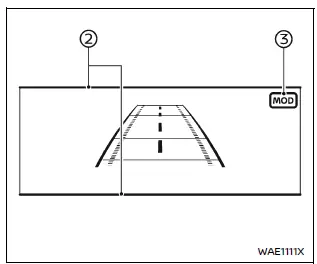
In other Nissan Armada camera modes such as front, rear, front-wide, Invisible Hood View, and rear-wide, the orange frame 2 indicates the detected movement area.
A green MOD icon 3 confirms that the Nissan Armada system is actively monitoring for movement.
A gray MOD icon 3 indicates that the Nissan Armada MOD system is currently inactive in that view.
If the MOD system is manually turned off, the Nissan Armada MOD icon will not be displayed.
Turning MOD on and off
The Nissan Armada Moving Object Detection system can be enabled or disabled through the vehicle information display settings, allowing drivers to customize system behavior according to their preferences.
This flexibility ensures that the Nissan Armada driver can adapt the system to different driving environments while maintaining optimal safety and awareness.
 Basic information
CAMERA/
button
WARNING
Improper use of the Nissan Armada Moving Object Detection (MOD) system
may lead to serious injury or fatal accidents. Always follow all safety instruction ...
 MOD system limitations
WARNING
The following section outlines important limitations of the Moving Object
Detection (MOD) system in the Nissan Armada. Ignoring these limitations or relying
on the system beyond its capab ...
Other materials:
Front Bumper Fascia Air Deflector Replacement
Front Bumper Fascia Air Deflector Replacement
Callout
Component Name
Preliminary Procedure
Remove the front bumper fascia opening lower cover. Refer to Front Bumper
Fascia Opening Lower Cover Replacement.
...
Rear Wheelhouse Panel Liner Extension Replacement
Rear Wheelhouse Panel Liner Extension Replacement
Callout
Component Name
Preliminary Procedure
Remove the tire and wheel assembly. Refer to Tire and Wheel Removal and
Installation.
1
Rear Wheelh ...
Front Wheel Drive Shaft Replacement
Special Tools
J-45859 Axle Remover
For regional equivalent tools, refer to Special Tools.
Removal Procedure
Raise and support the vehicle. Refer to Lifting and Jacking the Vehicle.
Remove the front suspension skid plate bolts (1) and the front suspen ...

0.005