
Chevrolet Sonic Repair Manual: Overview (Radio with Touchscreen)
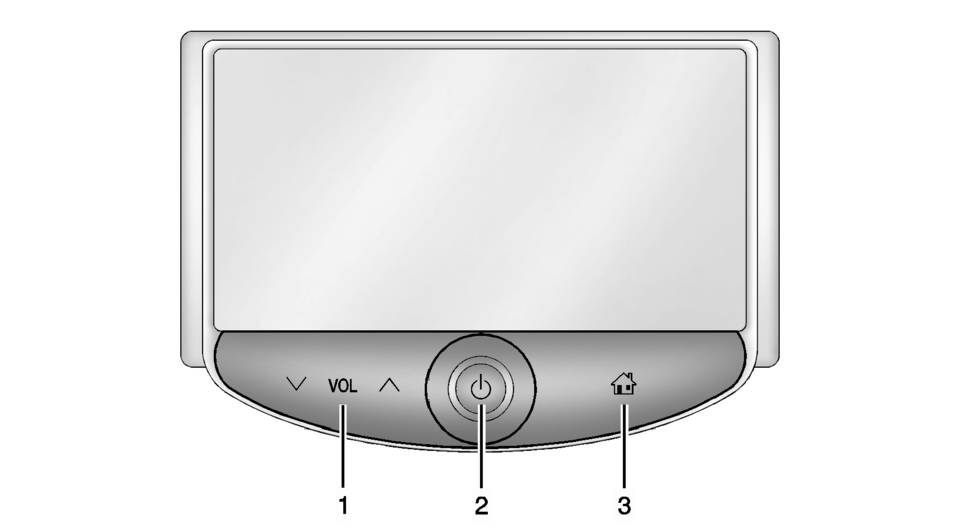
- z VOL y (Volume)
- Press to decrease or increase the volume.
- Press and hold to turn the power on or off.
- Press to go to the Home Page. See Home Page.
 Overview (Radio with CD/USB)
91011121314151617
O /VOL (Power/Volume)
Turns the system on or off and adjusts the volume.
Z (Eject)
Removes a disc from the CD slot.
Buttons 1−6
Radio: Saves a ...
 Radio Frequency Identification (RFID)
RFID technology is used in some vehicles for functions such as tire pressure
monitoring and ignition system security, as well as in connection with conveniences
such as Remote Keyless Entry ...
Other materials:
Reporting Safety Defects to the United States Government
If you believe that your vehicle has a defect which could cause a crash or could
cause injury or death, you should immediately inform the National Highway Traffic
Safety Administration (NHTSA) in addition to notifying General Motors.
If NHTSA receives similar complaints, it may open an investig ...
Catalytic Converter Replacement (LUV)
Removal Procedure
Warning: Refer to Exhaust Service Warning.
Warning: Refer to Protective Goggles and Glove Warning.
Remove the exhaust manifold heat shield. Refer to Exhaust Manifold Heat
Shield Replacement.
Remove the catalytic converter heated oxygen senso ...
Engine Oil Cooler Inlet Pipe Replacement (LUW)
Removal Procedure
Drain the cooling system. Refer to Cooling System Draining and Filling.
Remove the exhaust manifold with catalytic converter. Refer to Exhaust
Manifold with Catalytic Converter Replacement.
Remove the engine oil cooler pipe bolts (1) an ...

0.0093