Chevrolet Sonic manuals

Chevrolet Sonic Repair Manual: Parking Brake Adjustment (Drum Brake)

Chevrolet Sonic Repair Manual / Chassis / Brakes / Drum Brakes / Parking Brake Adjustment (Drum Brake)

Note:

The park brake cable adjusting nut is a nylon lock type. Use ONLY HAND TOOLS whenever tightening or loosening the adjusting nut.

  1. Apply and fully release the park brake several times. Verify that the park brake lever releases completely.
  2. Turn ON the ignition. Verify the red BRAKE warning lamp is not illuminated.
  3. If the red BRAKE warning lamp is illuminated, verify the following:
  • If the red BRAKE warning lamp remained illuminated and there were no other visible causes, refer to Symptoms - Hydraulic Brakes.
  • Turn OFF the ignition.
  • Remove the front floor console. Refer to Front Floor Console Replacement.


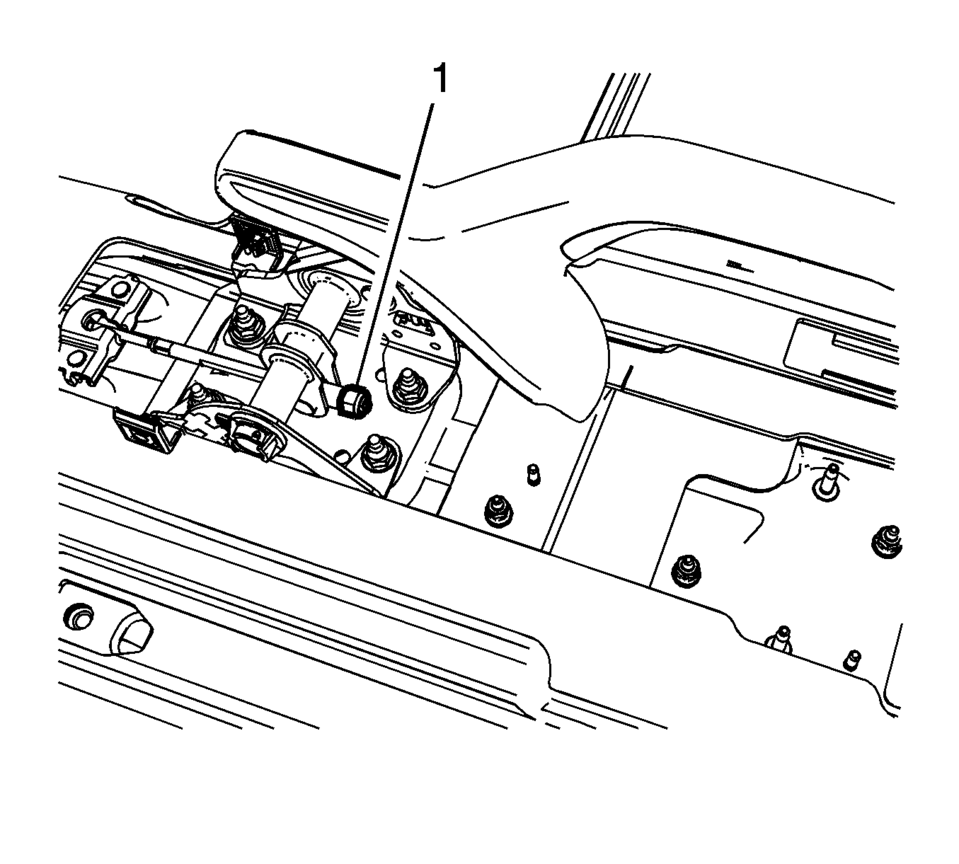
  • With the park brake lever in the released position, loosen the adjusting nut (1) enough to completely relieve tension on the front cable.
  • Raise and support the vehicle. Raise the vehicle just enough to allow rear tire and wheel assembly removal and rear drum adjustment. Refer to Lifting and Jacking the Vehicle.
  • Remove the rear tire and wheel assemblies. Refer to Tire and Wheel Removal and Installation.
  • Adjust the rear drum brakes. Refer to Drum Brake Adjustment.
  • Ensure there is no brake shoe drag after adjustment by rotating the brake drums. If drag exists, re-center the brake shoes and perform the brake shoe adjustment again.
  • Install 2 wheel nuts to the wheel studs and firmly hand tighten in order to retain the brake drums.
  • Fully release the park brake lever.
  • Tighten the park brake cable adjusting nut (1) until the threaded portion of the front park brake cable extends beyond the adjusting nut approximately 27 mm (1.06 in).
  • Apply the park brake lever.
  • Attempt to rotate the rear brake drums. There should be no rotation forward or rearward.
  • Fully release the park brake lever.
  • Verify the park brake is released by rotating the rear brake drums. The drums should rotate freely and exhibit no brake shoe drag.
  • If the drums do not rotate freely, repeat the park brake cable adjustment procedure.
  • Raise the park brake lever 3 detent positions and attempt to rotate the rear brake drums:
  • Raise the park brake lever one additional detent position and attempt to rotate the rear brake drums.
  • Verify that the left and right brake drums cannot be rotated.
  • Remove the wheel nuts retaining the brake drums.
  • Install the rear tire and wheel assemblies. Refer to Tire and Wheel Removal and Installation.
  • Lower the vehicle.
  • Install the front floor console. Refer to Front Floor Console Replacement.
  • Release the park brake lever.
  • Drum Brake System Description and Operation
    System Component Description The drum brake system consists of the following: Drum Brake Shoes Applies mechanical output force, from hydraulic brake wheel cylinders, to frict ...

    Parking Brake Cable Replacement (Drum Brake)
    Removal Procedure Remove the front floor console. Refer to Front Floor Console Replacement. Ensure that the parking brake lever is in the fully released position. Us ...

    Other materials:

    SIR Inflator Module Handling and Storage Warning
    Warning: When carrying an undeployed inflator module: Do not carry the inflator module by the wires or connector. Make sure the air bag opening points away from you. When storing an undeployed inflator module: Make sure the air bag opening points away from the surface o ...

    Valve Guide Reaming, and Valve and Seat Grinding
    Valve Cleaning Procedure Use soft bristle wire brush to clean any carbon build-up from the valve head. DO NOT use a wire brush on any part of the valve stem. The valve stem is chrome plated to provide enhanced wear characteristics. Wire brushing the stem could remove the chr ...

    Steering Assist with HD map data (a feature of ProPILOT Assist 2.1)
    In the Nissan Armada equipped with ProPILOT Assist 2.1, Steering Assist is enhanced by HD map data, enabling more advanced driving support. When all required conditions are met, the system indicator turns blue, signaling that enhanced functionality is active. In this advanced mode, the Nissan ...

    В© 2014-2026 Copyright www.csmans.com
     
    0.0064