
Chevrolet Sonic Owner's Manual: Power Mirrors
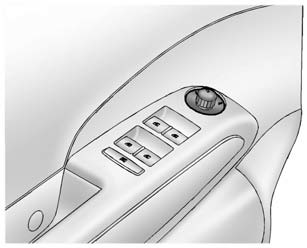
For vehicles with power outside mirrors:
1. Select the mirror by moving the selector switch to L for the driver side or R for the passenger side.
2. Use the control knob to move the mirror in the desired direction.
See Folding Mirrors.
 Manual Mirrors
Move the control up, down, or side to side to adjust the mirror.
See Folding Mirrors. ...
 Folding Mirrors
Manual Folding Mirrors
The vehicle has manual folding mirrors. These mirrors can be folded inward to
prevent damage when going through an automatic car wash. To fold, pull the mirror
toward the v ...
Other materials:
Automatic Transmission Fluid
How to Check Automatic Transmission Fluid
It is not necessary to check the transmission fluid level. A transmission fluid
leak is the only reason for fluid loss. If a leak occurs, take the vehicle to your
dealer and have it repaired as soon as possible.
There is a special procedure for checkin ...
Tread Wear Indicators Description
The original equipment tires have tread wear indicators that show when you should
replace the tires.
The location of these indicators are at 60 degree intervals around the outer
diameter of the tire. The indicators appear as a 6 mm (0.25 in) wide band when the
tire trea ...
Safety note
WARNING
Never disassemble or modify the Nissan Armada system components. Doing
so may result in malfunction, fire, electric shock, or serious injury.
If the Nissan Armada system shows abnormal behavior, such as freezing,
loss of sound, or delayed response, discontinue use immediately.
...

0.0057