
Nissan Armada 2025-2026 Owner's Manual: ProPILOT Assist mode indicators
Basic information
The Nissan Armada ProPILOT Assist system features multiple operating modes that adapt dynamically to driving conditions. These modes are visually represented by different colors, allowing the driver to quickly understand the current level of assistance. As driving conditions become more favorable, the Nissan Armada ProPILOT Assist system will automatically transition to the highest available mode to maximize support and driving convenience.
The table below illustrates the hierarchy of available Nissan Armada ProPILOT Assist modes, with higher levels of assistance shown toward the bottom. Each mode requires specific conditions to be met, ensuring that the system operates safely and effectively at all times.

NOTE:
If the steering wheel icon appears in yellow on your Nissan Armada display, it indicates that Steering Assist functionality may be limited. In this situation, the driver must immediately take full control of steering to ensure safe vehicle operation.
How it works:
The Nissan Armada ProPILOT Assist system integrates a network of advanced sensors and monitoring technologies to deliver precise and responsive assistance. Depending on the system version, it utilizes a combination of the following components:
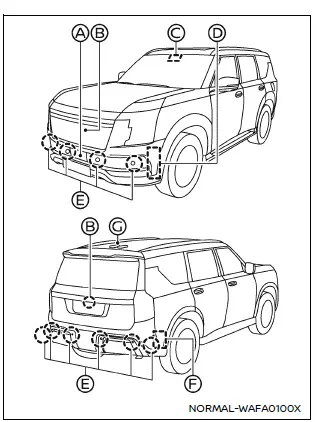
Example
- Front radar sensor: Continuously monitors vehicles ahead in the same lane and in adjacent lanes, helping maintain safe following distance in the Nissan Armada.
- Intelligent Around View Monitor cameras (front and rear): Provide a comprehensive view of the surroundings, enhancing awareness in tight or complex driving environments.
- Multi-sensing front camera: Detects lane markings, nearby vehicles, and open spaces, enabling accurate lane positioning and adaptive responses.
- Side radar sensors (front) (ProPILOT Assist 2.1 only): Track vehicles and open areas in adjacent lanes to assist with lane changes and advanced driving support.
- Sonar sensors: Monitor close-range surroundings, improving safety during low-speed maneuvers.
- Side radar sensors (rear): Detect vehicles approaching from behind or traveling in blind spots, enhancing overall situational awareness.
- GNSS antenna (ProPILOT Assist 2.1 only): Provides precise positioning data to support advanced navigation-based assistance features in the Nissan Armada.
NOTE:
To ensure optimal performance of the Nissan Armada ProPILOT Assist system, always keep all sensors, cameras, and radar units clean and unobstructed. Dirt, ice, snow, or damage can significantly reduce system accuracy and reliability.
The Nissan Armada radar sensors may become temporarily blocked by environmental factors such as heavy rain, snow, road spray, fog, or mist.
Additionally, physical obstructions such as ice buildup, frost, mud, or debris can interfere with proper sensor operation.
Always inspect and clean the areas around the sensors to maintain full system functionality.
Avoid placing stickers (including transparent films), mounting accessories, or applying paint near sensor locations, as this can negatively affect detection capability.
Do not strike, impact, or otherwise damage the areas surrounding the sensors on your Nissan Armada.
If the sensor area has been damaged in a collision, it is strongly recommended to have your Nissan Armada inspected by an authorized NISSAN dealer or qualified repair facility.
Precautions on repairing the bumper
Special care must be taken when repairing the bumper of the Nissan Armada, as critical radar sensors are integrated into this area.
These radar sensors function by emitting signals and analyzing their reflections to detect surrounding objects and vehicles.
WARNING
Improper bumper repairs, including the use of non-approved materials, incorrect repainting techniques, or filler applications, can weaken or block radar signals. This may cause the Nissan Armada ProPILOT Assist system to fail in detecting obstacles correctly, potentially leading to serious accidents, injuries, or hazardous driving situations.
If bumper repair is required, it is strongly recommended that all work be performed by a certified NISSAN dealer to ensure proper system calibration and safety.
Limitations
The performance of the Nissan Armada ProPILOT Assist system can be influenced by numerous external and environmental factors. In certain situations, the system may not operate as intended or may become temporarily unavailable.
Drivers must always remain attentive and prepared to take full control of the Nissan Armada at any time, as ProPILOT Assist is designed to assist—not replace—the driver.
The Nissan Armada ProPILOT Assist system may be affected by a variety of external conditions that can limit its performance. These influencing factors include, but are not limited to, the following situations:
- Poor visibility conditions such as heavy rain, snow, ice accumulation, fog, or mist, which can reduce sensor accuracy in the Nissan Armada.
- Strong or direct light sources, including glare from oncoming traffic or intense sunlight, which may interfere with camera detection.
- Obstruction of radar sensors, cameras, or other detection components caused by dirt, mud, snow, or ice buildup.
- External interference near sensors or radars, such as bike racks, decals, accessories, or improperly installed equipment.
- Lane markings that are faded, inconsistent, or difficult to detect.
- Driving through construction zones where markings and road layout may be unclear or changing.
- Featureless or barren landscapes where visual references are minimal.
- Roads with unusually wide or narrow lane configurations that may confuse detection systems.
- Sudden or aggressive deceleration events that exceed system response limits.
- Passing through tollbooths or similar structures where sensor readings may be disrupted.
The Nissan Armada ProPILOT Assist system may not respond or react appropriately to the following objects or situations:
- Stationary vehicles that are not moving within the flow of traffic.
- Pedestrians, cyclists, or animals entering or present on the roadway.
- Loose objects or debris on the road surface.
- Traffic cones or pylons commonly found in construction areas.
WARNING
The following outlines critical limitations of the Nissan Armada ProPILOT Assist system, including ProPILOT Assist, ProPILOT Assist 1.1, ProPILOT Assist 2.1, Intelligent Cruise Control (ICC), Steering Assist, and Lane Change Assist. Failure to operate the Nissan Armada in accordance with these limitations may result in serious injury or even death.
- The Nissan Armada ProPILOT Assist system is primarily designed for highway or freeway driving. Its use in urban or city environments is not recommended.
- These systems are not capable of adapting to all road conditions automatically.
They function best in steady, predictable traffic. Avoid using them on roads with sharp curves, poor weather conditions, or unstable road surfaces.
- All Nissan Armada ProPILOT Assist functions have inherent performance
limitations.
Never rely solely on these systems. They cannot compensate for inattentive driving, distractions, or severe weather conditions that reduce visibility.
- Drivers must remain fully attentive at all times when using Nissan Armada ProPILOT Assist. You are responsible for braking, accelerating, and steering as needed to maintain safe vehicle operation and appropriate distance from other road users.
- When the Nissan Armada ProPILOT Assist system brings the vehicle to a complete stop, it may automatically resume movement if the stop duration is short (approximately 3 seconds for standard ProPILOT Assist or up to 30 seconds for ProPILOT Assist 1.1 and 2.1 on supported highways). Always be prepared to apply the brakes immediately if required.
- Always check your surroundings carefully before allowing the Nissan Armada to resume movement after a stop.
- The Nissan Armada ProPILOT Assist system is primarily designed to detect
motorized vehicles traveling in the same direction. It may not detect or respond
to the following:
- Pedestrians, animals, or stationary objects in the roadway
- Oncoming vehicles in the same lane
- Motorcycles traveling offset within a lane
- Loose debris or unexpected obstacles
- When the trailer Blind Spot Warning (BSW) function is activated, Steering Assist functionality in the Nissan Armada will be disabled.
- The Nissan Armada ProPILOT Assist system may not function correctly or
may automatically disengage under the following conditions:
- Steering Assist is canceled when Trailer BSW is active or when Tow mode is selected.
- The air suspension system (if equipped) is set to HIGH mode, is actively adjusting, or is experiencing a malfunction.
- The system is unable to accurately detect vehicles in adjacent lanes or behind the Nissan Armada.
- When 4H or 4L drive modes are selected on 4WD models.
- In certain real-world driving scenarios, the Nissan Armada ProPILOT Assist system may not operate as expected or may temporarily become unavailable.
For maximum safety, always treat Nissan Armada ProPILOT Assist as a driver support feature—not an autonomous driving system—and remain fully engaged in the driving process at all times.
To ensure safe operation of the Nissan Armada ProPILOT Assist systems and to prevent unintended behavior or potential accidents, these systems must never be used under the following conditions:
- On roads with dense, fast-moving traffic or sharp curves where rapid driver response is required beyond system capabilities
- On slippery or hazardous road surfaces such as wet, icy, snowy roads, or when road spray from surrounding traffic reduces visibility and traction
- On unpaved, rough, or uneven road surfaces, as well as steep inclines or declines that may compromise system performance in the Nissan Armada
- During severe or unpredictable weather conditions, including heavy rain, snowstorms, fog, ice, sandstorms, or dust storms
- When the sensor or camera detection performance is reduced, including
situations such as:
- When snow, ice, dirt, or debris covers the Nissan Armada sensors, or when the windshield camera area is fogged or obstructed
- When objects such as stickers, roof racks, bike carriers, or cargo interfere with sensor operation
- When strong light sources (such as direct sunlight or high beams from oncoming vehicles) interfere with cameras, or when sudden lighting changes occur (e.g., entering/exiting tunnels or passing under bridges)
- When traffic conditions are unstable, requiring frequent acceleration and deceleration, or when cut-in detection and warning systems activate repeatedly
- When following or approaching unusually shaped vehicles such as car carriers, flatbed trucks, or trailers that may confuse sensor readings
- When interference from external radar sources disrupts normal system operation
- When the Nissan Armada is equipped with non-standard components (such as aftermarket brakes, tires, or suspension systems), or when operating under abnormal conditions (e.g., worn tires, incorrect tire pressure, tire chains, or reduced headlight performance)
- When the vehicle is overloaded or carrying excessive weight in the rear seats or cargo area, exceeding recommended capacity limits
- When towing a trailer or another vehicle, as this can affect system behavior and detection accuracy in the Nissan Armada
- When lane markings are missing, faded, inconsistent, or difficult to detect, or when multiple markings or road features (such as tire grooves or seams) may be misinterpreted as lane lines
- When driving through areas with changing or temporary traffic patterns, including merging lanes, lane splits, construction zones, toll booths, or exit ramps
- When lane markings are not visible due to darkness and insufficient headlight illumination
- In scenarios where detection of a vehicle ahead may be delayed or inaccurate,
including:
- A vehicle suddenly merging into your lane
- Driving on blind curves or winding roads
- A stopped or slow-moving vehicle becoming visible only after another vehicle changes lanes
- Motorcycles traveling off-center within the lane
- The driver must always remain alert and ready to take immediate control of the Nissan Armada when necessary to ensure safe navigation under all traffic and road conditions
- The Driver Monitoring System (for Nissan Armada ProPILOT Assist 2.1)
may not accurately detect driver condition in certain situations, including:
- When sunlight or fluctuating lighting conditions affect the camera's ability to detect the driver
- When the driver’s face is partially obscured or not properly positioned
- When objects block the view between the driver and the monitoring camera
- When the camera lens is dirty or obstructed
- When multiple faces are detected near the driver’s seat (e.g., a passenger leaning forward)
- When the driver squints, changes posture, or is affected by glare or fatigue
- The Nissan Armada side radar sensors may fail to detect or may delay detection of vehicles in adjacent lanes under certain conditions, such as rapidly approaching vehicles, motorcycles, or vehicles with unusual height profiles. Always stay aware of surrounding traffic and be prepared to steer accordingly.
- In some situations, objects or vehicles may suddenly enter the detection zone, potentially triggering unexpected automatic braking or system responses in the Nissan Armada.
For safe operation, always treat Nissan Armada ProPILOT Assist as a supportive technology and not a replacement for attentive, responsible driving. :contentReference[oaicite:0]{index=0}
For safe and effective operation of the Nissan Armada ProPILOT Assist system, always remain attentive and avoid using these features in situations where they are not recommended or may be unreliable.
Example
How to operate ProPILOT Assist
NOTE:
When ProPILOT Assist is activated in the Nissan Armada, all available related systems and functions are engaged simultaneously to provide a comprehensive driver assistance experience.
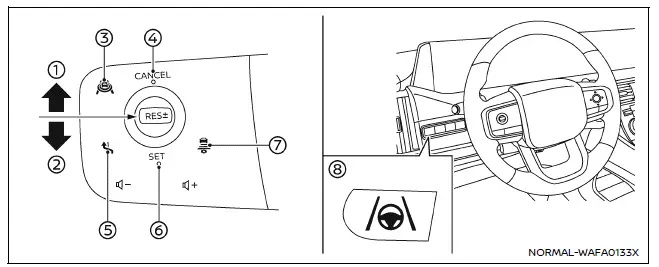
- RES+- switch (RES+ operation): Resumes the previously set vehicle speed or increases the cruise speed incrementally in the Nissan Armada.
- RES+- switch (RES- operation): Resumes the previous speed or reduces the cruise speed step-by-step for smoother control.
- ProPILOT Assist switch: Activates or deactivates the Nissan Armada ProPILOT Assist system.
- CANCEL switch: Immediately cancels the active ProPILOT Assist operation.
- Lane Change Assist switch (ProPILOT Assist 2.1): Allows the driver to confirm or reject system-suggested lane changes.
- SET switch: Sets and maintains the desired cruising speed.
- Distance switch: Adjusts the following distance between your Nissan Armada and the vehicle ahead.
- Steering Assist switch: Enables or disables the Steering Assist function.
Turning on ProPILOT Assist (2-step operation):
1. Press the ProPILOT Assist switch 3.
- The Nissan Armada ProPILOT Assist display will appear in the instrument cluster.
- The Safety Shield status screen will briefly be shown to confirm system readiness.
NOTE:
To activate conventional fixed-speed cruise control mode in the Nissan Armada, press and hold the ProPILOT Assist switch for more than 1.5 seconds. In this mode, advanced ProPILOT Assist functions are disabled and only basic cruise control remains active.
2. Once the desired speed is reached, press the SET switch 6.
- The Nissan Armada will maintain the selected speed unless a slower vehicle is detected ahead or features such as Speed Limit Assist or Speed Adjust by Route (available in ProPILOT Assist 1.1 and 2.1) are active.
- After activation, relevant ProPILOT Assist indicators and status displays will appear clearly on the dashboard.
NOTE:
If the Nissan Armada ProPILOT Assist system is only in standby mode (step 1 completed), automatic braking and speed control will not be active.
How to adjust distance setting:
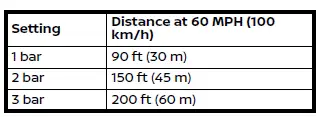
The following distance to the vehicle ahead can be customized using the distance switch 7.
- The Nissan Armada calculates following distance based on time intervals relative to speed, rather than a fixed physical gap. This ensures consistent safety margins at different speeds.
How to change the vehicle set speed:
To increase speed:
- Press and hold the RES+- switch 1 to increase speed in increments of approximately 5 MPH (5 km/h) in the Nissan Armada.
- Quickly press and release the RES+- switch 1 to increase speed by approximately 1 MPH (1 km/h).
- Alternatively, accelerate manually to the desired speed and then press the SET switch 6 to store the new speed.
For optimal results, always use Nissan Armada ProPILOT Assist in appropriate conditions and remain prepared to intervene at any moment for safe driving control.
To decrease speed:
- Press and hold the RES+- switch 2 downward to gradually reduce the cruising speed of your Nissan Armada in increments of approximately 5 MPH (5 km/h), allowing for smooth and controlled deceleration.
- Briefly press and release the RES+- switch 2 downward to fine-tune the speed reduction by approximately 1 MPH (1 km/h), providing precise control over your Nissan Armada’s driving pace.
How to momentarily accelerate or decelerate:
- When additional acceleration is needed, depress the accelerator pedal. Once released, the Nissan Armada will automatically return to the previously set cruise speed. During this process, the set speed indicator will flash, signaling that the vehicle is temporarily exceeding the preset speed.
NOTE:
In Hands Off mode, it is essential to keep your hands on the steering wheel when accelerating, as the Nissan Armada ProPILOT Assist system still requires driver engagement for safe operation.
- To reduce speed manually, depress the brake pedal. This action will place the Nissan Armada ProPILOT Assist system into standby mode. To resume the previously set cruising speed, push the RES+- switch in either direction 1 or 2.
WARNING
When the accelerator pedal is pressed, the Intelligent Cruise Control (ICC) system in the Nissan Armada will not provide automatic braking or forward collision warnings. The driver must actively manage vehicle speed and maintain a safe following distance. Failure to do so may result in serious injury or even fatal consequences.
How to enable/disable Steering Assist:
You can activate or deactivate the Steering Assist function in your Nissan Armada using one of the following methods:
- Steering Assist switch 8 located on the steering wheel
- Vehicle information display settings menu
Settings → Driver Assistance → Lane Centering Assist → Steering Assist → ON/OFF
NOTE:
The Steering Assist setting in the Nissan Armada remains stored even after the engine is turned off and restarted, ensuring consistent driver preferences.
How to cancel ProPILOT Assist:
To deactivate the Nissan Armada ProPILOT Assist system, use one of the following methods:
- Press the CANCEL switch 4 to place the system into standby mode.
- Lightly press the brake pedal. This will also switch the system to standby. To resume operation, press the RES+- switch (direction 1 or 2) to return to the previously set speed, or press the SET switch 6 to establish a new cruising speed.
NOTE:
If ProPILOT Assist is canceled while the Nissan Armada is stationary, the system may automatically engage the parking brake for added safety.
WARNING
To prevent unintended vehicle movement in the Nissan Armada, always deactivate the ProPILOT Assist system before exiting the vehicle. Ensure the system is turned off using the ProPILOT Assist switch 3, shift the transmission into the P (Park) position, and switch off the engine. Failure to follow these steps may result in serious injury or property damage.
For optimal safety and performance, always remain attentive and ready to take full control of your Nissan Armada, even when advanced driver assistance systems are active.
 ProPILOT Assist Systems Overview
The Nissan Armada ProPILOT Assist suite is engineered to provide advanced driver
support by combining multiple intelligent technologies that enhance safety, comfort,
and driving confidence. Each f ...
 ProPILOT Assist displays and indicators
ProPILOT Assist and ProPILOT Assist 1.1
ProPILOT activation
Appears once the Nissan Armada ProPILOT Assist system is enabled, confirming
that the driver assistance features are ready to o ...
Other materials:
Lane Departure Warning (LDW)
If equipped, LDW is intended to help avoid unintentional lane departures at speeds
of 56 km/h (35 mph) or greater. LDW uses a camera sensor to detect the lane markings.
The LDW indicator, , appears green if
a lane marking is detected. If the vehicle departs the lane, the indicator will
chang ...
Repairing Damaged Wire Insulation
If the wire insulation has been chafed, or broken, enough to show the conductive
portion of the wire, and the wire is not damaged, determine the length of insulation
that needs to be repaired. If the repair is less than 280?€‰mm (11?€‰in), cut the
wire within the damaged area. Then sli ...
Drum Brake System Description and Operation
System Component Description
The drum brake system consists of the following:
Drum Brake Shoes
Applies mechanical output force, from hydraulic brake wheel cylinders,
to friction surfaces of brake drums.
Brake Drums
Uses mechanical output force applied to fric ...

0.0049