
Chevrolet Sonic Repair Manual: Radio Antenna Base Replacement
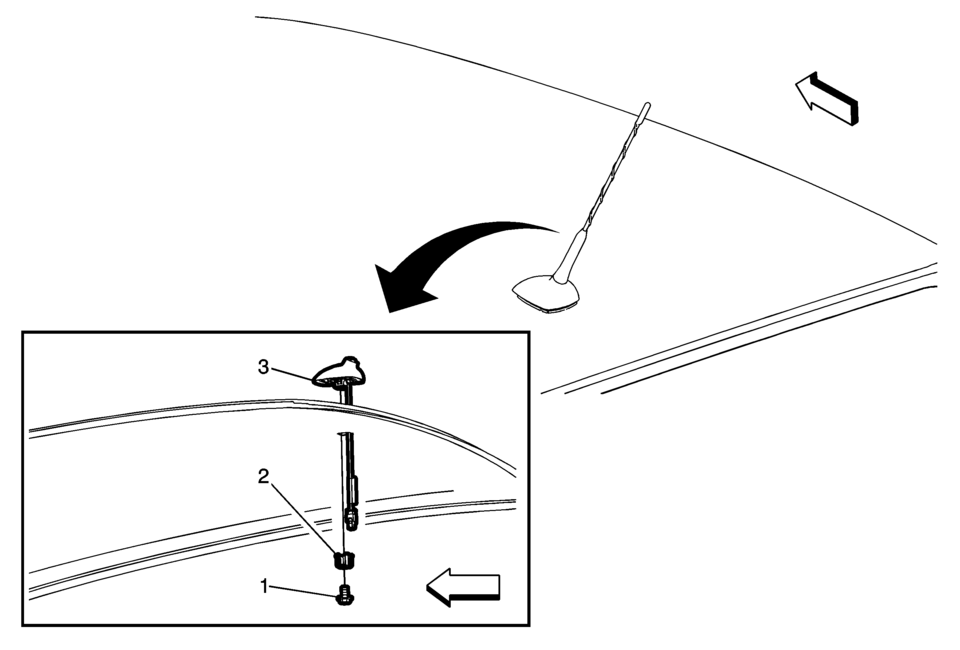
|
Callout |
Component Name |
|---|---|
|
Preliminary Procedure
Lower the rear of the headlining trim panel. Refer to Headlining Trim Panel Replacement. |
|
|
1 |
Radio Antenna Base Fastener Caution: Refer to Fastener Caution.
9 Y (80 lb in) |
|
2 |
Radio Antenna Base Retainer |
|
3 |
Radio Antenna Base Assembly Procedure
Disconnect the electrical connectors. |
 Overview (Radio with Touchscreen)
z VOL
y (Volume)
Press to decrease or increase the volume.
O (Power)
Press and hold to turn the power on or off.
D (Home Page)
Press to go to the Home Page. See Hom ...
 Radio Antenna Replacement
Radio Antenna Replacement
Callout
Component Name
1
Radio Antenna
Procedure
Rotate the mast counterclockwise in or ...
Other materials:
Liftgate Strut Replacement
Liftgate Strut Replacement
Callout
Component Name
1
Liftgate Strut
Warning: When a lift gate hold open device is being removed
or installed, provide alternate support to avoid the possibility of
damage ...
Tire and Wheel Balancing (Collet Cone Selection)
Important: Never use the hub cap bore to center the wheel onto
the balancer. The pilot bore (on the hub side of the wheel) is machined
to be concentric to very tight non - standard tolerances. The bottom cap
bore is not machined to this same degree of precision.
Accurate mac ...
Drive Range, First Gear Engine Braking (Gen 1)
When the gear selector lever is moved to the Drive (D) range from the Neutral
(N) position, the transmission will provide engine braking. In this operating range,
the normally-low 1234 pressure control solenoid 5 is commanded ON and, in the engine
braking mode, the following changes occur with ...

0.0048