
Chevrolet Sonic Repair Manual: Lift Plate and Holding Fixture Installation
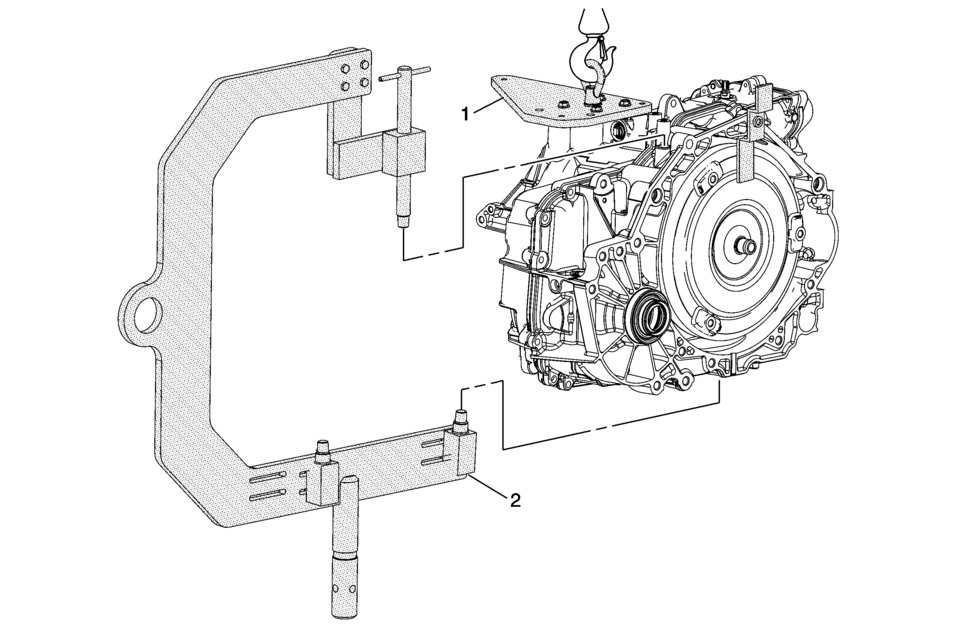
|
Callout |
Component Name |
|---|---|
|
1 |
DT-47811-A Transmission Lift Plate Warning: Handle with care, the transmission assembly weighs over 83 Kg (183 lbs). Bodily injury could occur if not handled properly. Caution: Refer to Fastener Caution. Procedure
Tighten bolts and nut. Tighten
12 Y (106 lb in) Special Tools
DT-47811-A Transmission Lift Plate For equivalent regional tools, refer to Special Tools. |
|
2 |
DT-46625 Transmission Holding Fixture Procedure
13 Y (10 lb ft) Special Tools
DT-46625-10 Holding Fixture Adapter For equivalent regional tools, refer to Special Tools. |
 Internal Components Removal
Internal Components Removal
Callout
Component Name
1
1??? Clutch Backing Plate Retainer Ring
Warning: The retain ...
 Lift Plate and Holding Fixture Removal
Lift Plate and Holding Fixture Removal
Callout
Component Name
1
DT-46625 Transmission Holding Fixture
For equivalent ...
Other materials:
Parking Brake Adjustment (Disc Brake)
Note: The park brake cable adjusting nut is a nylon lock type. Use
ONLY HAND TOOLS whenever tightening or loosening the adjusting nut.
Apply and fully release the park brake several times. Verify that the park
brake lever releases completely.
Turn ON the ignition. Verify the red B ...
Drivetrain and Front Suspension Frame Replacement
Special Tools
EN-45059 Angle Meter
For equivalent regional tools, refer to Special Tools.
Removal Procedure
Support the radiator and condenser from above using the upper brackets
on each side.
Raise the vehicle on a hoist. Refer to Lifting and Jacking the Vehicle.
Re ...
Battery Negative Cable Replacement
Battery Negative Cable Replacement
Callout
Component Name
Preliminary Procedures
Disconnect the battery current sensor connector.
Remove the battery tray. Refer to Battery Tray Replacement.
1
Bo ...

0.0091