
Chevrolet Sonic Repair Manual: Radio Front Side Door Speaker Replacement
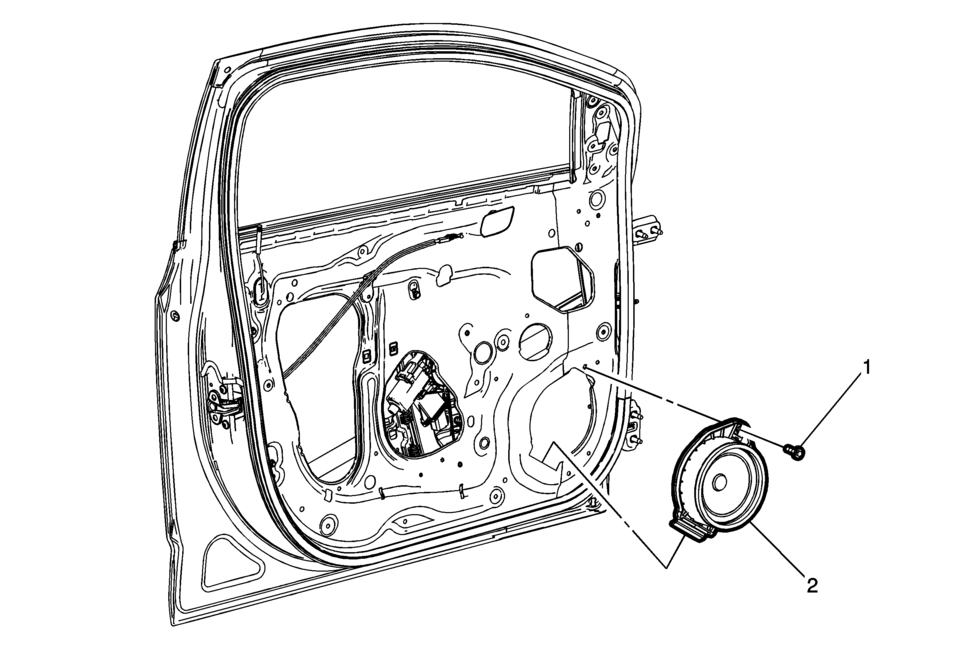
|
Callout |
Component Name |
|---|---|
|
Preliminary Procedure
Remove the front side door trim. Refer to Front Side Door Trim Replacement. |
|
|
1 |
Radio Front Side Door Speaker Bolt Caution: Refer to Fastener Caution. |
|
2 |
Radio Front Side Door Speaker Procedure
Disconnect the electrical connector. |
 Radio Frequency Identification (RFID)
RFID technology is used in some vehicles for functions such as tire pressure
monitoring and ignition system security, as well as in connection with conveniences
such as Remote Keyless Entry ...
 Radio Programming and Setup
Note:
DO NOT program a control module unless directed to by a service procedure
or a service bulletin. If the ECU is not properly configured with the correct
calibration software, th ...
Other materials:
Quarter Outer Panel Pressure Relief Valve Replacement
Quarter Outer Panel Pressure Relief Valve Replacement
Callout
Component Name
Preliminary Procedure
Remove the rear bumper fascia. Refer to Rear Bumper Fascia Replacement
1
Quarter Outer Panel Pre ...
Timing Belt Idler Pulley Replacement
Timing Belt Idler Pulley Replacement
Callout
Component Name
Preliminary Procedure
Remove the timing belt. Refer to Timing Belt Replacement.
1
Timing Belt Idler Pulley Bolt
Caution: Refer to ...
Event Data Recorders (EDR)
Basic information
Your Nissan Armada is equipped with an Event Data Recorder (EDR), a system designed
to capture critical vehicle data during specific crash or near-crash situations.
These events may include airbag deployment or impact with road obstacles. The
primary function of the EDR is to ...

0.0101