
Chevrolet Sonic Repair Manual: Radio Rear Side Door Speaker Replacement
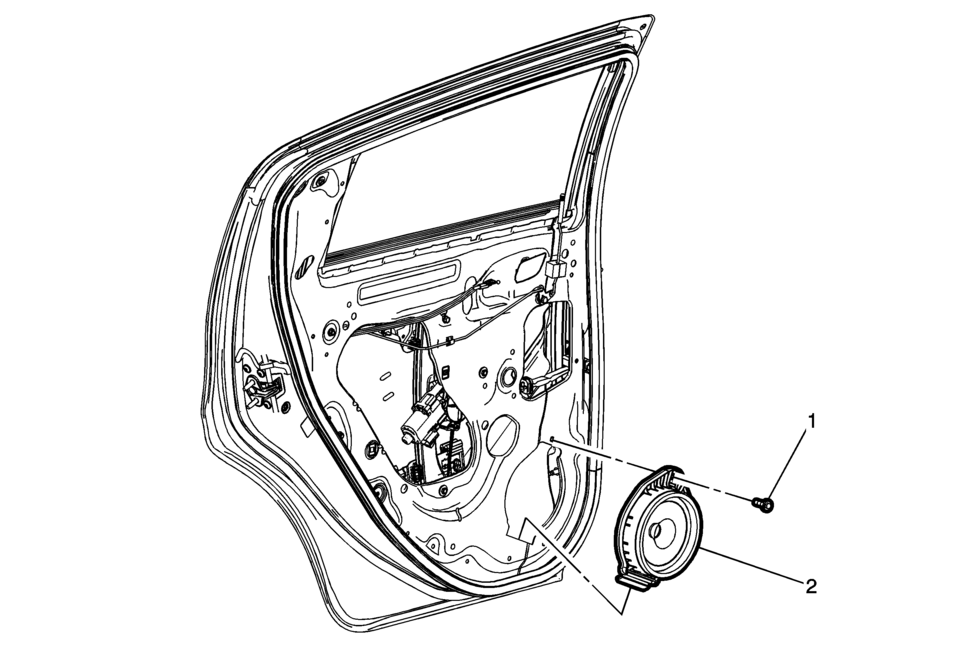
|
Callout |
Component Name |
|---|---|
|
Preliminary Procedure
Remove the rear side door trim. Refer to Rear Side Door Trim Replacement. |
|
|
1 |
Radio Rear Side Door Speaker Bolt Caution: Refer to Fastener Caution. |
|
2 |
Radio Rear Side Door Speaker Procedure
Disconnect the electrical connectors. |
 Radio Front Side Door Speaker Replacement
Radio Front Side Door Speaker Replacement
Callout
Component Name
Preliminary Procedure
Remove the front side door trim. Refer t ...
 Radio Replacement (With US8)
Radio Replacement
Callout
Component Name
Preliminary Procedure
Remove the instrument panel center molding. Refer to
Instrume ...
Other materials:
Driving with the Blind Spot Mirror
Actual Mirror View
1. When the approaching vehicle is a long distance away, the image in the main
mirror is small and near the inboard edge of the mirror.
2. As the vehicle gets closer, the image in the main mirror gets larger and moves
outboard.
3. As the vehicle enters the blind zone, the ...
Air Conditioning Compressor and Condenser Hose Replacement (LDE/LWE)
Removal Procedure
Recover the refrigerant. Refer to Refrigerant Recovery and Recharging.
Disconnect the A/C refrigerant pressure sensor electrical connector.
Remove air conditioning compressor and condenser hose nut (1).
Remove air conditioning compressor and ...
Shift Fork Cleaning and Inspection (Gen 1)
Warning: Wear safety glasses to avoid injury when using compressed
air or any cleaning solvent. Bodily injury may occur if fumes are inhaled
or if skin is exposed to chemicals.
Clean the following components with a suitable solvent.
Air dry all the parts.
3rd and ...

0.0049