
Chevrolet Sonic Repair Manual: Rear Compartment Lid Hinge Torque Rod Replacement
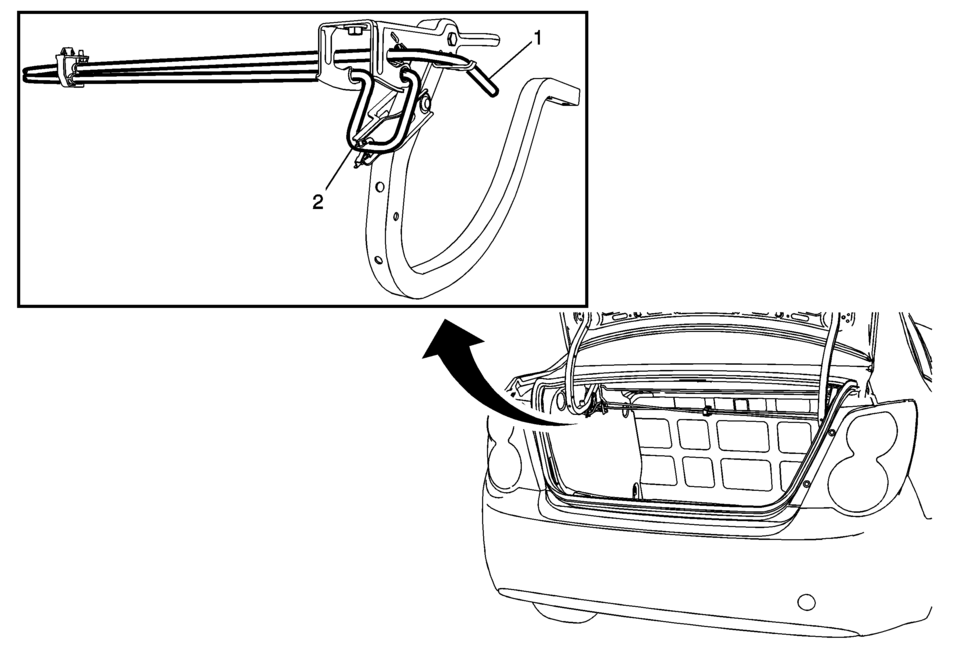
|
Callout |
Component Name |
|---|---|
|
Warning: Refer to Hood Hold-Open Device Warning. Preliminary Procedure
Open and support the rear compartment lid. Special Tools
BO-125 Torque Rod Lifter For equivalent regional tools, refer to Special Tools. |
|
|
1 |
Rear Compartment Lid Hinge Torque Rod?€“ Right Side Note: Only use the special tool to remove and install the rear compartment lid hinge torque rod. |
|
2 |
Rear Compartment Lid Hinge Torque Rod?€“ Left Side Note: Only use the special tool to remove and install the rear compartment lid hinge torque rod. |
 Rear Compartment Lid Adjustment
Rear Compartment Lid Adjustment
Callout
Component Name
1
Rear Compartment Lid
Caution: Refer to Fastener Caution ...
 Rear Compartment Lid Rear Hinge Replacement
Rear Compartment Lid Rear Hinge Replacement
Callout
Component Name
Preliminary Procedures
Remove the rear window trim panel. Refer ...
Other materials:
Different Size Tires and Wheels
If wheels or tires are installed that are a different size than the original
equipment wheels and tires, vehicle performance, including its braking, ride and
handling characteristics, stability, and resistance to rollover may be affected.
If the vehicle has electronic systems such as antilock ...
Hood Hinge Replacement
Hood Hinge Replacement
Callout
Component Name
Preliminary Procedures
Remove the hood. Refer to Hood Replacement.
Remove the front fender. Refer to Front Fender Replacement.
1
Hood Hinge Bolt (Q ...
Body Side Frame Rocker Reinforcement Replacement
Removal Procedure
Warning: Refer to Approved Equipment for Collision Repair
Warning.
Warning: Refer to Glass and Sheet Metal Handling Warning.
Note: The body side frame rocker reinforcement is made of
Ultra High Strength Dual Phase Steel and ...

0.0078