
Chevrolet Sonic Repair Manual: Rear Side Door Replacement
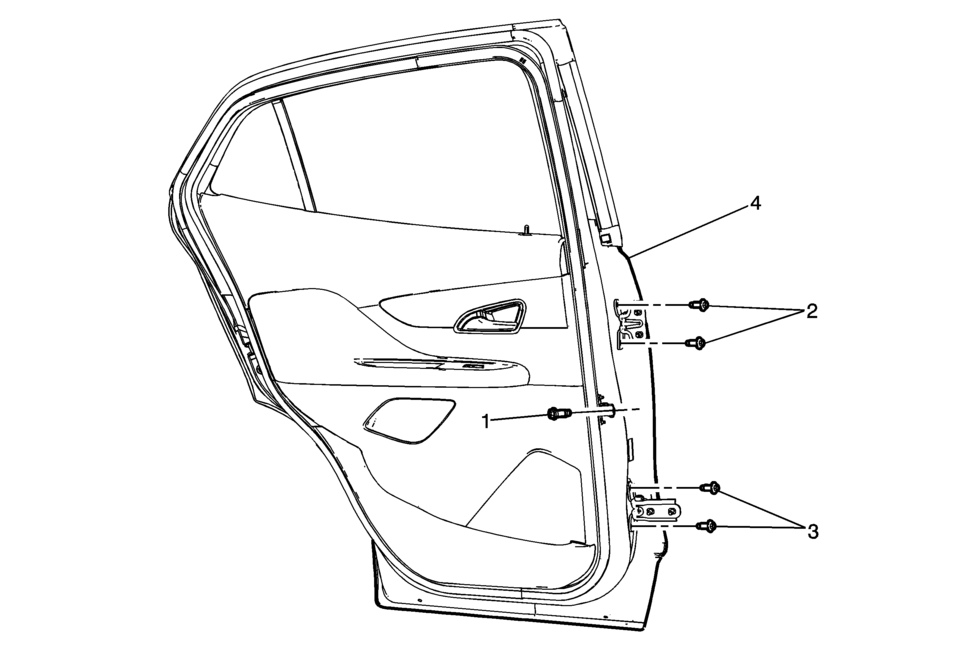
|
Callout |
Component Name |
|---|---|
|
Warning: Refer to SIR Warning.
|
|
|
1 |
Rear Side Door Check Link Bolt to Body Caution: Refer to Fastener Caution.
22?€‰Y (16?€‰lb?€‰ft) |
|
2 |
Rear Side Door Hinge Bolt to Door (Qty:?€‰2) Tighten
32?€‰Y (24?€‰lb?€‰ft) |
|
3 |
Rear Side Door Hinge Bolt to Door (Qty:?€‰2) Tighten
32?€‰Y (24?€‰lb?€‰ft) |
|
4 |
Rear Side Door Assembly Procedure
|
 Rear Side Door Outer Panel Replacement
Removal Procedure
Warning: Refer to Glass and Sheet Metal Handling Warning.
Note: According to different corrosion warranties, only the
regional mandatory joini ...
 Rear Side Door Stationary Window Replacement
Rear Side Door Stationary Window Replacement
Callout
Component Name
Warning: Refer to Glass and Sheet Metal Handling Warning.
...
Other materials:
Infants and Young Children
Everyone in a vehicle needs protection! This includes infants and all other children.
Neither the distance traveled nor the age and size of the traveler changes the need,
for everyone, to use safety restraints. In fact, the law in every state in the United
States and in every Canadian province ...
Front Brake Caliper Overhaul
Disassembly Procedure
Warning: Refer to Brake Dust Warning.
Warning: Refer to Brake Fluid Irritant Warning.
Warning: Do not place fingers in front of the caliper piston(s)
in an attempt to catch or protect it when applying compressed air. The
piston(s) ...
Evaporative Emission System Hose/Pipe Replacement
Removal Procedure
Disconnect the evaporative emission pipe (1). Refer to Plastic Collar
Quick Connect Fitting Service.
Remove the plastic retainer (1) and disconnect the evaporative emission
pipe (2).
Lift and support t ...

0.0057