
Chevrolet Sonic Repair Manual: Rear Side Door Trim Replacement (Sedan)
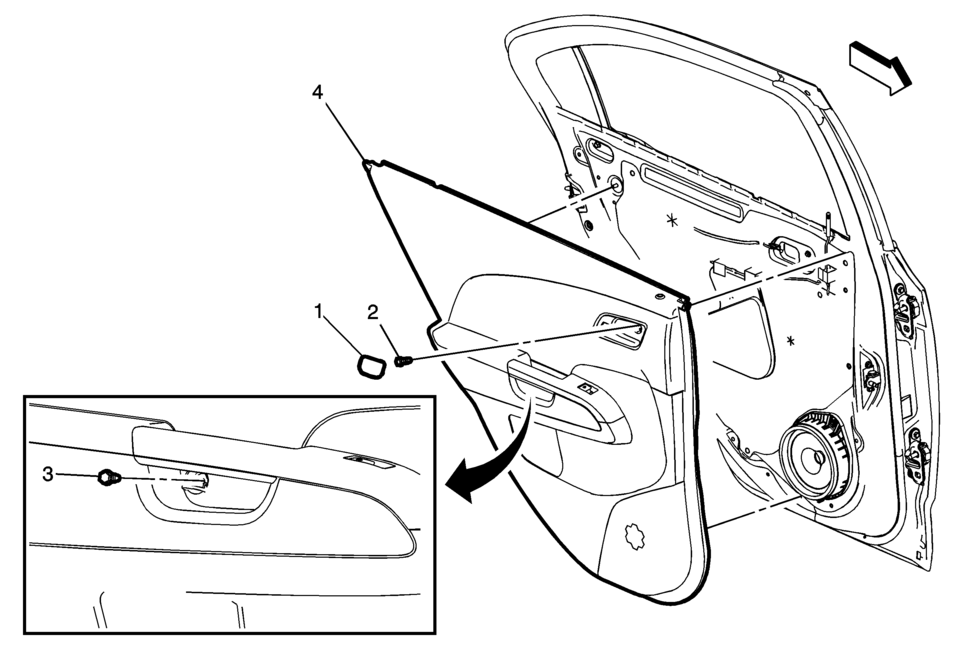
|
Callout |
Component Name |
|---|---|
|
1 |
Rear Side Door Inside Handle Bolt Cap |
|
2 |
Rear Side Door Inside Handle Fastener Caution: Refer to Fastener Caution. Procedure
Pull handle back to remove cap. Use suitable tool to unsnap. |
|
3 |
Rear Side Door Trim Fastener Procedure
Use a small flat-bladed tool to open the rear side door trim integral cap to access the fastener. |
|
4 |
Rear Side Door Trim Assembly Procedure
|
 Rear Side Door Trim Replacement (Hatchback)
Rear Side Door Trim Replacement
Callout
Component Name
Preliminary Procedure
Remove the rear side door upper rear trim panel. R ...
 Rear Side Door Upper Rear Trim Panel Replacement (Hatchback)
Rear Side Door Upper Rear Trim Panel Replacement
Callout
Component Name
1
Rear Side Door Upper Rear Trim Panel Assembly
...
Other materials:
Overview (Radio with Touchscreen)
z VOL
y (Volume)
Press to decrease or increase the volume.
O (Power)
Press and hold to turn the power on or off.
D (Home Page)
Press to go to the Home Page. See Home Page.
...
Transmission Fluid Pump Disassemble (6T30)
Table 1:
Fluid Filter Assembly and Torque Converter Fluid Seal
Disassemble
Table 2:
Fluid Pump Disassemble
Fluid Filter Assembly and Torque Converter
Fluid Seal Disassemble
Fluid Filter Assembly and Torque Converter Fluid Seal Disassemble
...
Synchronizers Assemble
1st/2nd Gear Synchronizer
iv
Note: When servicing the synchronizers, retain them in the
same order that they are removed. Keep the synchronizer components together
and mark them to identify correct location.
Install the synchronizer inserts (1) into ...

0.0059