
Chevrolet Sonic Owner's Manual: Rear Vision Camera Location
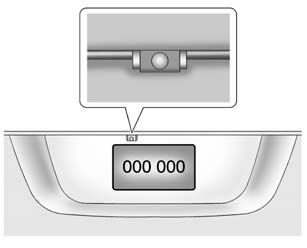
The camera is above the license plate.
The area displayed by the camera is limited. It does not display objects that are close to either corner or under the bumper and can vary depending on vehicle orientation or road conditions. Displayed images may be closer or farther than they appear.
The following illustrations show the field of view that the camera provides.
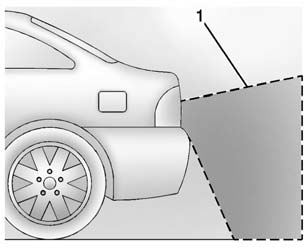
1. View displayed by the camera.
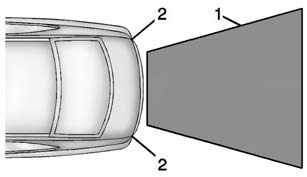
1. View displayed by the camera.
2. Corner of the rear bumper.
 Rear Vision Camera (RVC)
This vehicle may have the RVC system. Read this entire section before using it.
The RVC system can assist the driver when backing up by displaying a view of
the area behind the vehicle.
Warning
T ...
 When the System Does Not Seem to Work Properly
The RVC system may not work properly or display a clear image if:
The RVC is turned off. See “Turning the Rear Camera System On or Off� earlier
in this section.
It is dark.
The sun or t ...
Other materials:
Radio Front Side Door Speaker Replacement
Radio Front Side Door Speaker Replacement
Callout
Component Name
Preliminary Procedure
Remove the front side door trim. Refer to Front
Side Door Trim Replacement.
1
Radio Front Side Door Speaker ...
Side Window Defogger Outlet Grille Replacement
Side Window Defogger Outlet Grille Replacement
Callout
Component Name
1
Side Window Defroster Outlet Grille (Qty:?€‰2)
Procedure
Use a flat bladed plastic trim tool to aid in the removal of the grille
ass ...
Turbocharger Coolant Return Pipe Replacement (LUV)
Turbocharger Coolant Return Pipe Replacement
Callout
Component Name
Preliminary Procedure
Remove the turbocharger. Refer to Turbocharger Replacement.
1
Turbocharger Fastener
Caution: Refer t ...

0.0049