
Chevrolet Sonic Repair Manual: Rear Window Wiper Arm Replacement
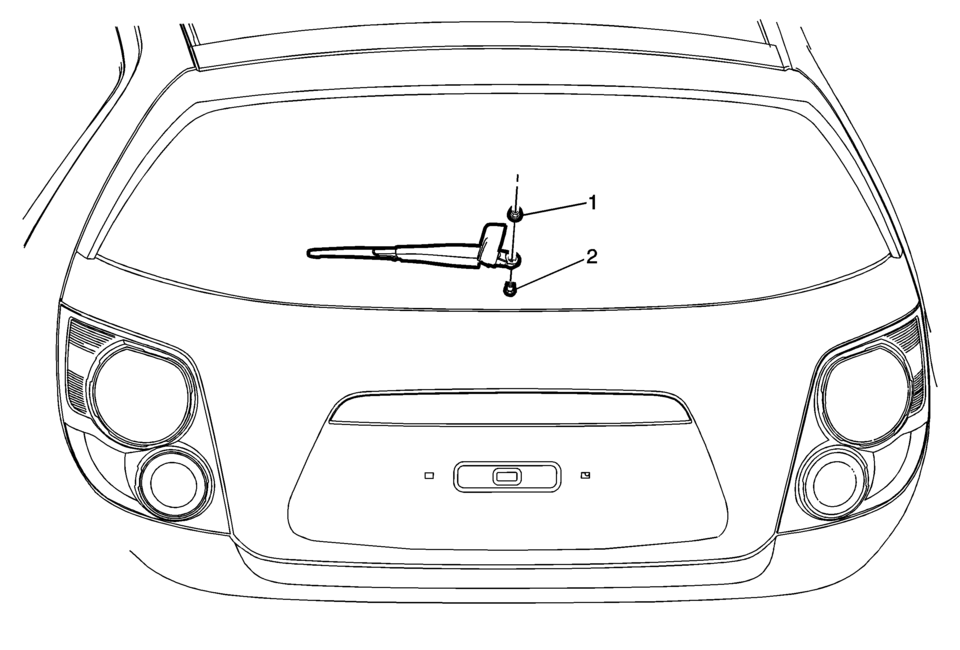
|
Callout |
Component Name |
|---|---|
|
Preliminary Procedure
Using a small flat-bladed tool, release the locking tabs and lift the end of the wiper arm nut cover in order to access and remove the rear wiper arm nut. |
|
|
1 |
Rear Window Wiper Arm Nut Caution: Refer to Fastener Caution.
10?€‰Y (89?€‰lb?€‰in) |
|
2 |
Rear Window Wiper Arm Tip: Align and hold the rear window wiper arm blade to the edge of the blackout on the rear liftgate window while tightening. |
 Wiper Chatter Repair
Some vehicles may exhibit a condition where the windshield wipers chatter and/or
wipe unevenly. Several items may contribute to this condition. To completely repair
this condition, ALL of the item ...
 Windshield Wiper Arm Replacement
Windshield Wiper Arm Replacement
Callout
Component Name
Preliminary Procedure
Open and support the hood assembly.
...
Other materials:
Vehicle Load Limits
It is very important to know how much weight the vehicle can carry. This weight
is called the vehicle capacity weight and includes the weight of all occupants,
cargo, and all nonfactory-installed options. Two labels on the vehicle show how
much weight it may properly carry: the Tire and Loadin ...
Detecting the Vehicle Ahead
The green vehicle ahead indicator will appear when a vehicle is detected ahead.
Whenever this indicator does not appear, FCA will not respond. The indicator may
disappear on curves, highway exit ramps, or hills, or due to poor visibility. The
FCA system will not detect another vehicle ahead ...
Front Wheel Drive Shaft Seal Replacement - Case Side
Front Wheel Drive Shaft Seal Replacement - Case Side
Callout
Component Name
1
Front Wheel Drive Shaft Oil Seal
Special Tools
DT-23129 Universal Seal Remover
DT-47790 Seal Installer
GE-6125-1B Slide Hamme ...

0.0079