
Chevrolet Sonic Owner's Manual: Rear Wiper Blade Replacement
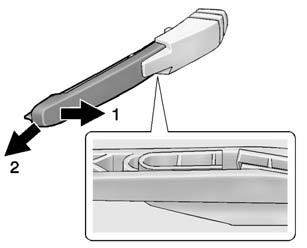
1. Pull the wiper arm a short distance away from the glass (1).
2. Pull the blade out from the arm (2).
It may require extra effort to remove the old blade.
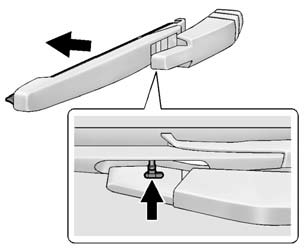
3. Once the blade pin disengages from the wiper arm, remove the wiper blade by sliding the pin out of the guide hole.
4. Reverse the steps to install the new blade.
 Front Wiper Blade Replacement
Windshield wiper blades should be inspected for wear or cracking. See the Maintenance
Schedule for more information.
Replacement blades come in different types and are removed in different wa ...
 Headlamp Aiming
Headlamp aim has been preset and should need no further adjustment.
If the vehicle is damaged in a crash, the headlamp aim may be affected. If adjustment
to the headlamps is necessary, see your dea ...
Other materials:
Rear Side Door Upper Rear Trim Panel Replacement (Hatchback)
Rear Side Door Upper Rear Trim Panel Replacement
Callout
Component Name
1
Rear Side Door Upper Rear Trim Panel Assembly
Procedure
Pull the door upper rear trim panel away from the rear side door.
...
Radiator Surge Tank Outlet Hose Replacement (LDE LUW)
Radiator Surge Tank Outlet Hose Replacement
Callout
Component Name
Preliminary Procedure
Drain the coolant. Refer to Cooling System Draining and Filling
1
Radiator Surge Tank Outlet Hose Clamps (Qty ...
Charge Air Cooler Inlet Air Hose Replacement
Removal Procedure
Disconnect the battery negative cable. Refer to Battery Negative Cable
Disconnection and Connection.
Remove the front bumper fascia. Refer to Front Bumper Fascia Replacement.
Loosen the charge air cooler inlet air pipe clamp (1) at the ...

0.0075