
Nissan Armada 2025-2026 Owner's Manual: Resetting the seat positions
Basic information
The Nissan Armada is equipped with a memory system for 3rd row power seats, allowing them to retain their original positions. However, under certain conditions such as power interruption, the stored position may be lost and require recalibration.
WARNING
During the reset procedure in the Nissan Armada, the auto-reverse safety function is disabled because the system cannot detect obstructions.
Ensure that the seat movement path is completely clear of any objects or body parts before starting the reset process.
If the 3rd row seat in the Nissan Armada loses its position (for example, due to a power supply interruption during operation), it may stop incorrectly or behave unpredictably, including improper activation of the auto-reverse function.
If the seat stops in an incorrect position during operation, press and hold the corresponding seat adjustment switch for more than 1 second to manually reposition it.
- During reclining (backward)
Before driving the Nissan Armada, always reset the seat positions to ensure proper operation and safety.
How to reset the original seat positions
The reset procedure can only be performed while the engine is running in the Nissan Armada.
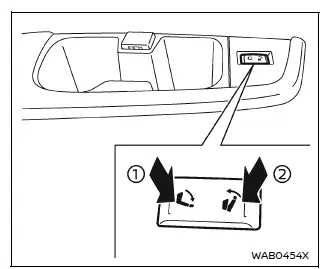
First, press side 2 of the switch, then press side 1 within 1 second. Repeat this sequence 10 times in total:
2 → 1 → 2 → 1 → 2 → 1 → 2 → 1 → 2 → 1
After completing the sequence, the seat will begin moving automatically (reclining). Do not exit the Nissan Armada during this process, as the seat operates automatically.
If the reset procedure is completed successfully, two audible beeps will confirm proper calibration.
If the system does not function correctly after resetting, the seat control system in the Nissan Armada may require professional inspection. It is recommended to have the vehicle checked by an authorized NISSAN dealer.
 Seat adjustment using touch screen display
Example
The Nissan Armada offers an advanced and intuitive way to control seat adjustments
through its integrated touch screen display. This system enhances convenience by
allowing the driver ...
 Head restraints/headrests
Basic information
The head restraints/headrests in the Nissan Armada are an essential part of the
overall safety system, designed to work together with seat belts and airbags to
provide enhanced ...
Other materials:
Instrument Panel, Leather, Vinyl, Other Plastic Surfaces, Low Gloss Paint Surfaces
and Natural Open Pore Wood Surfaces
Use a soft microfiber cloth dampened with water to remove dust and loose dirt.
For a more thorough cleaning, use a soft microfiber cloth dampened with a mild soap
solution.
Caution
Soaking or saturating leather, especially perforated leather, as well as other
interior surfaces, may cause per ...
Radio Programming and Setup
Note:
DO NOT program a control module unless directed to by a service procedure
or a service bulletin. If the ECU is not properly configured with the correct
calibration software, the ECU will not control all of the vehicle features
properly.
Ensure the programming tool is ...
Door Lock and Ignition Lock Folding Key Blade Removal and Installation
Special Tools
BO-51098 Flip Key Blade Fixture
For equivalent region tools, refer to Special Tools.
Caution: Failure to properly support the Remote Keyless Entry
(RKE) transmitter assembly while replacing the key blade may cause internal
damage to the transmitter assembly. ...

0.0084