
Nissan Armada 2025-2026 Owner's Manual: Seat adjustment using touch screen display
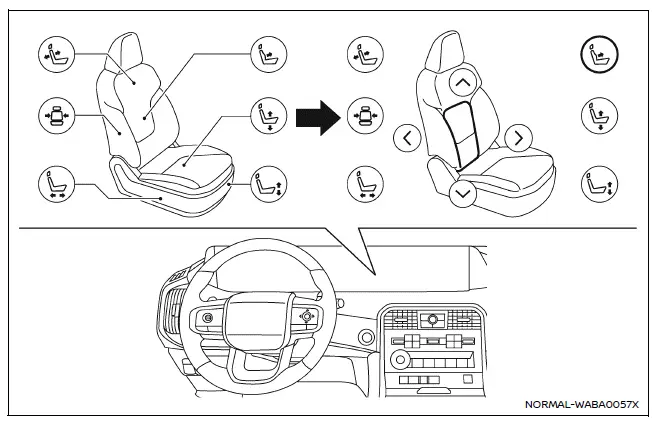
Example
The Nissan Armada offers an advanced and intuitive way to control seat adjustments through its integrated touch screen display. This system enhances convenience by allowing the driver to manage multiple seating functions quickly and efficiently without relying solely on physical controls.
Refer to the "Touch screen display" section or the separate NissanConnect Owner’s Manual for detailed instructions on operating the display system in the Nissan Armada.
The driver’s seat and 3rd row seats (if so equipped) in the Nissan Armada can be adjusted directly via the touch screen interface, providing a modern and user-friendly experience.
Touch
 on the display, then select the "Vehicle" menu.
Next, tap the "Seat" option and choose the desired function to control seat settings in the Nissan Armada.
The following features may be available depending on the vehicle configuration:
- Massage Settings
- Driver's Seat Pop-up
- Passenger's Seat Pop-up
- Front Power Seat Adjustment
- Power Folding Rear Seats
This touchscreen-based control system in the Nissan Armada allows for seamless customization of seat comfort and positioning, enhancing both driver and passenger experience.
NOTE:
- If the physical adjustment switch of a seat is being used, the same seat cannot be controlled via the touch screen display simultaneously.
- For safety reasons, seat adjustments for the driver via the touch screen display are disabled while the Nissan Armada is in motion.
 Flexible seating
Basic information
The flexible seating system in the Nissan Armada is designed to deliver exceptional
versatility, allowing you to quickly adapt the interior layout for passengers or
cargo. Wheth ...
 Resetting the seat positions
Basic information
The Nissan Armada is equipped with a memory system for 3rd row power seats, allowing
them to retain their original positions. However, under certain conditions such
as power int ...
Other materials:
When to Add Engine Oil
1.8L Shown, 1.4L Similar
If the oil is below the minimum mark on the dipstick, add 1 L (1 qt) of the recommended
oil and then recheck the level. See “Selecting the Right Engine Oil� in this section
for an explanation of what kind of oil to use. For engine oil crankcase capacity,
see Cap ...
Brake Fluid Level Indicator Switch Replacement
Removal Procedure
Disconnect the brake fluid level indicator switch electrical connector.
Using a small, flat-bladed tool, lift the locking tab on the underside
of the brake fluid level indicator switch (1) and remove the switch.
Inspect the master cyli ...
Inspection/Maintenance (I/M) System DTC Table (LUW)
Inspection/Maintenance (I/M) System DTC Table
System
DTCs Required to Set System Status to YES
If an inspection/maintenance system status indicator did NOT update to
YES during the Inspection/Maintenance System Check,
review ea ...

0.0174