
Chevrolet Sonic Owner's Manual: When to Add Engine Oil
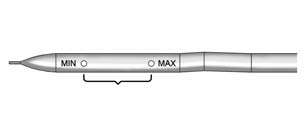
1.8L Shown, 1.4L Similar
If the oil is below the minimum mark on the dipstick, add 1 L (1 qt) of the recommended oil and then recheck the level. See “Selecting the Right Engine Oil� in this section for an explanation of what kind of oil to use. For engine oil crankcase capacity, see Capacities and Specifications.
Caution
Do not add too much oil. Oil levels above or below the acceptable operating range shown on the dipstick are harmful to the engine. If you find that you have an oil level above the operating range, i.e., the engine has so much oil that the oil level gets above the upper mark that shows the proper operating range, the engine could be damaged. You should drain out the excess oil or limit driving of the vehicle and seek a service professional to remove the excess amount of oil.
See Engine Compartment Overview for the location of the engine oil fill cap.
Add enough oil to put the level somewhere in the proper operating range. Push the dipstick all the way back in when through.
 Checking Engine Oil
It is a good idea to check the engine oil level at each fuel fill. In order to
get an accurate reading, the oil must be warm and the vehicle must be on level ground.
The engine oil dipstick handle ...
 Selecting the Right Engine Oil
Selecting the right engine oil depends on both the proper oil specification and
viscosity grade. See Recommended Fluids and Lubricants.
Specification
Use and ask for licensed engine oils with the ...
Other materials:
Front Side Door Adjustment
Front Side Door Adjustment
Callout
Component Name
Preliminary Procedure
Remove the front wheelhouse liner. Refer to Front Wheelhouse Liner Replacement.
1
Front Side Door
Caution: Refer to ...
Manual HVAC Description and Operation
The air temperature and the air delivery description and operation are divided
into five areas:
HVAC Control Components
Air Speed
Air Delivery
Heating and A/C Operation
Recirculation Operation
HVAC Control Components
HVAC Control Assembly
The HVAC control assembly inter ...
Throttle Body Assembly Replacement
Removal Procedure
Disconnect the throttle body wiring harness connector.
Remove the charge air cooler outlet air hose from
the throttle body. Refer to Charge Air Cooler Outlet
Air Hose Replacement.
Remove the 4 throttle body fasteners (3).
Remo ...

0.0068