
Chevrolet Sonic Owner's Manual: Seat Adjustment
Manual Seats
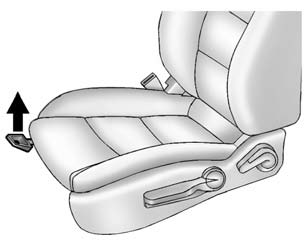
To adjust a manual seat:
1. Pull the handle at the front of the seat.
2. Slide the seat to the desired position and release the handle.
3. Try to move the seat back and forth to be sure it is locked in place.
See Seat Adjustment.
Seat Height Adjuster
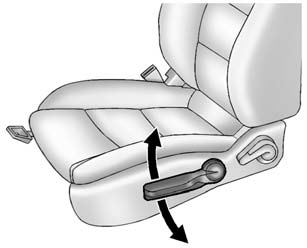
If available, move the lever up or down to manually raise or lower the seat.
See Seat Adjustment.
Reclining Seatbacks
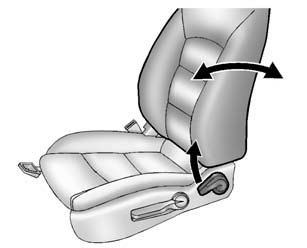
To recline a manual seatback:
1. Lift the lever.
If necessary, move the safety belt out of the way to access the lever.
2. Move the seatback to the desired position, and then release the lever to lock the seatback in place.
3. Push and pull on the seatback to make sure it is locked in place.
To return the seatback to the upright position:
1. Lift the lever fully without applying pressure to the seatback, and the seatback will return to the upright position.
2. Push and pull on the seatback to make sure it is locked.
See Reclining Seatbacks.
 Windows
Manual Windows
If equipped, use the window crank to open and close each window.
See Manual Windows.
Power Windows
If equipped, press the switch down to open the window. Pull the front of the
s ...
 Second Row Seats
The rear seatbacks can be folded down to increase cargo space.
See Rear Seats. ...
Other materials:
Tires and Wheels Description and Operation
There are two types of tire and wheel balancing: static and dynamic.
Static balance is the equal distribution of weight around the wheel. Assemblies
that are statically unbalanced cause a bouncing action called wheel tramp. This
condition may eventually cause uneven tire wear.
...
Relay Replacement (Attached to Wire Harness)
Removal Procedure
Locate the relay. Refer to the Master Electrical Component List to locate
the relay in the vehicle.
Remove any fasteners which hold the relay in place.
Remove any connector position assurance (CPA) devices or secondary locks.
Note: Use care w ...
Engine Flywheel Installation
Special Tools
EN-652 Flywheel Holder
EN-45059 Torque Angle Sensor Kit
For equivalent regional tools, refer to Special Tools.
Clean the thread in the crankshaft.
Install the crankshaft position reluctor ring (1).
Install the flywheel (2).
Install the EN-6 ...

0.0078