
Nissan Armada 2025-2026 Owner's Manual: Steering wheel
Basic information
WARNING
- Never attempt to adjust the Nissan Armada steering wheel while the vehicle is in motion. Doing so may result in loss of control and could lead to a serious accident.
- Do not position the Nissan Armada steering wheel closer than necessary
for safe and comfortable driving. The driver’s air bag deploys with significant
force, and improper seating position increases the risk of severe injury or
fatal consequences.
Always sit fully back against the seatback, maintain a safe distance from the steering wheel, and ensure that seat belts are properly fastened at all times.
Manual operation
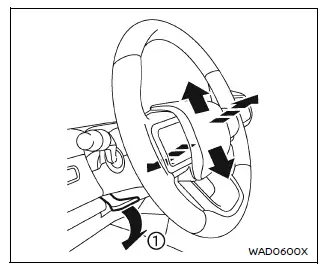
To manually adjust the Nissan Armada steering wheel, pull the lock lever 1 downward and set the steering wheel to your preferred height and reach (tilt and telescopic position).
Once the desired position is achieved, push the lock lever upward firmly to secure the Nissan Armada steering wheel in place.
Power operation
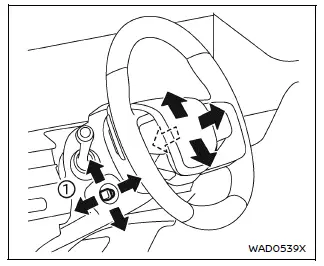
Tilt or telescopic operation
The Nissan Armada steering wheel can also be adjusted electronically using the control lever 1, allowing smooth and precise tilt and telescopic positioning for optimal driving comfort.
Entry/Exit function operation:
The Nissan Armada memory seat system automatically raises the steering wheel when the driver’s door is opened and the ignition is OFF.
This intelligent feature improves accessibility, making it easier to enter and exit the Nissan Armada without obstruction.
Additionally, when returning to the driving position, the steering wheel can automatically return to its preset position, enhancing convenience and personalization.
 Fuel-filler door
Basic information
CAUTION
Avoid directing high-pressure water, such as from a pressure washer,
onto or around the Nissan Armada fuel-filler door area.
Always ensure the fuel-filler door is s ...
 Sun visors
To reduce glare from the front, pull down the main Nissan Armada sun visor
1.
To block sunlight from the side, detach the sun visor from the center mount
and rotate it sideways 2.
Ext ...
Other materials:
Turning the Systems Off and On
The button for TCS and StabiliTrak is on the center console.
Caution
Do not repeatedly brake or accelerate heavily when TCS is off. The vehicle
driveline could be damaged.
To turn off only TCS, press and release the
button. The traction off light
displays in the instrument cluster.
To tu ...
Tire Rotation
Tires should be rotated every 12 000 km (7,500 mi). See Maintenance Schedule.
Tires are rotated to achieve a uniform wear for all tires. The first rotation
is the most important.
Anytime unusual wear is noticed, rotate the tires as soon as possible, check
for proper tire inflation pressure, an ...
Front Side Door Upper Hinge and Lower Hinge Replacement
Front Side Door Upper Hinge and Lower Hinge Replacement
Callout
Component Name
1
Front Side Door Upper Hinge to Body Bolt (Qty:?€‰2)
Caution: Refer to Fastener Caution.
Procedures
Before removing ...

0.0048