
Nissan Armada 2025-2026 Owner's Manual: System maintenance
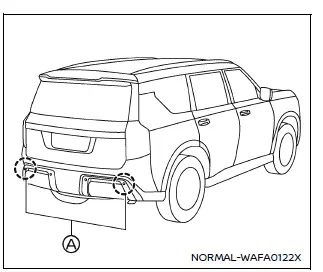
Example
Basic information
The Nissan Armada RCTA system relies on two radar sensors (A) mounted near the rear bumper to detect approaching vehicles.
To ensure optimal performance of the Nissan Armada safety systems, always keep the radar sensor areas clean and unobstructed.
Environmental conditions such as water spray, fog, or condensation may temporarily reduce sensor performance.
Obstructions like ice, frost, dirt, or debris can also interfere with accurate detection.
Regularly inspect and clean the sensor areas on your Nissan Armada to maintain reliable system functionality.
Avoid placing stickers (including transparent materials), installing accessories, or applying additional paint near the radar sensors, as these modifications can degrade detection capability.
Do not strike, hit, or otherwise damage the sensor areas. If the rear bumper area of your Nissan Armada is damaged in a collision, it is strongly recommended to have it inspected by a NISSAN dealer.
Precautions on repairing the bumper
Special care must be taken when repairing the rear bumper of the Nissan Armada, as the radar sensors are integrated into this component.
The radar sensors operate by emitting signals and analyzing the reflections to detect objects and vehicles in the surrounding area.
WARNING
Improper repair methods—such as using incorrect materials, applying non-approved body fillers, or repainting without proper procedures—can weaken or block radar signals. This may prevent accurate detection and significantly increase the risk of accidents or injury.
If bumper repair is required, always consult an authorized NISSAN dealer to ensure that the Nissan Armada safety systems are properly restored and calibrated.
Radio frequency statement
For USA
This Nissan Armada system complies with Part 15 of the FCC Rules. Operation is subject to the following conditions: (1) it may not cause harmful interference, and (2) it must accept any interference received, including interference that may cause undesired operation.
CAUTION TO USERS
Any modifications not expressly approved by the responsible party may void the user's authority to operate this equipment in the Nissan Armada.
For Canada
This Nissan Armada system contains license-exempt transmitter(s)/receiver(s) compliant with Innovation, Science and Economic Development Canada RSS standards. Operation is subject to the following conditions: (1) the device may not cause interference, and (2) it must accept any interference, including that which may cause undesired operation.
Maintaining the radar and sensor systems of your Nissan Armada in optimal condition ensures maximum effectiveness of advanced driver assistance features and enhances overall driving safety. :contentReference[oaicite:0]{index=0}
 System temporarily unavailable
When the Nissan Armada detects that the radar sensors are obstructed, the system
will automatically deactivate to ensure safe and reliable operation.
A warning message reading "Unavailable Sid ...

Other materials:
Throttle Body Heater Outlet Pipe Replacement (LUW)
Throttle Body Heater Outlet Pipe Replacement
Callout
Component Name
Preliminary Procedure
Drain the cooling system. Refer to Cooling System Draining and Filling.
1
Engine Coolant Air Bleed Hose
...
2-6 Clutch Piston Installation (6T30)
2-6 Clutch Piston Installation
Callout
Component Name
1
2? Clutch Piston Assembly
Note:
Position the 2? piston air bleed and large slot toward the
top of the case.
DT-48271 seal protector pr ...
Gears Cleaning and Inspection (Gen 2)
Gears
Warning: Wear safety glasses to avoid injury when using compressed
air or any cleaning solvent. Bodily injury may occur if fumes are inhaled
or if skin is exposed to chemicals.
Clean the following gears in a suitable solvent and
air dry all the p ...

0.0058