
Nissan Armada 2025-2026 Owner's Manual: Touch screen display
Basic information
In the Nissan Armada, many vehicle systems and advanced features can be conveniently controlled through the intuitive touch screen display, providing a modern and user-friendly interface for drivers.
For a complete overview of touch screen operation in the Nissan Armada, refer to the NissanConnect Owner’s Manual, which explains all available functions in detail.
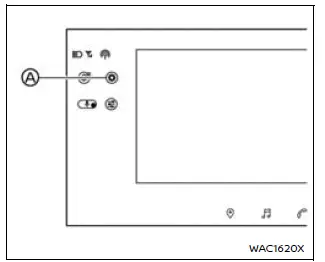
Example
Tap the
 A icon on the Nissan Armada touch screen display to access the "All Settings" menu.
From there, simply touch the desired option to configure settings according to your preferences.
Available features and menu items in the Nissan Armada may vary depending on trim level, installed equipment, software version, and driving conditions.
For additional functions not listed here, consult the NissanConnect Owner’s Manual for the Nissan Armada.
Vehicle
Camera
The Nissan Armada allows extensive customization of camera-related features through the touch screen display.
- Predictive Course Lines
Enables or disables dynamic guidelines that assist in maneuvering and parking the Nissan Armada. - Display Settings The following visual parameters can be fine-tuned for optimal
clarity:
- Brightness
- Contrast
- Tint
- Color
- Black Level
- Saved Locations
Allows the Nissan Armada driver to manage stored camera viewpoints and parking references. - Ultra Wide Camera
Activates or deactivates the ultra-wide viewing mode, enhancing visibility around the Nissan Armada. - My Parking Locations
Enables registration and management of personalized parking guidelines. - Automatic 360º Moving
When enabled, the Nissan Armada will display a rotating 360º 3D vehicle view when the Camera button is pressed after ignition is turned ON.
 - Vehicle Color
Allows customization of the vehicle color displayed in the Intelligent Around View Monitor for better visual identification.
Dash Cam
The Nissan Armada integrated dash cam system provides flexible recording settings to enhance safety and documentation.
By default, all recording functions are disabled on first use. When "Auto Record Video" is activated for the first time, related features such as "Parking Monitoring" and "Recording At Impact" are also enabled automatically. After activation, each feature can be controlled independently.
- Auto Record Video
Enables or disables continuous recording functionality in the Nissan Armada. - Record Sound
Allows audio recording to be turned ON or OFF (excluding event recordings). - Parking Monitoring
When enabled, the Nissan Armada automatically records video if an impact is detected while parked.This provides added security and monitoring for unattended vehicles.
- Recording At Impact
Automatically records video when a collision or sudden impact is detected during driving or while stationary. - Recording Time
Allows selection of video clip duration:- 1 min
- 3 min
- 5 min
- Video Bitrate
Adjusts recording quality and file size:- High
- Standard
- Low
- Video Overlay Information
When enabled, driving data such as speed and location is embedded into recorded videos. - Impact Sensitivity
Allows customization of how sensitive the Nissan Armada is to impacts that trigger recording:- High
- Middle
- Low
- Wi-Fi File Transfer
Enables wireless connection between the Nissan Armada and a smartphone, allowing video files to be viewed and downloaded via a dedicated app. - Self-timer
Allows setting a delay for in-car camera capture:- 0 sec
- 3 sec
- 10 sec
- Adjust Camera Angle
Provides manual adjustment of front and rear camera positioning for optimal recording angles. - Dash Cam System
Includes system-level controls:- Software Version
- Format SD card
- Reset All Dash Cam Settings to Default
- Front Camera
Adjustable parameters include:- Brightness
- Contrast
- Rear Camera
Adjustable parameters include:- Brightness
- Contrast
- Inside Camera
Adjustable parameters include:- Brightness
- Contrast
Climate
In the Nissan Armada, the climate control system offers advanced customization options, allowing drivers and passengers to fine-tune cabin comfort through the touch screen display.
- Airflow Intensity
Allows Nissan Armada users to select the desired airflow strength for optimal comfort during any driving condition.OFF, 1, 2 or 3
- Auto Recirculation
Enables or disables the automatic air recirculation function in the Nissan Armada, helping maintain interior air quality. - Auto Recirculation Sensitivity
Allows adjustment of how quickly the Nissan Armada system reacts to external air quality changes.OFF, 1, 2 or 3
- Defrost Activates Front & Rear
When enabled in the Nissan Armada, the rear defroster will automatically activate whenever the front defroster is turned ON, improving visibility in cold conditions.This synchronized operation enhances overall safety and convenience.
- Auto Defogging Sensitivity
Allows users to adjust how sensitive the Nissan Armada system is to windshield fogging conditions.OFF, 1, 2 or 3
- Biometric Cooling (BIO COOL)
Enables or disables the advanced biometric cooling feature in the Nissan Armada, designed to optimize passenger comfort based on detected conditions. - Heated Steering Wheel Sensitivity
Allows adjustment of heating responsiveness for the steering wheel in the Nissan Armada.OFF, 1, 2 or 3
- Driver Auto Seat Sensitivity
Customizes automatic seat climate intensity for the driver’s seat in the Nissan Armada.OFF, 1, 2 or 3
- Passenger Auto Seat Sensitivity
Allows passengers to enjoy personalized seat climate control settings in the Nissan Armada.OFF, 1, 2 or 3
- 2nd Row Left Auto Seat Sensitivity
Provides rear passengers in the Nissan Armada with adjustable seat ventilation or heating intensity.OFF, 1, 2 or 3
- 2nd Row Right Auto Seat Sensitivity
Ensures balanced climate comfort for all rear occupants in the Nissan Armada.OFF, 1, 2 or 3
Seat
The Nissan Armada offers premium seat customization features to enhance comfort and luxury for every passenger.
- Massage Settings
The Nissan Armada allows users to activate and personalize seat massage functions with multiple modes and intensities.- ON/OFF
- Relaxing, Refreshing or Lumbar
- Intensity
- Speed
- Driver's Seat Pop-up
Controls whether seat adjustment notifications appear on the Nissan Armada display. - Passenger's Seat Pop-up
Provides the same functionality for the front passenger seat in the Nissan Armada. - Front Power Seat Adjustment
Allows precise adjustment of seating position for both driver and front passenger in the Nissan Armada for optimal ergonomics. - Power Folding Rear Seats
Enables automatic folding and returning of the third-row seats in the Nissan Armada, increasing cargo space when needed.
Interior Light
The Nissan Armada interior lighting system enhances cabin ambiance and visibility through customizable lighting options.
Available settings include:
- Accent Lighting
Allows adjustment of brightness to create a comfortable interior atmosphere in the Nissan Armada. - Ambient Lighting
Provides advanced customization, including ON/OFF control, brightness adjustment, and color selection.
(Locations)- Front
- Rear (Colors)
- ProPILOT Assist Mode
- Delight (4 colors)
- Discovery (4 colors)
- Passion (4 colors)
- Harmony (4 colors)
- Additional (48 colors)
These lighting configurations in the Nissan Armada allow drivers to personalize the cabin environment, enhancing both comfort and driving experience, especially during night driving.
 Clock and outside air temperature
In the Nissan Armada, both the clock 1 and the outside air temperature 2 are
conveniently displayed at the top section of the vehicle information display, allowing
the driver to quickly access ...

Other materials:
How to Add Coolant to the Coolant Surge Tank
Caution
This vehicle has a specific coolant fill procedure. Failure to follow this
procedure could cause the engine to overheat and be severely damaged.
If no problem is found, check to see if coolant is visible in the coolant surge
tank. If coolant is visible but the coolant level is not at t ...
Scheduling Service Appointments
When the vehicle requires warranty service, contact your dealer and request an
appointment. By scheduling a service appointment and advising the service consultant
of your transportation needs, your dealer can help minimize your inconvenience.
If the vehicle cannot be scheduled into the service ...
Differential lock mode switch
The rear differential lock (DIFF-LOCK) in the Nissan Armada is designed to distribute
engine torque evenly between the left and right rear wheels, ensuring balanced traction
in demanding driving conditions.
When the Nissan Armada becomes stuck in challenging environments such as sand,
sno ...

0.0054