
Nissan Armada 2025-2026 Owner's Manual: Clock and outside air temperature
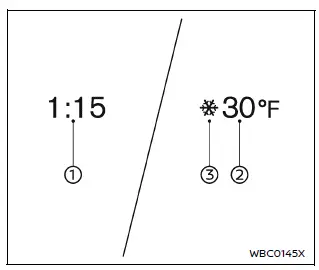
In the Nissan Armada, both the clock 1 and the outside air temperature 2 are conveniently displayed at the top section of the vehicle information display, allowing the driver to quickly access essential information while driving.
Clock
The clock in the Nissan Armada can be adjusted through the vehicle settings menu or by referring to the dedicated "Clock" section in the system settings or the NissanConnect Owner’s Manual.
Accurate time display in the Nissan Armada ensures better trip planning and synchronization with navigation and infotainment functions.
Outside air temperature (ºF or ºC)
The Nissan Armada displays the outside air temperature in either ºF or ºC, depending on user preference, within a measurement range of −40 to 140ºF (−40 to 60ºC).
This system also includes a low temperature alert feature. When the outside temperature drops below 27ºF (−3ºC), a warning indicator appears in the Nissan Armada to notify the driver of potential icy road conditions.
The temperature sensor 3 in the Nissan Armada is positioned in front of the radiator, where it continuously monitors ambient conditions.
However, readings may be influenced by external factors such as engine heat, road surface temperature, airflow direction, or prolonged idling, which can cause slight variations.
As a result, the temperature displayed in the Nissan Armada may differ from readings shown on road signs, billboards, or other external sources.
For optimal awareness, drivers of the Nissan Armada should consider these variations and always adapt driving behavior to real road conditions, especially in cold weather.
 Trip computer
Example
Basic information
In the Nissan Armada, the trip computer is controlled using intuitive switches
located directly on the steering wheel, allowing the driver to navigate menus without
...
 Touch screen display
Basic information
In the Nissan Armada, many vehicle systems and advanced features can be conveniently
controlled through the intuitive touch screen display, providing a modern and user-friendly
...
Other materials:
Cruise Control Description and Operation
Cruise control is a speed control system that maintains a desired vehicle speed
under normal driving conditions at speeds above 40 km/h (25 mph). Steep grades may
cause variations in the selected vehicle speeds.
The following are the main components of the Cruise Control System:
...
Front Side Door Window Replacement
Front Side Door Window Replacement
Callout
Component Name
Warning: Refer to Glass and Sheet Metal Handling Warning.
Preliminary Procedures
Remove the front side door trim panel. Refer to Front Side Door
Tr ...
Manual Transmission Shift Lever and Selector Lever Cable Replacement
Removal Procedure
Remove the battery tray. Refer to
Battery Tray Replacement.
Disconnect the shift lever and selector lever cable
end (1) from the transmission shift lever and selector lever.
Pull the cable retainers (2) to release the shift
le ...

0.0046