
Chevrolet Sonic Repair Manual: Transmission Rear Mount Replacement
- Removal Procedure
-
- Raise and support the vehicle. Refer to Lifting and Jacking the Vehicle.
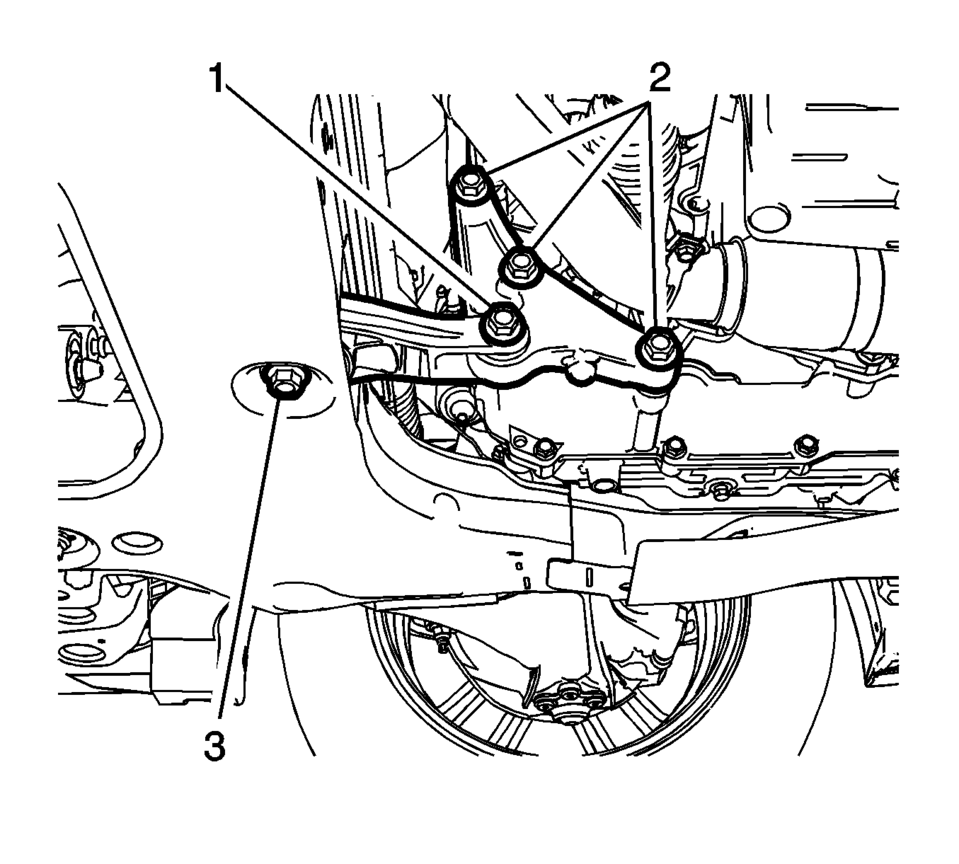
- Remove and DISCARD the rear transmission mount bracket to rear mount through bolt (1).
- Remove rear transmission mount to frame bolt (3).
- Push and hold the powertrain assembly forward and then remove rear transmission mount.
- Installation Procedure
-
- Push and hold the powertrain assembly forward and then install rear transmission mount.
- Install rear transmission mount to frame bolt (3)
and tighten to 100 Y (74 lb ft)
.
- Install the NEW rear transmission mount bracket to
rear mount through bolt (1) and tighten to 80 Y
(59 lb ft) plus 45?0 degrees
.
- Lower the vehicle.
Caution:
Refer to Fastener Caution.
 Transmission Rear Mount Bracket Replacement
Removal Procedure
Raise and support the vehicle. Refer to
Lifting and Jacking the Vehicle.
Remove the front suspension skid plate, if equipped.
Refer to Drivetrain and Front Su ...
 Transmission Replacement
Removal Procedure
Remove the battery and battery tray. Refer to
Battery Tray Replacement.
Disconnect the transmission range selector lever cable
terminal (1) ...
Other materials:
Rear Window Defogger Description and Operation
Rear Window Defogger System Components
The rear window defogger system consist of the following components:
The HVAC control module
The body control module (BCM)
The rear defogger relay
The rear window grid
Driver outside rearview mirror
Passenger outside rearview mirro ...
Lift Plate and Holding Fixture Removal
Lift Plate and Holding Fixture Removal
Callout
Component Name
1
DT-46625 Transmission Holding Fixture
For equivalent regional tools, refer to Special
Tools.
Note: Raise the transmission in order to remov ...
ProPILOT Assist mode indicators
Basic information
The Nissan Armada ProPILOT Assist system features multiple operating modes that
adapt dynamically to driving conditions. These modes are visually represented by
different colors, allowing the driver to quickly understand the current level of
assistance. As driving conditions ...

0.0069