
Nissan Armada 2025-2026 Owner's Manual: Warning & Indicator Lights
Warning/indicator lights (red)
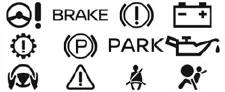
Warning/indicator lights (yellow)
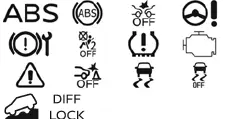
Warning/indicator lights (other)
 ( white )
 (
green )
(
green )

Checking lights
In the Nissan Armada, the warning and indicator light system is designed to immediately inform the driver about the vehicle’s condition, safety systems, and operational status. To properly verify system readiness, ensure that all doors are securely closed, engage the parking brake, fasten all seat belts, and turn the ignition switch to the ON position without starting the engine.
Under these conditions, the following warning and indicator lights in the Nissan Armada (if equipped) should illuminate as part of the initial system check:
 ,
,
 ,
,
 or
or
 ,
,
 ,
,
 ,
,

These lights confirm that the monitoring systems of the Nissan Armada are functioning correctly at startup.
Additionally, the following indicator lights (if equipped) in the Nissan Armada should briefly illuminate and then turn off, confirming normal operation of their respective systems:
 ,
,
 ,
,
 ,
,
 ,
,
 or
or
 ,
,
 ,
,
 or
or
 ( red) ,
 (yellow),
 .
.
This startup sequence is an essential diagnostic feature of the Nissan Armada, ensuring that all warning systems, sensors, and onboard electronics are operating as intended before driving.
If any warning or indicator light in the Nissan Armada fails to illuminate during this check, remains on unexpectedly, or behaves differently than described, this may indicate a malfunction, sensor issue, or even a simple bulb failure.
For safety and reliability, it is strongly recommended to have the Nissan Armada inspected by an authorized NISSAN dealer to diagnose and resolve any potential issues.
Regular monitoring of the dashboard indicators in the Nissan Armada helps ensure safe driving conditions and allows early detection of potential mechanical or electronic problems.

 Warning/indicator lights (red)
Brake warning light
or
In the Nissan Armada, the brake warning light is a critical safety indicator
that helps monitor the condition of the braking system. When the ignition switch
is tur ...
Other materials:
Accessories and Modifications
Adding non-dealer accessories or making modifications to the vehicle can affect
vehicle performance and safety, including such things as airbags, braking, stability,
ride and handling, emissions systems, aerodynamics, durability, and electronic systems
like antilock brakes, traction control, a ...
Engine Replacement (Automatic Transmission)
Special Tools
J-45859 Wheel Drive Shaft Remover
CH-807 Closure Plugs
For equivalent regional tools, refer to Special Tools.
Removal Procedure
Remove the battery and battery tray. Refer to Battery Tray Replacement.
Relieve the fuel system pressure. Refer to Fuel Pressur ...
Throttle/Idle Learn
Description
The engine control module (ECM) learns the airflow through the throttle body
to ensure the correct idle. The learned airflow values are stored within the
ECM. These values are learned to adjust for production variation and will continuously
learn during the life of the ...

0.0071