
Chevrolet Sonic Repair Manual: Windshield Side Garnish Molding Replacement
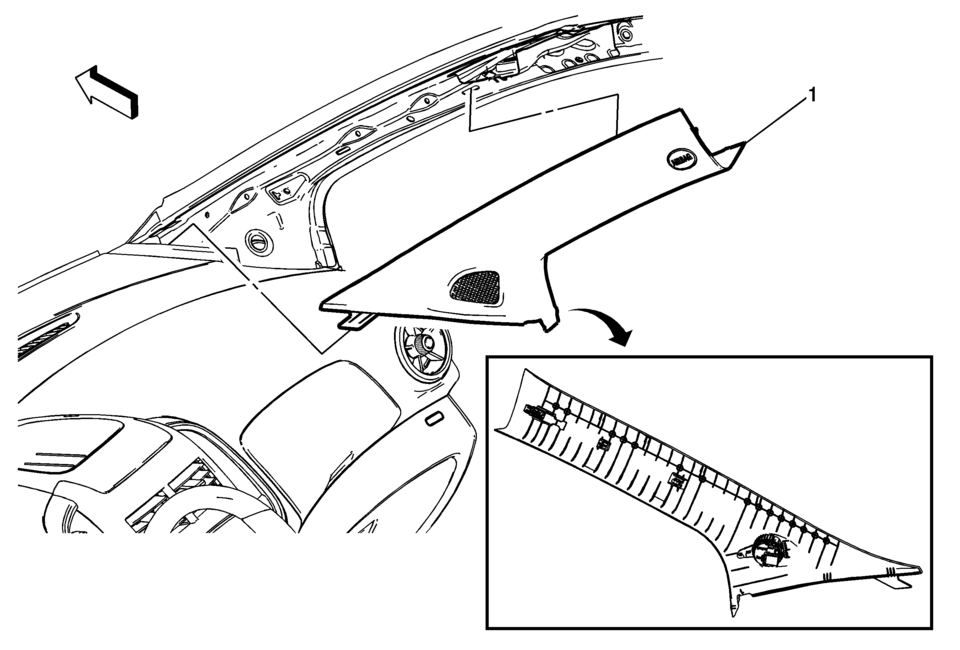
|
Callout |
Component Name |
|---|---|
|
Preliminary Procedures
Disable the SIR system, if equipped. Refer to SIR Disabling and Enabling. |
|
|
1 |
Windshield Side Garnish Molding Assembly Procedure
|
 Windshield Replacement
Special Tools
BO-24402-A Glass Sealant Remover (Cold Knife)
BO-39032 Stationary Glass Removal Tool
Use an adhesive that is approved by GM
For equivalent regional tools, refer to Special Too ...
 Windshield Upper Reveal Molding Replacement
Windshield Upper Reveal Molding Replacement
Callout
Component Name
Preliminary Procedures
Remove the windshield to replace the ...
Other materials:
Front Side Door Window Regulator Handle Replacement
Front Side Door Window Regulator Handle Replacement
Callout
Component Name
1
Front Side Door Window Regulator Handle Clip
Procedure
Use the appropriate tool, remove the clip from handle.
2
...
Radiator Mounting Stud Repair
Repair Procedure
Note: If the radiator is leaky, replace it. Refer to Radiator
Replacement.
Pressure test the cooling system. Refer to Cooling System Leak Testing.
Grind the fracture surface (1) with a proper tool.
Drill a hole in the cente ...
Engine Control Module Replacement
Engine Control Module Replacement
Callout
Component Name
Note: If the ECM is to be replaced, the ECM must be RESET
(prepared for removal) prior to removal from the vehicle. Failing to
reset the ECM will result in the ...

0.0058