
Chevrolet Sonic Repair Manual: Wireless Communication Interface Antenna Replacement
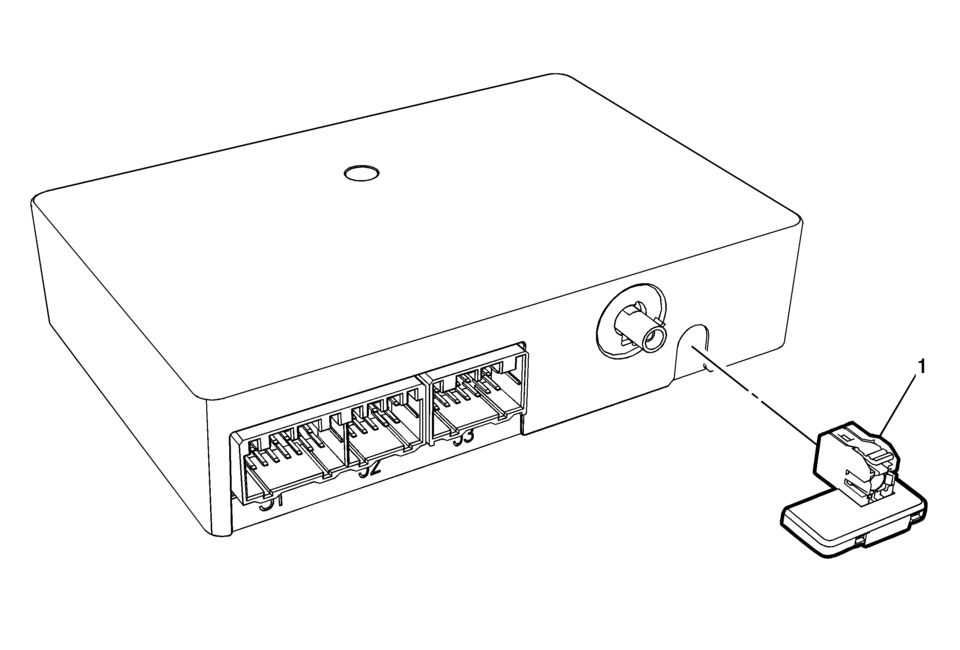
|
Callout |
Component Name |
|---|---|
|
Preliminary Procedure
Remove the communication interface module. Refer to Communication Interface Module Replacement |
|
|
1 |
Wireless Communication Interface Antenna Bluetooth Module Procedure
Unsnap the Antenna from Communication Module. |
 Special Tools (MIT Tool Instructions)
Bluetooth Pairing for Vehicles with
Radio RPO: UF7
Either reset the pin code on the radio to 0000, or go under Device Info on
the radio and see what the pin code is (to enter it later o ...

Other materials:
Rear Side Door Upper Rear Trim Panel Replacement (Hatchback)
Rear Side Door Upper Rear Trim Panel Replacement
Callout
Component Name
1
Rear Side Door Upper Rear Trim Panel Assembly
Procedure
Pull the door upper rear trim panel away from the rear side door.
...
Crankshaft Balancer Installation
Special Tools
EN-470–B Angular Torque Wrench
EN-956?E Extension
EN-49979 Crankshaft Shock Mount Retainer
For equivalent regional tools, refer to Special Tools.
Note: The crankshaft balancer flange must fit to the hexagon of
the oil pump rotor (2) and to the two ...
Engine Control Module Description
The Engine Control Module (ECM) interacts with many emission related components
and systems, and monitors emission related components and systems for deterioration.
OBD II diagnostics monitor the system performance and a diagnostic trouble code
(DTC) sets if the system performance degrades. Th ...

0.006