
Chevrolet Sonic Repair Manual: Wireless Communication Interface Antenna Replacement
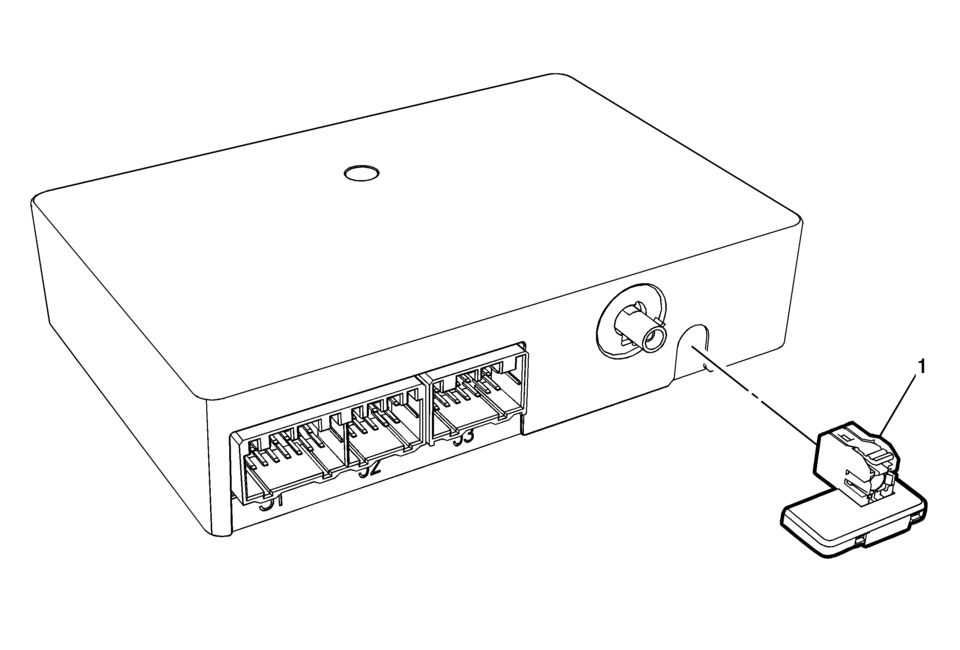
|
Callout |
Component Name |
|---|---|
|
Preliminary Procedure
Remove the communication interface module. Refer to Communication Interface Module Replacement |
|
|
1 |
Wireless Communication Interface Antenna Bluetooth Module Procedure
Unsnap the Antenna from Communication Module. |
 Special Tools (MIT Tool Instructions)
Bluetooth Pairing for Vehicles with
Radio RPO: UF7
Either reset the pin code on the radio to 0000, or go under Device Info on
the radio and see what the pin code is (to enter it later o ...

Other materials:
Cruise Control
If the vehicle is equipped with cruise control, a speed of about 40 km/h (25
mph) or more can be maintained without keeping your foot on the accelerator. Cruise
control does not work at speeds below 40 km/h (25 mph).
Warning
Cruise control can be dangerous where you cannot drive safely at a st ...
Passing Assist (ProPILOT Assist 2.1)
Basic information
Passing Assist in the Nissan Armada is an advanced feature of ProPILOT Assist
2.1, engineered to support safer and more efficient overtaking maneuvers on highways.
Before using this function, it is strongly recommended to review the full ProPILOT
Assist section to fully unde ...
Sonar system limitations
WARNING
The following limitations apply to the Nissan Armada sonar system. Failure
to understand and follow these limitations may result in serious injury or even
fatal accidents.
Carefully review all limitations of the Nissan Armada sonar system. Environmental
conditions such as heavy r ...

0.0078