
Chevrolet Sonic Repair Manual: Instrument Panel Airbag Arming Status Display Replacement
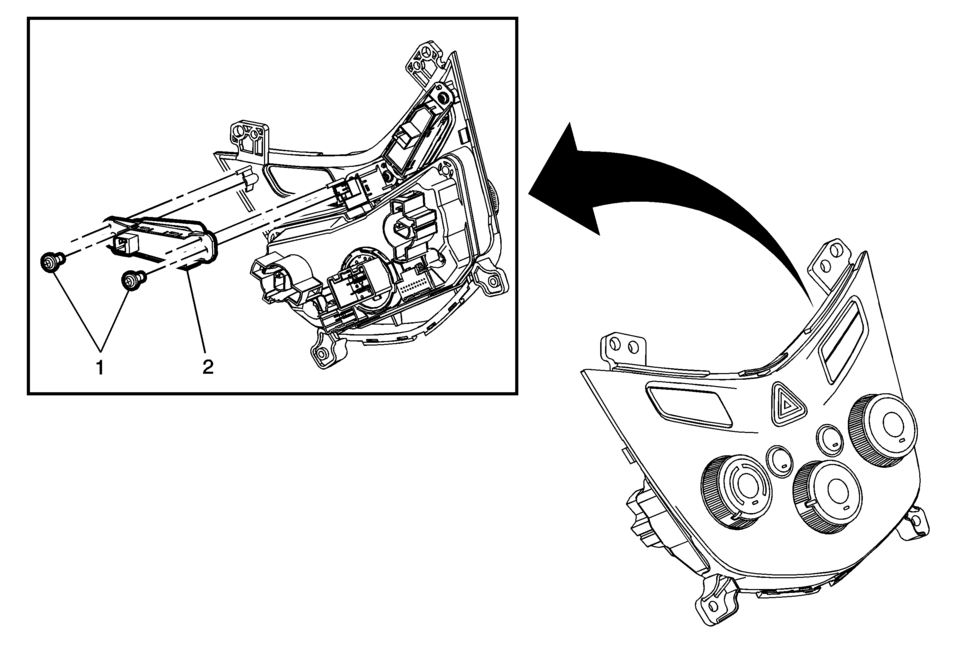
|
Callout |
Component Name |
|---|---|
|
Preliminary Procedure
Remove the heater and air conditioning control. Refer to Heater and Air Conditioning Control Replacement. |
|
|
1 |
Instrument Cluster Display Switch Fastener (Qty:?€‰2) Caution: Refer to Fastener Caution. |
|
2 |
Inflatable Restraint Instrument Panel Module Indicator Procedure
Disconnect the electrical connector. |
 Instrument Panel Accessory Upper Trim Plate Replacement
Instrument Panel Accessory Upper Trim Plate Replacement
Callout
Component Name
Preliminary Procedure
Remove the instrument pane ...
 Instrument Panel Assembly Replacement
Instrument Panel Assembly Replacement
Callout
Component Name
Preliminary Procedure
Remove the right and left windshield side garnis ...
Other materials:
Trip Computer
The trip computer is located in the Driver Information Center (DIC).
It provides the driver with driving information such as average speed, fuel range,
average fuel economy, and a timer.
1. SET/CLR: Press to set or clear the menu item displayed. This is not used to
reset the trip odometer. T ...
Front Side Door Window Switch Bezel Replacement (Left Side)
Front Side Door Window Switch Bezel Replacement
Callout
Component Name
Preliminary Procedure
Remove the front side door trim. Refer to Front Side Door Trim Replacement.
1
Front Side Door Window S ...
Engine Coolant Air Bleed Hose Replacement (LUV)
Engine Coolant Air Bleed Hose Replacement
Callout
Component Name
1
Engine Coolant Air Bleed Hose Clamp (Qty: 2)
Special Tools
BO-38185 Hose Clamp Pliers
For equivalent regional tools, refer to Special T ...

0.006