
Chevrolet Sonic Repair Manual: Oil Pan Cleaning and Inspection
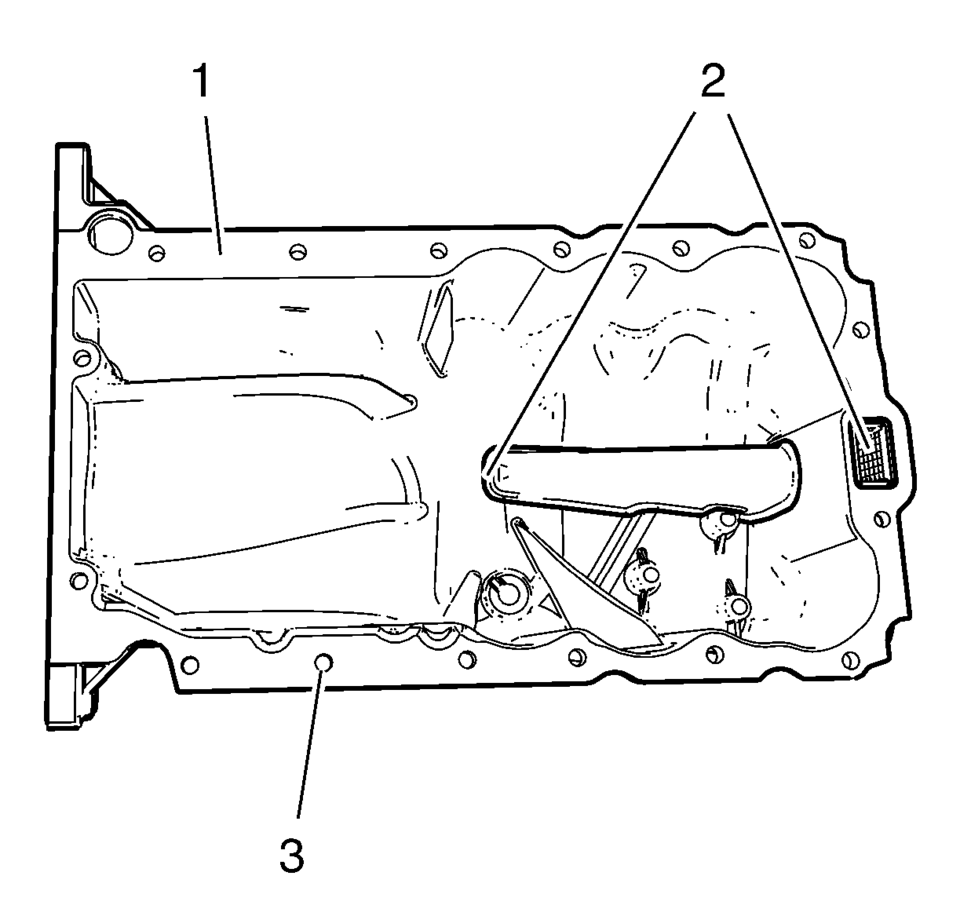
- Clean the oil suction gallery (2) with compressed air. Be sure to remove all dirt and old gasket material from the suction gallery (2).
- Remove all remaining old gasket material from sealing surface (1) and screw bores (3).
- Clean the sealing surfaces from dirt and grease.
- Inspect the sealing surface for cracks and damage.
Warning:
Wear safety glasses when using compressed air in order to prevent eye injury.
Caution:
To ensure proper engine lubrication, clean clogged or contaminated oil galleries in an approved solvent and with compressed air. Failure to clean oil galleries may cause engine damage.
 Oil Sump/Pan
...
 Oil Pan Installation
Special Tools
EN-49980 Guidance Pins
For equivalent regional tools, refer to Special Tools.
Clean the sealing surfaces from old sealing material, dirt, oil and grease.
Note: The seal ...
Other materials:
Front Bumper Fascia Tow Eye Access Hole Cover Replacement
Front Bumper Fascia Tow Eye Access Hole Cover Replacement
Callout
Component Name
1
Front Bumper Fascia Front Tow Eye Access Hole Cover
Procedure
Using a small flat-bladed tool, release the cover from the front
...
Windshield Upper Reveal Molding Replacement
Windshield Upper Reveal Molding Replacement
Callout
Component Name
Preliminary Procedures
Remove the windshield to replace the reveal molding. Refer to Windshield
Replacement.
1
Windshield Revea ...
Airbag Roof Side Rail Module Replacement - Rear
Airbag Roof Side Rail Module Replacement - Rear
Callout
Component Name
Warning: In order to prevent SIR deployment, personal injury,
or unnecessary SIR system repairs, do not strike the door or the door
pillar in the ...

0.0049