
Chevrolet Sonic Repair Manual: Overview (Radio with CD/USB)
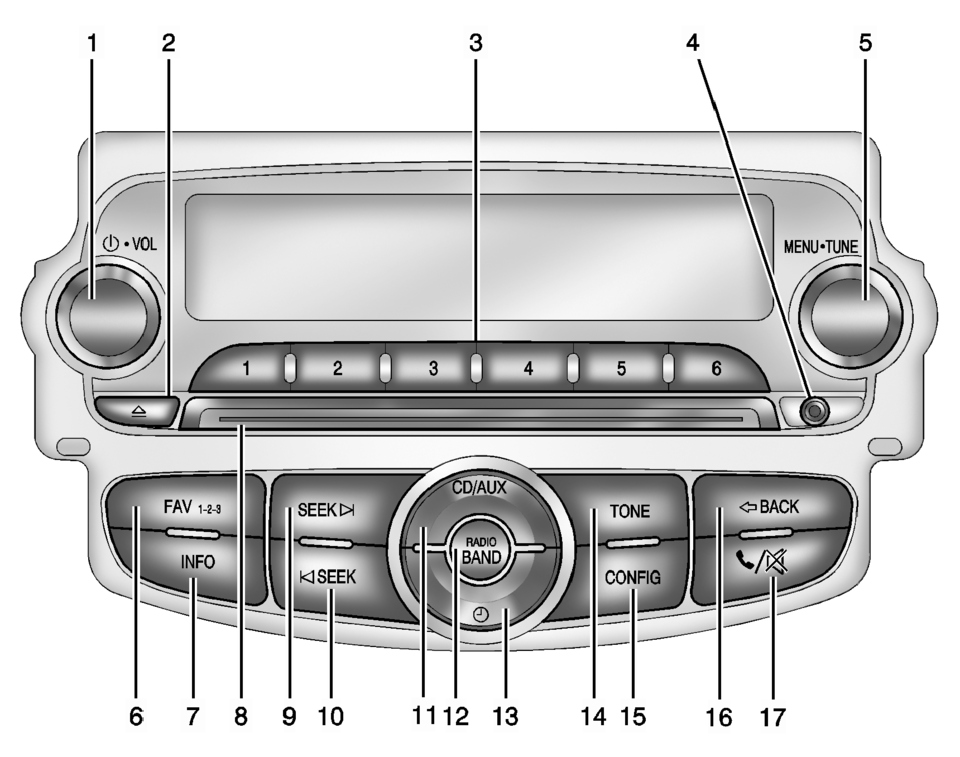
- O /VOL (Power/Volume)
- Turns the system on or off and adjusts the volume.
- Removes a disc from the CD slot.
- Radio: Saves and selects favorite stations.
- 3.5 mm (1/8 in) connection for external devices.
- Radio: Manually selects radio stations.
- CD: Selects tracks.
- Radio: Opens the favorites list.
- Radio: Shows available information about the current station.
- CD: Shows available information about the current track.
- Radio: Seeks the next station.
- CD: Selects the next track or fast forwards within a track.
- Radio: Seeks the previous station.
- CD: Selects the previous track or rewinds within a track.
- Selects the CD player or an external audio source.
- Changes the band while listening to the radio.
- Selects the radio when listening to a different audio source.
- Opens the Clock menu.
- Opens the Tone menu.
- Opens the Configuration menu.
- Menu: Moves one level back.
- Character Input: Deletes the last character.
- Opens the Phone menu.
- Mutes the audio system.
 Overview (AM-FM Radio)
45tune<=backtoneseekl>klseekpushmenu101112131415
FAV 1-2-3 (Favorites)
Radio: Opens the favorites list.
O /VOL (Power/Volume)
Turns the system on or off and adjusts the vol ...
 Overview (Radio with Touchscreen)
z VOL
y (Volume)
Press to decrease or increase the volume.
O (Power)
Press and hold to turn the power on or off.
D (Home Page)
Press to go to the Home Page. See Hom ...
Other materials:
Door Locks
To lock or unlock the doors from outside the vehicle:
Use the key in the driver door to lock all doors or unlock the driver door
only.
Press or
on the Remote Keyless Entry (RKE)
transmitter. See Remote Keyless Entry (RKE) System Operation.
To lock the doors from inside the vehic ...
Bluetooth Audio
Streaming Audio
If equipped, music may be played from a paired Bluetooth. See Bluetooth (Voice
Recognition) or Bluetooth (Overview) or Bluetooth (Infotainment
Controls) for help pairing a device.
The music can be controlled by controls on the device.
To play music via Blueto ...
Hood Adjustment
Hood Adjustment
Callout
Component Name
1
Hood
Caution: Refer to Fastener Caution.
Procedure
Loosen the 4 hood hinge nuts.
Adjust the hood in order to obtain an even gap on both sides between
...

0.0061