
Nissan Armada 2025-2026 Owner's Manual: Basic information
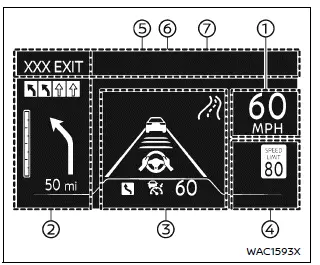
Example
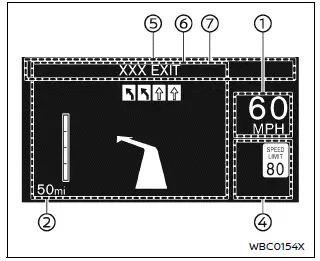
Example
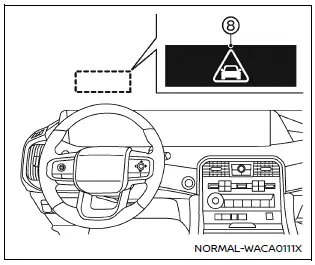
WARNING
- In the Nissan Armada, improper adjustment of the HUD brightness or position may obstruct the driver’s forward visibility through the windshield, increasing the risk of accidents that could lead to serious injury or death.
- Do not focus on the Head Up Display (HUD) in the Nissan Armada for extended periods. Always keep attention on the road, as distraction may prevent you from noticing vehicles, pedestrians, or obstacles.
The Nissan Armada Head Up Display (HUD) can present a wide range of real-time driving information directly in the driver’s line of sight, including:
- Vehicle speed
- Navigation directions
- Driving Assist system status
- Traffic Sign Recognition
- Audio information
- TEL/SMS notifications
- Driver assistance alerts
- Warning messages
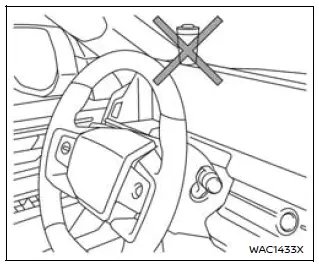
CAUTION
- Do not spill liquids near the HUD projector in the Nissan Armada, as this may cause system malfunction.
- Avoid touching internal components of the HUD projector, as this may damage the system.
- Do not place sharp objects near the projector opening to prevent scratches on the display surface.
- Ensure no objects are placed on the instrument panel that could block the HUD projection in the Nissan Armada.
- Clean the projector lens using a soft cloth with water only. Avoid using chemicals, alcohol, or abrasive materials that may damage or discolor the lens.
- Do not spray liquids directly onto the HUD lens, as this may lead to malfunction of the Nissan Armada display system.
NOTE:
- When wearing polarized sunglasses, the HUD image in the Nissan Armada may become difficult to see. Adjust brightness or remove sunglasses if necessary.
- Weather conditions such as rain, snow, or strong sunlight may affect HUD visibility.
- If the HUD image appears distorted in the Nissan Armada, have the system inspected by an authorized Nissan dealer.
- The Nissan Armada uses a specially designed windshield for HUD projection. Replacement should only be performed by a Nissan dealer.
- For cleaning, use a soft dry cloth or a slightly damp cloth, followed by a dry wipe to maintain clarity.

 How to use the HUD
Basic information
To activate the Head Up Display in the Nissan Armada, press the HUD switch. Press
it again to turn the system off.
If the HUD is turned off, it will remain disabled even afte ...
Other materials:
Door Lock and Ignition Lock Folding and Non-Folding Key Cutting
High Security keys are available from the service parts system.
Obtain the key code from the security card or from the GM Dealer World, Parts,
Key Code Look Up system.
If you have the key code and access to a Triax-E., BD Laser or other code key
cutting machine from the GM Dealer Equipment C ...
Manifold Absolute Pressure Sensor Replacement
.-
Manifold Absolute Pressure Sensor Replacement
Callout
Component Name
1
Manifold Absolute Pressure Sensor Fastener
Caution: Refer to Fastener Caution
Tighten
6 Y (54 lb in)
...
Input Shaft Support Replacement (Gen 2)
Input Shaft Support Replacement
Callout
Component Name
1
3-5 Reverse and 4-5-6 Clutch Fluid Seals (Qty: 3)
Note:
Discard the fluid seals. They are not reusable.
Refer to 3-5-Reverse an ...

0.0062