
Chevrolet Sonic Repair Manual: Input Shaft Support Replacement (Gen 2)
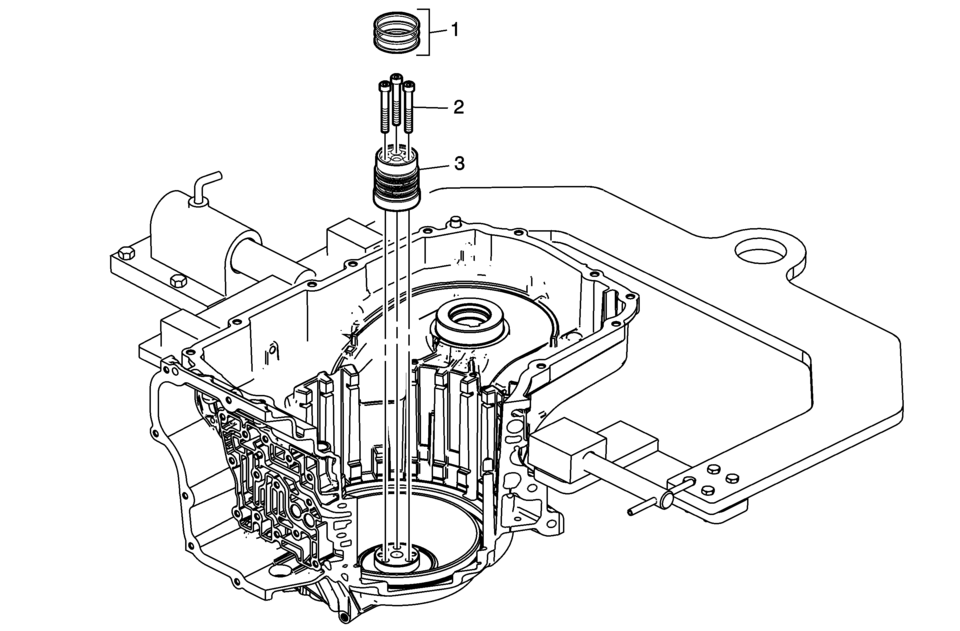
|
Callout |
Component Name |
|---|---|
|
1 |
3-5 Reverse and 4-5-6 Clutch Fluid Seals (Qty: 3) Note:
|
|
2 |
Input Shaft Support Bolts M6 x 50 (Qty: 3) Caution: Refer to Fastener Caution.
12 Y (106 lb in) |
|
3 |
Input Shaft Support Note: Inspect the support for wear, damage or porosity. |
 Input Shaft Support Replacement (Gen 1)
Input Shaft Support Replacement
Callout
Component Name
1
3-5 Reverse and 4-5-6 Clutch Fluid Seals (Qty: 4)
...
 Input Speed Sensor Replacement
Removal Procedure
Remove the control solenoid valve and transmission
control module assembly. Refer to Control Solenoid
Valve and Transmission Control Module Assembly Replacement. ...
Other materials:
Sunroof Motor/Actuator Initialization/Teach Process
Note: If the sunroof motor is new, cycle the sunroof seven?€‰(7) times
to teach the motor/actuator initialization process.
Perform the initialization/teach procedure on a reinstall motor or a new
motor. Ensure the electrical harness on the headliner is connected to the sunroof
mot ...
Parking Brake Adjustment (Disc Brake)
Note: The park brake cable adjusting nut is a nylon lock type. Use
ONLY HAND TOOLS whenever tightening or loosening the adjusting nut.
Apply and fully release the park brake several times. Verify that the park
brake lever releases completely.
Turn ON the ignition. Verify the red B ...
Exhaust Camshaft Installation
Note: Mind the markings on the camshaft bearing caps. Camshaft
bearing caps should be installed in their original position.
Lubricate camshaft and camshaft bearing caps with engine oil.
Install the exhaust camshaft (3).
Install the 5 camshaft bearing caps̴ ...

0.0061