
Nissan Armada 2025-2026 Owner's Manual: Battery
Basic information
- On the Nissan Armada, batteries labeled "do not open" are fully maintenance-free, meaning the internal electrolyte level does not require inspection. For accurate diagnostics and performance checks, it is strongly recommended to consult an authorized NISSAN dealer or a qualified technician.
- To ensure reliable operation of your Nissan Armada, always keep the battery housing clean and dry. If necessary, gently clean the surface using a mixture of baking soda and water to neutralize any corrosion.
- Inspect the battery terminals regularly. Make sure all connections are tight, corrosion-free, and securely fastened to maintain optimal electrical flow in your Nissan Armada.
- If the Nissan Armada will remain unused for an extended period (30 days
or longer), disconnect the negative terminal
 battery cable to prevent gradual discharge and preserve battery life.
NOTE:
To maintain battery health in your Nissan Armada, avoid conditions that may lead to battery drain or starting issues, including:
1. Prolonged use or installation of electronic devices (such as phone chargers, GPS systems, or entertainment equipment) when the engine is off.
2. Driving the Nissan Armada infrequently or only for short distances, which may not allow the battery to fully recharge.
In such situations, periodic battery charging is recommended to maintain proper performance and extend service life.
WARNING
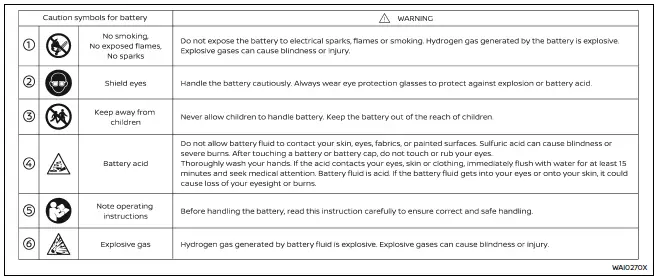
- Never expose the Nissan Armada battery to open flames or sparks.
The battery emits hydrogen gas, which is highly explosive. Avoid contact between battery fluid and skin, eyes, fabrics, or painted surfaces.
After handling the battery or its cap, do not touch your eyes.
If contact occurs, wash hands thoroughly. In case of acid exposure, immediately rinse the affected area with water for at least 15 minutes and seek medical attention.
- Always wear appropriate eye protection and remove jewelry when working near the Nissan Armada battery.
- Battery terminals contain lead and lead compounds. Wash hands thoroughly after handling.
- Keep the battery out of reach of children at all times.
- Never tilt or invert the battery.
Example
NOTE:
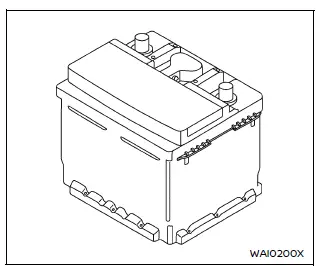
Do not attempt to open or dismantle the Nissan Armada battery casing.
This battery is sealed and does not include removable caps.
Jump starting
If your Nissan Armada requires jump starting, refer to the appropriate section in the manual. If the engine still fails to start, the battery may require replacement. Professional inspection by a NISSAN dealer is recommended.
Variable voltage control system
CAUTION
- Do not connect accessories directly to the Nissan Armada battery terminals.
This bypasses the vehicle’s voltage management system and may prevent proper charging.
- Always operate electrical accessories with the engine running to avoid draining the Nissan Armada battery.
The Nissan Armada variable voltage control system monitors electrical demand and adjusts generator output to optimize battery charging efficiency.
 Window washer fluid
WARNING
Washer antifreeze solutions are toxic. Always store them in labeled containers
and keep them away from children and animals.
Maintain the washer fluid level in your Nissan Armada by ...
 Drive belts
Water pump
Alternator
Drive belt automatic tensioner
Crankshaft pulley
Air conditioning compressor
WARNING
Always ensure the ignition switch is OFF before inspecting or servicing th ...
Other materials:
Front Seat Cushion Inner Trim Panel Replacement
Front Seat Cushion Inner Trim Panel Replacement
Callout
Component Name
1
Driver or Passenger Seat Inner Recliner Finish Cover Cap
Procedure
Use a flat-bladed tool to release the cap from the recliner cover.
...
Transmission Component and System Description
The mechanical components of the 6T30/40/45/50 are as follows:
A torque converter with an electronically controlled capacity clutch (ECCC)
Gear-type fluid pump assembly
1??? and low and reverse clutch housing assembly
4?? and 3? reverse clutch housing assembly
2? clutch assem ...
Garage mode system
The Nissan Armada liftgate height can be customized to suit specific environments,
such as garages with limited clearance.
1. Open the Nissan Armada liftgate fully.
2. Manually adjust the liftgate to the desired height and hold it in position.
3. Press and hold the liftgate close and lock switc ...

0.0046