
Chevrolet Sonic Owner's Manual: Cruise Control
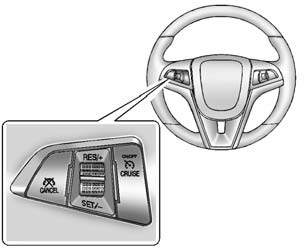
 : Press to turn the cruise control
system on and off.
RES/+: Move the thumbwheel up briefly to make the vehicle resume to a previously set speed or hold upwards to accelerate. If cruise control is already active, use to increase vehicle speed.
SET/−: Move the thumbwheel down briefly to set the speed and activate cruise control. If cruise control is already active, use to decrease speed.
 : Press to disengage cruise control
without erasing the set speed from memory.
See Cruise Control.
 Steering Wheel Controls
Some audio steering wheel controls could differ depending on the vehicle's options.
Some audio steering wheel controls can be adjusted at the steering wheel.
/
: Press to interact with the ...
 Driver Information Center (DIC)
The DIC display is in the instrument cluster. It shows the status of many vehicle
systems. The controls for the DIC are on the turn signal lever.
1. SET/CLR: Press to set or clear the menu item d ...
Other materials:
Body Control Module Programming and Setup
Note:
DO NOT program a control module unless directed to by a service procedure
or a service bulletin. If the control module is not properly configured
with the correct calibration software, the control module will not control
all of the vehicle features properly.
Ensure th ...
Engine Block Disassemble
Remove the cylinder head locating (1, 2).
Remove the oil pressure switch (1).
Remove the knock sensor bolt (2) and the knock sensor (1).
Clean the thread.
Remove the oil flow check valve (1).
Remove the oil pressure rel ...
Fuel Tank Filler Pipe Replacement
Removal Procedure
Remove the bracket fastener (1).
Lift and support the vehicle. Refer to
Lifting and Jacking the Vehicle.
Remove the fuel tank filler pipe bracket fastener (1).
Disconnect the vent hose (2). Refer to
Plastic Collar ...

0.0113