
Nissan Armada 2025-2026 Owner's Manual: Differential lock mode switch
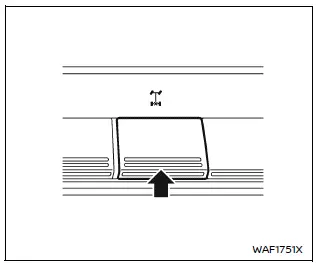
The rear differential lock (DIFF-LOCK) in the Nissan Armada is designed to evenly distribute engine torque between the left and right rear wheels, improving traction in low-grip conditions.
To activate the differential lock in the Nissan Armada, reduce speed below 4 MPH (7 km/h), switch the 4WD system to 4L mode, and press the differential lock switch.
The DIFF-LOCK indicator
 will blink and then remain illuminated once the system is fully engaged.
To disengage the system, press the switch again. The indicator will turn off once the Nissan Armada differential returns to normal operation.
- The Nissan Armada differential lock operates only when the engine is running.
- In 4WD AUTO or 4H modes, the DIFF-LOCK function will not engage even if the switch is activated (indicator will blink).
WARNING
- Use the Nissan Armada differential lock only in emergency situations when the vehicle cannot be freed using standard 4L mode.
- When DIFF-LOCK is engaged in the Nissan Armada, steering becomes more difficult, especially at higher speeds, which may be dangerous and cause drivetrain damage.
- While DIFF-LOCK is active, the ABS warning light will illuminate, indicating that anti-lock braking functionality may be limited.
- Do not use the Nissan Armada differential lock while turning or when
one wheel is spinning, as this may damage drivetrain components.
Improper use can lead to costly repairs and unsafe driving conditions.
- Avoid sudden acceleration while DIFF-LOCK is engaged to protect the Nissan Armada powertrain system.
Failure to follow these precautions in the Nissan Armada may result in loss of steering control, increasing the risk of accidents and serious injury.
Trailer Brake Controller Unit (TBCU)
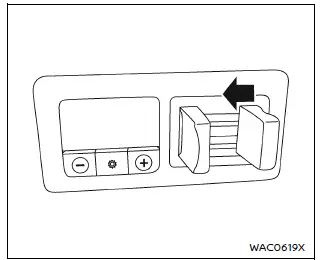
The Nissan Armada Trailer Brake Controller Unit (TBCU), located on the instrument panel, allows the driver to precisely adjust the braking force applied to a connected trailer.
This system improves towing stability and safety by synchronizing trailer braking with vehicle deceleration.
Proper adjustment of the TBCU in the Nissan Armada is essential for maintaining control and ensuring smooth braking performance while towing heavy loads.
 Hill descent control switch
WARNING
In the Nissan Armada, never rely exclusively on the hill descent control
system to regulate vehicle speed on steep downhill slopes. Always maintain full
control of the vehicle an ...
 Rear Door Alert
In the Nissan Armada, the Rear Door Alert system is designed as a helpful reminder
feature that alerts the driver when there may be an item or passenger left in the
rear seats. Always check the re ...
Other materials:
Towing the Vehicle
Notice: Incorrectly towing a disabled vehicle may cause damage. The
damage would not be covered by the vehicle warranty. Do not lash or hook to
the chassis components including the front and rear subframes, suspension control
arms and links during towing and recovery of a disabled vehicl ...
Rear Side Door Window Regulator Motor Replacement
Rear Side Door Window Regulator Motor Replacement
Callout
Component Name
Warning: Refer to Glass and Sheet Metal Handling Warning.
Preliminary Procedure
Remove the rear side door window regulator. Refer to Rear ...
Moonroof
Basic information
WARNING
In the Nissan Armada, occupants may be ejected through an open moonroof
during an accident. Always ensure that all passengers are properly secured with
seat belts and that child restraints are used where required.
Never allow anyone to stand up, lean out, or ex ...

0.0049