
Nissan Armada 2025-2026 Owner's Manual: Moonroof
Basic information
WARNING
- In the Nissan Armada, occupants may be ejected through an open moonroof during an accident. Always ensure that all passengers are properly secured with seat belts and that child restraints are used where required.
- Never allow anyone to stand up, lean out, or extend any part of their body through the Nissan Armada moonroof while the vehicle is moving or when the moonroof is closing.
CAUTION
- Before opening the Nissan Armada moonroof, remove any water, snow, ice, or debris from the glass surface to prevent damage or malfunction.
- Avoid placing heavy objects on or around the Nissan Armada moonroof area, as this may damage the mechanism or glass panel.
Power moonroof and sunshade
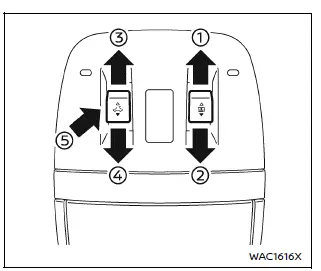
Sliding sunshade and moonroof
In the Nissan Armada, the power sunshade and moonroof provide flexible ventilation and lighting options for a more комфортний driving experience.
Press the sunshade switch to the OPEN position 1 to begin opening. If the sunshade is partially open, it may stop at a half-open position before fully opening when the switch is pressed again.
When the Nissan Armada moonroof switch is pushed to the OPEN position 3, the glass panel first moves to the comfort mode position. If the sunshade is fully closed, it will automatically open halfway before the moonroof begins moving.
Pressing the switch again will fully open the Nissan Armada moonroof for maximum airflow.
To close, press the moonroof switch to the CLOSE position 4, and the Nissan Armada system will automatically close the glass panel. The sunshade can be closed independently using the CLOSE position 2.
To stop movement at any time, press the Nissan Armada switch in any direction (OPEN, CLOSE, or UP).
Tilting moonroof
To tilt the Nissan Armada moonroof upward, press the switch to the UP position 5.
To return it to the closed position, press the switch again or move it to the CLOSE position 4.
Comfort mode
The Nissan Armada comfort mode position is optimized for driving with the moonroof open, reducing wind noise and improving cabin comfort compared to a fully open position.
For everyday driving, it is recommended to use comfort mode to maintain a quieter and more pleasant cabin environment.
Auto-reverse function
WARNING
In the Nissan Armada, there are small areas near the fully closed position where obstacles may not be detected. Always ensure passengers keep their hands and body parts clear before closing the moonroof or sunshade.
The Nissan Armada auto-reverse function enhances safety by automatically reversing the moonroof or sunshade if an obstruction is detected during closing.
If resistance is sensed, the system will immediately reopen the moonroof or sunshade to prevent injury.
However, environmental factors such as vibrations or sudden impacts may trigger the Nissan Armada auto-reverse function even without an actual obstruction.
If the system activates repeatedly or the Nissan Armada battery has been discharged, the moonroof or sunshade may not close properly. In such cases, press and hold the switch in the CLOSE position 4 to complete closure.
If the moonroof does not operate
If the Nissan Armada moonroof or sunshade does not function correctly, perform the following initialization procedure:
1. Ensure both the moonroof and sunshade are fully closed by repeatedly pressing the CLOSE positions 2 and 4.
2. Press and hold the Nissan Armada moonroof switch in the CLOSE position 4 for approximately 10 seconds.
The moonroof will tilt upward slightly, and the sunshade will move briefly before stopping.
3. Release the switch, then immediately press and hold it again in the CLOSE position 4.
The Nissan Armada system will perform an automatic reset sequence:
Sunshade fully open → moonroof tilt down → moonroof fully open → moonroof fully close → sunshade fully close
4. Release the switch once the sequence is complete.
5. Verify that the Nissan Armada moonroof operates normally.
WARNING
The driver of the Nissan Armada is fully responsible for ensuring safe operation of the moonroof at all times, including when passengers are using it.
Failure to follow proper usage instructions in the Nissan Armada may result in serious injury or death.
- Do not allow children to operate the Nissan Armada moonroof unsupervised, as improper use may lead to accidents or injury.
- Before leaving the Nissan Armada, switch the ignition OFF and never leave children or the Intelligent Key inside the vehicle.
- Do not intentionally trigger the Nissan Armada auto-reverse function, as doing so may result in injury.
CAUTION
- Do not place objects such as papers or cloth on the Nissan Armada sunshade while it is moving, as this may cause malfunction or damage.
- Avoid applying pressure to the sunshade arms, as deformation may occur.
- Do not insert objects into the Nissan Armada sunshade inlet, as this may damage the mechanism.
- Do not hang items on the sunshade rail or components.
- Never forcefully pull the Nissan Armada sunshade, as this may stretch or damage it.
If the Nissan Armada moonroof system continues to malfunction after performing the above procedure, it is recommended to have the vehicle inspected by an authorized Nissan dealer.
Proper use and maintenance of the Nissan Armada moonroof system ensure long-term reliability, comfort, and safety for all occupants.
 Windows
Power windows
Basic information
WARNING
In the Nissan Armada, always ensure that all passengers keep their hands,
arms, and other body parts inside the vehicle while it is moving and before
...
 Interior lights
Basic information
CAUTION
In the Nissan Armada, avoid leaving interior lights switched on for extended
periods when the engine is not running, as this may lead to battery discharge.
Always s ...
Other materials:
Engine Front Cover and Oil Pump Installation
Special Tools
EN-952 Fixing Pin
EN-953-A Fixing Tool
EN-49977-100 Transmitter Disc Fixation
EN-49977-200 Fixing Tool
For equivalent regional tools, refer to Special Tools.
Note: Mind the guide sleeves when installing engine front cover.
Install the engine front ...
Oil Pan Installation
Special Tools
EN-49980 Guidance Pins
For equivalent regional tools, refer to Special Tools.
Clean the sealing surfaces from old sealing material, dirt, oil and grease.
Note: The sealing bead should be applied close to the inner edge
of the oil pan. Take care that the oil suctio ...
Tire pressure
Tire Pressure Monitoring System (TPMS)
The Nissan Armada is equipped with an advanced Tire Pressure Monitoring System
(TPMS) designed to continuously track the air pressure in all tires except the spare.
When the tire pressure drops significantly below the recommended level, the low
tire press ...

0.0077