
Nissan Armada 2025-2026 Owner's Manual: Windows
Power windows
Basic information
WARNING
- In the Nissan Armada, always ensure that all passengers keep their hands, arms, and other body parts inside the vehicle while it is moving and before closing any windows. Use the window lock feature to prevent unintended operation.
- To reduce the risk of injury or fatal accidents in the Nissan Armada,
never leave children, individuals requiring assistance, or pets unattended inside
the vehicle.
The interior temperature of the Nissan Armada can rise rapidly on warm days, creating dangerous conditions that may lead to serious injury or death.
The power window system in the Nissan Armada operates when the ignition switch is in the ON position and remains functional for a short period after the ignition is turned OFF.
If either the driver’s or front passenger’s door is opened during this time, the Nissan Armada will automatically disable power window operation for safety.
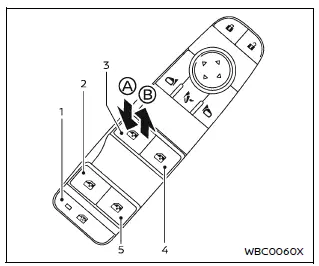
- Window lock button
- Rear left passenger side window
- Driver side window
- Front passenger side window
- Rear right passenger side window
Main power window switch (driver's side)
In the Nissan Armada, the driver’s main power window switch allows full control of all windows.
To open a window, push the switch down A. To close it, pull the switch up B and hold it until the desired position is reached.
The Nissan Armada main control panel enables centralized operation, making it convenient for the driver to manage all windows from one location.
Locking rear passenger's windows
The Nissan Armada window lock feature enhances safety by disabling rear passenger window controls.
When the lock button is pressed (indicator illuminates), rear passengers cannot operate their window switches. Only the driver can control them using the main panel.
To restore functionality, press the window lock button again.
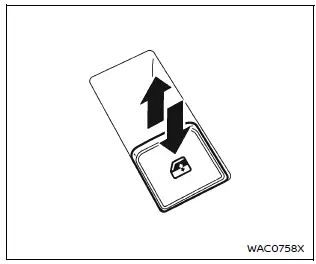
Passenger side power window switch
Each passenger in the Nissan Armada has access to an individual window control switch for their respective window.
However, when the window lock is activated, rear passenger controls are disabled, ensuring greater safety—especially for children.
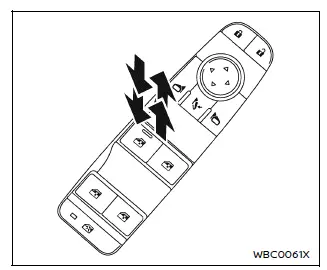
Automatic operation
The Nissan Armada automatic window feature allows fully opening or closing a window with a single action.
To completely open the window, press the switch down to the second detent and release it. To fully close it, pull the switch up to the second detent and release.
The Nissan Armada system will continue operation automatically without holding the switch.
To interrupt the automatic movement, simply operate the switch in the opposite direction.
This convenient feature in the Nissan Armada enhances ease of use and improves driving comfort during everyday operation.
Auto-reverse function
The Nissan Armada is equipped with an advanced auto-reverse safety system that helps prevent injury.
If an object is detected while the window is closing, the Nissan Armada will automatically reverse the direction of the window to avoid entrapment.
This function is especially important for protecting passengers and improving overall safety.
However, always use caution when operating windows, as the Nissan Armada auto-reverse system may not detect very small or soft objects under certain conditions.
WARNING
In the Nissan Armada, there are small zones just before the window fully closes where obstacle detection may be limited. Always ensure that all passengers keep their hands, fingers, and other body parts inside the vehicle before operating the windows.
The Nissan Armada auto-reverse function is designed to enhance safety by automatically lowering the window if an object is detected during closing in automatic mode.
When the system detects resistance or an obstruction, the Nissan Armada immediately reverses the window direction to help prevent injury.
However, under certain driving conditions or environmental influences, such as vibrations or sudden impacts, the Nissan Armada auto-reverse system may activate even without an actual obstruction.
Window timer: The Nissan Armada window timer feature allows continued operation of the power windows for a short period after the ignition is switched OFF.
This function is automatically canceled when either the driver’s or front passenger’s door is opened, or when the preset time expires.
When power window switch does not operate
If the automatic window function in the Nissan Armada does not operate correctly, it may require initialization. Follow the steps below to restore proper functionality:
1. Close the Nissan Armada door completely.
2. Turn the ignition switch to the ON position.
3. Pull and hold the power window switch until the window is fully closed.*1
4. Release the switch.
5. Pull the switch again and hold it for at least 5 seconds.*2
6. Push the switch down and hold it until the window is fully open.
7. Release the switch.
8. Push the switch down again and hold it for at least 5 seconds.*2
9. Pull the switch up and hold it to fully close the window.*1
10. Test the Nissan Armada automatic window function by fully opening and closing the window to confirm successful initialization.
*1: If the Nissan Armada window stops before fully closing, release the switch and repeat the process until it closes completely.
*2: After holding the switch for approximately 5 seconds, the Nissan Armada window will begin moving again automatically.
If the Nissan Armada window cannot close automatically due to repeated activation of the auto-reverse function (possibly caused by a malfunction), you can temporarily cancel the feature by following this procedure:
1. Pull the power window switch upward until the auto-reverse function activates and the window moves downward.
2. Repeat this process twice.
3. Pull and hold the switch again to fully close the window and confirm that the Nissan Armada auto-reverse function has been disabled.
WARNING
When the Nissan Armada auto-reverse function is disabled, the window will no longer automatically reverse if an obstruction is detected. Always ensure that all passengers keep their hands and body parts clear of the window path before closing.
If the Nissan Armada power window system still does not function correctly after completing these steps, it is recommended to have the vehicle inspected by an authorized Nissan dealer.
Regular maintenance and proper operation of the Nissan Armada window system help ensure long-term reliability and passenger safety.
 Roof rack
Example
Basic information
WARNING
In the Nissan Armada, always install the crossbars onto the roof side
rails before placing any cargo. Loading items directly onto the roof rails or
ro ...
 Moonroof
Basic information
WARNING
In the Nissan Armada, occupants may be ejected through an open moonroof
during an accident. Always ensure that all passengers are properly secured with
seat belts ...
Other materials:
Pairing without Touchscreen
A Bluetooth-enabled cell phone must be paired to the Bluetooth system and then
connected to the vehicle before it can be used. See your cell phone manufacturer's
user guide for Bluetooth functions before pairing the cell phone. If a Bluetooth
phone is not connected, calls will be made usin ...
Transmission Fluid Pump, Front Differential Carrier Baffle, and Front Differential
Ring Gear Installation (6T30)
Transmission Fluid Pump, Front Differential Carrier Baffle, and Front
Differential Ring Gear Installation
Callout
Component Name
1
Torque Converter and Differential Housing Seal
2
Fluid Pu ...
Seat adjustment using touch screen display
Example
The Nissan Armada offers an advanced and intuitive way to control seat adjustments
through its integrated touch screen display. This system enhances convenience by
allowing the driver to manage multiple seating functions quickly and efficiently
without relying solely on physical c ...

0.0057