
Nissan Armada 2025-2026 Owner's Manual: Heated steering wheel
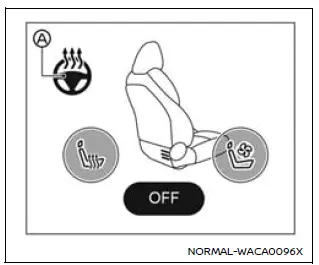
Example
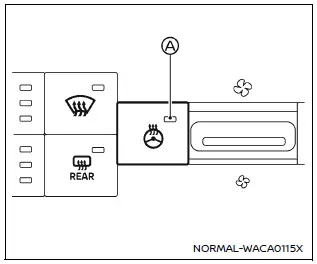
Example
The Nissan Armada heated steering wheel can be controlled either via the touch screen display or by using the dedicated switch on the instrument panel.
1. Start the engine of the Nissan Armada.
2. Touch the
 key A or press the heated steering wheel switch to turn the function ON or OFF.
ON: the icon changes color to orange, or the indicator A illuminates, confirming activation.
OFF: the icon turns white, or the indicator light switches off.
The Nissan Armada system automatically regulates the steering wheel temperature, maintaining it within a комфортний діапазон приблизно 86–104ºF (30–40ºC) by cycling heating on and off.
The indicator remains illuminated while the system is active.
For safety and efficiency, the Nissan Armada heated steering wheel automatically switches off after approximately 30 minutes.
 Horn
Horn
To sound the horn in the Nissan Armada, press firmly on the center pad area of
the steering wheel.
The horn is an essential safety feature used to alert other road users and prevent
potential ...
 Heated seats
Basic information
WARNING
In the Nissan Armada, avoid using seat heaters if occupants are unable to
sense temperature changes or pain. Improper use may result in overheating and serious
injury.
...
Other materials:
Overview (Radio with CD/USB)
91011121314151617
O /VOL (Power/Volume)
Turns the system on or off and adjusts the volume.
Z (Eject)
Removes a disc from the CD slot.
Buttons 1−6
Radio: Saves and selects favorite stations.
AUX Port
3.5 mm (1/8 in) connection for external devices.
...
Outside Mirror Description and Operation
Power Mirror System Components
The power mirror system consists of the following components:
Outside rearview mirror switch
Mirror selector switch
Driver outside rearview mirror
Passenger outside rearview mirror
Each of the outside rearview mirror contains two motors. Th ...
Differential lock mode switch
The rear differential lock (DIFF-LOCK) in the Nissan Armada is designed to distribute
engine torque evenly between the left and right rear wheels, ensuring balanced traction
in demanding driving conditions.
When the Nissan Armada becomes stuck in challenging environments such as sand,
sno ...

0.0066