
Nissan Armada 2025-2026 Owner's Manual: How to enable/disable the BSW system
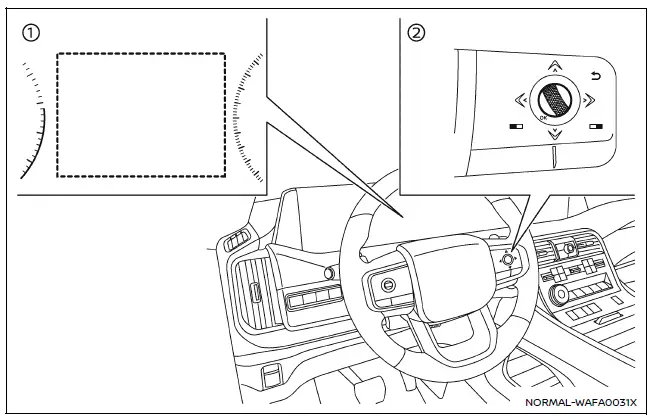
- Vehicle information display
- Steering-wheel-mounted controls (right side)
To configure the Nissan Armada BSW system, follow these steps:
1. Press the
 button until "Settings" appears in the vehicle information display, then confirm
using the scroll dial. Navigate to "Driver Assistance" and confirm.
button until "Settings" appears in the vehicle information display, then confirm
using the scroll dial. Navigate to "Driver Assistance" and confirm.
2. Select "Blind Spot Assist" and press the scroll dial.
3. Choose "Warning" and confirm to enable or disable the Nissan Armada BSW alerts.
4. To manage trailer-related functionality, select "Trailer Blind Spot" and confirm your preferred setting.
NOTE:
The Nissan Armada retains the selected BSW system settings even after the engine is turned off and restarted, ensuring consistent driver preferences across all journeys.
The Nissan Armada Blind Spot Warning system provides an additional layer of safety by monitoring areas that are difficult to see, helping drivers make more informed lane-change decisions while maintaining full control and responsibility for the vehicle.
 BSW system operation
Side indicator light
BSW indicator (vehicle information display)
Vehicle information display
Steering-wheel-mounted controls (right side)
The Nissan Armada BSW system becomes active at ...
 BSW system limitations
WARNING
The following limitations apply to the Nissan Armada Blind Spot Warning (BSW)
system. Ignoring these limitations or relying solely on the system may lead to serious
injury or even fatal a ...
Other materials:
Rear Side Door Window Weatherstrip Replacement (Sedan)
Rear Side Door Window Weatherstrip Replacement
Callout
Component Name
Preliminary Procedures
The rear door side window weatherstrip and window is serviced as
one assembly. Refer to Rear Side Door Stationary Window Replacement. ...
Rear Side Door Window Regulator Replacement (Hatchback)
Rear Side Door Window Regulator Replacement
Callout
Component Name
Warning: Refer to Glass and Sheet Metal Handling Warning.
Preliminary Procedure
Remove the front side door window from the guide. Do not remove ...
All Seasons Tires Description
Most GM vehicles are equipped with steel belted all-season radial tires as standard
equipment. These tires qualify as snow tires, with a higher than average rating
for snow traction than the non-all season radial tires previously used. Other performance
areas, such as wet traction, rolling ...

0.0048