
Nissan Armada 2025-2026 Owner's Manual: How to enable/disable the I-BSI system
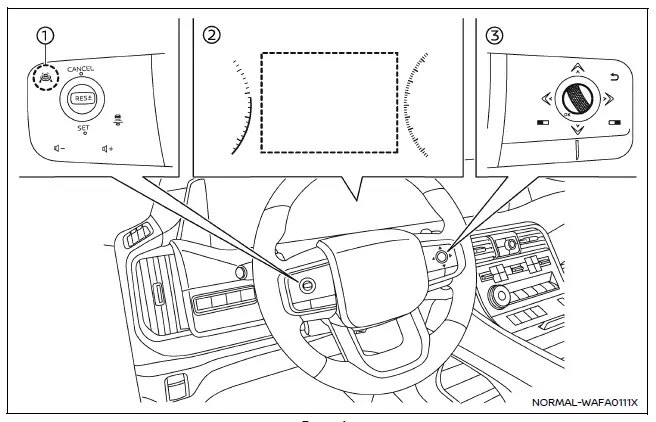
Example
- ProPILOT Assist switch (design may vary depending on the Nissan Armada model)
- Vehicle information display
- Steering-wheel-mounted control (right side)
To configure the Nissan Armada Intelligent Blind Spot Intervention (I-BSI) system, follow these steps:
1. Press the
 button repeatedly until "Settings" appears in the vehicle information display, then
confirm using the scroll dial.
button repeatedly until "Settings" appears in the vehicle information display, then
confirm using the scroll dial.
Use the scroll dial to navigate to "Driver Assistance" and confirm your selection.
2. Select "Blind Spot Assist" and press the scroll dial.
3. Choose "Intervention" and confirm to access I-BSI settings.
4. Press the ProPILOT Assist switch to activate or deactivate the Nissan Armada I-BSI system as needed.
NOTE:
- Activating ProPILOT Assist in the Nissan Armada automatically enables both the I-BSI and Intelligent Lane Intervention (I-LI) systems simultaneously.
- The Nissan Armada retains the selected system settings even after the engine is turned off and restarted, ensuring consistent driver preferences.
 I-BSI system operation
Example
Side indicator light
I-BSI ON indicator (vehicle information display)
I-BSI indicator (vehicle information display)
ProPILOT Assist switch (design may vary depending on Nissan Ar ...
 I-BSI system limitations
WARNING
The following limitations apply to the Nissan Armada Intelligent Blind Spot
Intervention (I-BSI) system. Failure to operate the vehicle within these limitations
may result in serious inju ...
Other materials:
Rear Compartment Stowage Shelf Replacement (Hatchback)
Rear Compartment Stowage Shelf Replacement
Callout
Component Name
1
Rear Compartment Stowage Shelf Assembly
...
Throttle Body Heater Outlet Pipe Replacement (LUW)
Throttle Body Heater Outlet Pipe Replacement
Callout
Component Name
Preliminary Procedure
Drain the cooling system. Refer to Cooling System Draining and Filling.
1
Engine Coolant Air Bleed Hose
...
3-5-Reverse and 4-5-6 Clutch Housing Disassemble (6T30/40/45/50 - Gen 2)
Table 1:
Turbine Shaft, Reluctor Wheel and Piston Removal
Table 2:
4?? Clutch Plate Removal
Table 3:
4?? Clutch Piston Removal
Table 4:
Reluctor Wheel and Piston Removal
Table 5:
3? Reverse Clutch Plate Removal
Turbine Shaft, Re ...

0.0101