
Nissan Armada 2025-2026 Owner's Manual: How to park with predictive course lines
Basic information
WARNING
- If the Nissan Armada is equipped with tires of a different size than standard, the predictive course lines may become inaccurate.
- On slippery or snow-covered roads, the Nissan Armada predictive course lines may not correspond precisely to the actual path of the vehicle.
- If the battery has been disconnected or discharged, the Nissan Armada
system may display incorrect predictive lines. To recalibrate:
- Turn the steering wheel fully from lock to lock while the engine is running.
- Drive the Nissan Armada straight for at least 5 minutes.
- Turning the steering wheel while the ignition is ON but the vehicle is stationary may also cause inaccurate predictive lines.
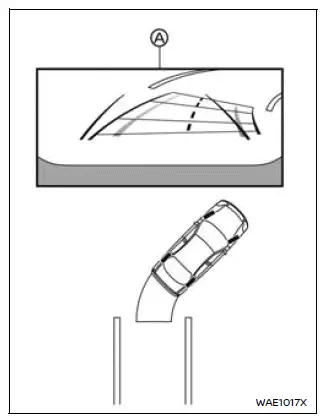
1. Before parking your Nissan Armada, visually inspect the parking space to ensure it is safe and clear of obstacles.
2. Shift the transmission into R (Reverse). The Nissan Armada rear camera view will automatically appear on the display A.
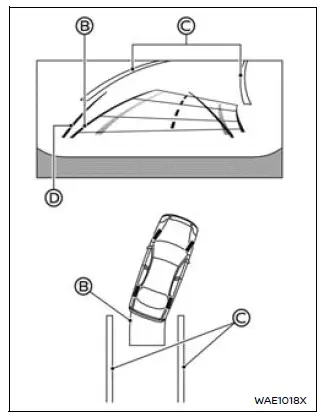
3. Slowly reverse the Nissan Armada while adjusting the steering wheel so that the predictive course lines B align with and enter the parking space C.
4. Continue steering to align the vehicle width guide lines D parallel with the parking space boundaries, ensuring accurate positioning.
5. Once the Nissan Armada is fully positioned within the parking space, shift into P (Park) and engage the parking brake.
Example
My Parking Locations
The Nissan Armada "My Parking Locations" feature allows drivers to store frequently used parking positions, ensuring sufficient space for door opening and easier parking alignment.
How to register the parking location:
After positioning your Nissan Armada correctly in the desired parking spot, follow these steps:
1. Press the "CAMERA/
 "
button.
"
button.
2. Tap
 to open the "Settings" menu.
3. Select the "My Parking Locations" option.
4. Choose your preferred slot from the list and tap "Register".
How to adjust the parking space frame:
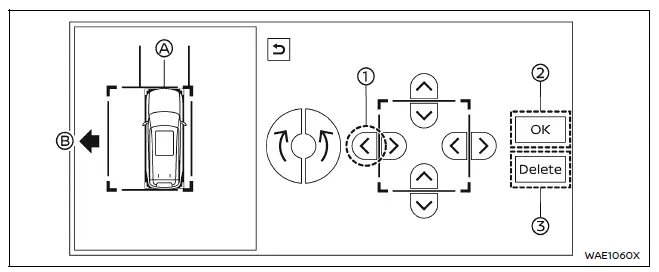
Use the on-screen arrow controls to modify the Nissan Armada parking frame A according to your space dimensions.
For instance, press key 1 to extend the frame toward direction B. Once satisfied, confirm the settings by pressing 2.
To delete a saved parking location, press 3.
After registration, the Nissan Armada system will automatically recognize the stored parking location and display guidance when approaching it in Reverse with the bird’s-eye view activated.
This intelligent Nissan Armada feature enhances everyday usability, making repeated parking scenarios faster, safer, and more precise.
 Difference between predictive and actual distances
Basic information
The Nissan Armada display guide lines and their projected positions on the ground
are intended as approximate references only and should not be relied upon as exact
measurements ...
 How to switch the display
With the ignition switch in the ON position, the Nissan Armada Intelligent Around
View Monitor can be activated either by pressing the CAMERA/
button or by shifting the transmission into the R ( ...
Other materials:
Immobilizer Description and Operation
The immobilizer system functions are provided by the body control module (BCM)
and the engine control module (ECM), as well as any modules which store and report
the environment identifier.
When an ignition key is inserted into the ignition lock cylinder and the ignition
is switched ON, the ...
Front Seat Cushion Outer Trim Panel Replacement
Front Seat Cushion Outer Trim Panel Replacement
Callout
Component Name
Preliminary Procedures
Remove the driver or passenger seat recliner handle. Refer to Front
Seat Back Recliner Handle Replacement
Remove the front seat ...
Air Conditioning Clutch Assembly Replacement (LDE/LUW/LWE)
Air Conditioning Clutch Assembly Replacement
Callout
Component Name
Preliminary Procedure
Remove the air conditioning compressor. Refer to Air Conditioning Compressor
Replacement.
1
Air Conditio ...

0.0054